The market offers a range of LED video wall controllers that can transform a single HDMI input into a stunning multi-screen wall. This guide highlights five notable options, detailing their capabilities, supported resolutions, and key features to help you choose a model that fits your space and performance needs. Whether you’re building a storefront display, control room wall, or event backdrop, these devices are designed to deliver synchronized image walls with varied splicing modes and robust control options.
Summary of chosen products
| Product | Brand | Display Modes | Resolution & Notes | Link |
|---|---|---|---|---|
| PORTTA HDMI Video Wall Controller 2×2 | Portta | 8 Modes: 2×2, 1×2, 2×1, 1×3, 3×1, 1×4, 4×1, 1×1 Splitter | 4K@30Hz input; outputs 1080p@60Hz | View |
| Video Wall Controller 2×2 4K | AOGETYO | 4 modes: 2×2, 1×2, 1×3, 1×4, plus 1×1 splitter | 4K@30Hz input; outputs up to 1080p | View |
| OREI 4K 2×2 Video Wall Controller | OREI | 2×2, 1×2, 2×1, 1×3, 3×1, 1×4, 4×1 (and 1×4 Splitter) | 4K@30/60Hz; 1080p outputs | View |
| Yuemona Video Wall Controller 2×2 4K | Yuemona | 2×2, 1×1, 1×2, 1×3, 1×4, 1×5 | 4K input; 1080p output options | View |
| PORTTA Video Wall Controller 3×3 4K | Portta | 19 display modes including 3×3, 1×1 splitter, 1×2/1×3/1×4, 2×2/2×3/2×4, 3×2/4×2 | 4K@30Hz input; 1080p outputs | View |
PORTTA HDMI Video Wall Controller 2×2

This 2×2 video wall processor distributes one HDMI input to four outputs, enabling eight display modes including 2×2, 1×2, 2×1, 1×3, 3×1, 1×4, 4×1, and 1×1 splitter. Control options include manual, IR remote, or RS232. It supports 4K at 30Hz input with 1080p outputs, and features Toslink and 3.5mm audio extraction. A 180° rotation and edge masking help minimize gaps and distortions in the combined wall.
Video Wall Controller 2×2 4K

The AOGETYO model folds 4K capability into a compact 2×2 wall controller with 4 HDMI outputs. It supports input via HDMI or DVI, and includes hotkeys on the remote for all modes. Supported resolutions cover 1920×1080 and 4K@30Hz, with 4×1 and other layouts available. It also emphasizes bezel considerations and simple setup, making it suitable for quick deployments where multiple wall configurations are needed.
OREI 4K 2×2 Video Wall Controller

This 2×2 processor divides a single HDMI or USB-C source across four displays with multiple layout options including 2×2, 1×2, 2×1, 1×3, 3×1, 1×4, and 4×1. It supports 4K@30/60Hz with 1080p outputs and includes EDID management and bezel adjustments. Audio is handled via HDMI or separate outputs, offering flexible sound routing for large wall installations.
Yuemona Video Wall Controller 2×2 4K
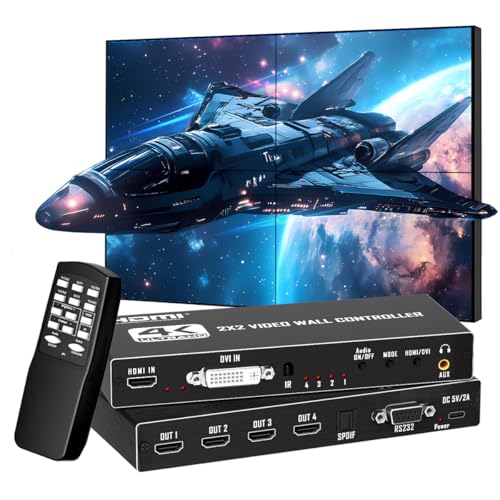
Yuemona’s 2×2 controller distributes one HDMI or DVI input to four outputs, turning four screens into a cohesive wall. It supports 4K input with 1080p outputs and includes IR remote, RS232, and 180° rotation in select modes. Edge masking helps reduce visible seams, contributing to a cleaner, more uniform display across the wall.
PORTTA Video Wall Controller 3×3 4K

This model drives up to 9 displays from a single HDMI input, delivering 19 display modes including 3×3, various splitter configurations, and PC portrait options. It supports 4K@30Hz input with 1080p outputs. Features include 180° rotation for most modes and edge masking to minimize the seam between tiles. It’s designed for larger-scale walls where many screens must align precisely.
Buying Guide
Key factors to consider when choosing a LED video wall controller include:
- Number of outputs and supported wall layouts: Choose a model that matches your intended wall configuration, whether 2×2, 3×3, or other arrangements.
- Resolution handling: Look for support of 4K input with 1080p outputs if your displays are 1080p, or true 4K@30Hz/60Hz in both input and outputs if using 4K panels.
- Rotation and edge masking: For seamless walls, rotation (180°) and edge masking help reduce gaps and distortions, especially on large arrays.
- Control options: RS232, IR remote, and manual controls affect integration with existing automation systems. Ensure compatibility with your control ecosystem.
- Audio handling: Some models provide Toslink, 3.5mm, or SPDIF outputs for external sound systems—crucial for signage or presentation setups.
- Bezel management and EDID: Proper bezel compensation avoids visible seams and ensures consistent image across all displays. EDID management helps optimize compatibility with various sources.
- Physical and installation considerations: Power draw, heat management, and mounting compatibility matter for wall installations in public or commercial spaces.
Performance perspective: For mission-critical installations, prioritize models with robust remote control features, reliable RS232 support, and clear documentation on display modes. If your wall will regularly switch between layouts, a model with intuitive mode switching and hotkeys reduces setup time. For high-traffic signage, consider fans or fanless designs with adequate cooling to maintain image stability over long runtimes.