For users who prioritize readability, comfort, and reduced eye strain, large print wireless keyboards offer a practical solution. This article highlights five top-rated options designed for seniors, students, and professionals seeking oversized keys, high-contrast lettering, and reliable wireless performance. Each product features large print keys, backlighting, and user-friendly layouts to improve accuracy and typing speed in various lighting conditions. Read on to compare features, connectivity, and ergonomics to find the best match for your setup.
Summary of Selected Products
| Product | Brand | Key Features | Connectivity | Backlight |
|---|---|---|---|---|
| Wireless Keyboard and Mouse – Large Print with Backlight | KOPJIPPOM | Large print, backlit, 2.4G wireless | 2.4G USB | Yes, multiple brightness levels |
| Large Print Wireless Keyboard and Mouse – 7 Colors Backlit | KOPJIPPOM | 7 color backlight, large letters | 2.4G USB | Yes, 7 colors |
| Large Print Backlit Wireless Keyboard – Silent Keys | Hamile | Large print, 7-color backlight, quiet keys | 2.4G USB | Yes, memory feature |
| Backlit Large Print Wireless Keyboard and Mouse Combo | Luzarriba | Large print, backlit, wrist rest | 2.4G USB | Yes |
| Full Size Large Print 2.4G Keyboard and Mouse | Fonicer | Oversized print, wireless, full-size | 2.4G USB | Yes |
KOPJIPPOM Wireless Keyboard And Mouse – Large Print

The KOPJIPPOM kit combines a full-size keyboard and a wireless mouse into a single 2.4GHz package designed for visibility and convenience. It features large print characters and a backlit keyboard with adjustable brightness, helping users type accurately in dim conditions. An integrated USB receiver sits on the back of the keyboard, simplifying setup and minimizing desk clutter. The kit supports Windows environments and provides a reliable wireless range up to about 33 feet, reducing the need for direct line-of-sight alignment.
Key points include: large print letters for easy reading, a bright backlight with multiple brightness levels, and a single USB connection for both devices. The back receiver indicator helps identify the dongle’s location, and the system is designed to minimize latency. Overall, this option delivers a straightforward, accessible solution for users who need clear keys and dependable wireless performance.
KOPJIPPOM Large Print With Seven Color Backlight

This large-print, seven-color backlit keyboard adds visual variety to low-light environments. The oversized letters improve legibility, and the backlight levels can be adjusted across three brightness settings. The included wireless mouse shares the same USB receiver, streamlining setup and reducing desk clutter. Compatibility spans Windows editions and various PC configurations, with note that some multimedia keys may have Mac OS limitations.
Highlights include: adjustable 7-color backlighting, easy-to-read keys, and a compact 2.4G wireless system. The design emphasizes readability and versatility, making it suitable for educational, home, or office use where visibility matters most.
Hamile Large Print Backlit Wireless Keyboard
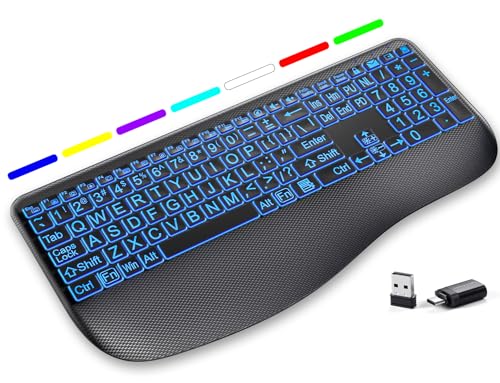
The Hamile keyboard emphasizes silent, low-profile keys with a large print layout and seven-color backlighting. It is designed to reduce typing noise while maintaining responsive keystrokes, which can improve typing accuracy in shared spaces. The keyboard operates over a 2.4GHz wireless connection and completes the package with memory-friendly backlight behavior that remembers the last lighting setting. It offers broad Windows compatibility and does not include a mouse in this bundle.
Considerations include: readability through high-contrast lettering, quiet operation for libraries or offices, and the trade-off of not including a mouse in this particular model. The integrated backlight supports customizing the ambience, aiding focus during late-night tasks.
SABLUTE Wireless Keyboard And Mouse With Backlit Letters

The SABLUTE combo focuses on a large-print keyboard with 7 backlit colors and an ergonomic wrist rest, designed to reduce fatigue during long typing sessions. The set includes a wireless mouse and emphasizes a low-latency connection via 2.4G wireless technology. The keyboard’s oversize letters improve readability, making it suitable for seniors, educational settings, and professionals requiring precise input.
Design notes cover wrist support, backlight control, and visibility enhancements. The keyboard and mouse pair aims to deliver a reliable, comfortable experience, with a focus on readability and accessibility in varied lighting conditions.
Fonicer Full Size Large Print 2.4G Keyboard And Mouse

The Fonicer solution provides oversized print on a full-size keyboard along with a 2.4G wireless mouse connection. The kit is designed to be compatible with Windows and Mac OS environments, broadening its usability. It includes a shared USB receiver and multiple key details to support easier learning and typing for users with visual impairments. The full-size layout helps users transition from standard keyboards with fewer changes in spacing and key placement.
Sksyloo Lighted Large Print Keyboard

The Sksyloo model emphasizes a full-size, backlit wireless keyboard with seven colors of backlighting and a wrist-friendly design. It uses a single USB receiver for a stable 2.4G connection and supports both Mac and Windows platforms. The large print keys reduce eyesight-related errors, and the backlight helps with accuracy in dim environments. The ergonomic considerations include readability and orderly key spacing that supports broader accessibility needs.
Luzarriba Backlit Keyboard And Mouse Combo
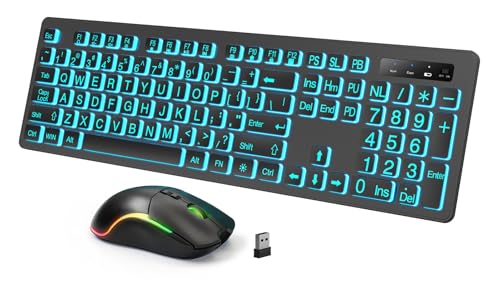
This backlit wireless keyboard and mouse duo highlights a large print layout with adjustable backlighting and a comfortable wrist rest, aimed at enhancing long-form typing for users who require clearer keys. The 2.4G connection provides reliable performance within a typical home or office range. The design balances readability, ease of use, and practical ergonomics for daily tasks in low-light settings.
KOPJIPPOM Large Print Backlit Wireless Keyboard

The KOPJIPPOM backlit model focuses on large print keys and bright backlighting with seven color options. The keyboard is rechargeable and designed for Windows, PC, and laptop use with a long standby time. A smart energy-saving feature turns off the backlight after 120 seconds of inactivity, helping extend battery life. The keyboard uses a separate power switch and backlit switch to optimize power usage while providing a comfortable typing experience with low-profile, quiet keys.
Lighted Up Full Size 2.4G Keyboard With Wrist Rest
This option pairs a full-size keyboard with seven-color backlighting and an integrated wrist rest. The 2.4G wireless setup allows stable connectivity for computers, laptops, and other compatible devices. The backlit feature improves key visibility in dim lighting, supporting users who need clear, high-contrast characters to reduce typing errors during nighttime tasks.
Buying Guide: Key Purchase Considerations
Display and Readability
Focus on large print keys, high-contrast lettering (white on black or black on yellow), and backlighting. If you work in dim environments, selectable backlight colors and brightness levels help minimize eyestrain and typos.
Connectivity and Compatibility
2.4G wireless connections typically provide reliable performance with a USB receiver. Check device compatibility with your operating system (Windows, Mac, Chrome OS) and confirm whether a mouse is included if needed for your workflow.
Ergonomics and Layout
Consider full-size keyboards for easier key replacement and a comfortable wrist rest. Ergonomic shapes and low-profile keys can reduce fatigue during long typing sessions, especially for users with visual impairments or motor challenges.
Power and Longevity
Rechargeable keyboards offer convenience, but assess standby times and charging requirements. Some models include auto-shutoff features to conserve power, which can be beneficial for extended use without frequent recharging.
Durability and Ease of Use
Look for sturdy construction, reliable key switches, and straightforward setup. Systems with clearly labeled receivers and simple pairing processes minimize user frustration and support long-term usability.
Multi-Device Scenarios
If you manage multiple devices, choose keyboards that maintain legibility across different screen setups and provide robust wireless ranges that work reliably in typical home or office layouts.