A Colortrac SmartLF 36-inch wide-format scanner is the closest match for buyers who need to scan documents at up to 36 inches wide. The products below also include a 24-inch scanner and three related large-format options, but those alternatives are not 36-inch document scanners. Compare the stated specifications carefully: the Canon and HP models are printers, while the CZUR is a book and document scanner with A3 capture support.
| Product | Best For | Important Distinction |
|---|---|---|
| Colortrac SmartLF 36-inch | Buyers seeking a 36-inch scanner | Listing provides limited specifications |
| Colortrac SmartLF Scan! 24-inch | Buyers who can work with 24-inch width | Smaller scan width |
| Canon imagePROGRAF TM-340 MFP | Large-format printing | Printer, not a standalone scanner |
| CZUR ET MAX | Books and A3 documents | Not a 36-inch scanner |
| HP DesignJet T630 | Technical and poster printing | 36-inch printer, not a scanner |
Colortrac SmartLF 36-Inch Wide Scanner

Best for: Buyers specifically looking for a scanner with a 36-inch-wide format. The product listing identifies it as a Colortrac SmartLF 36-inch wide-format scanner, making it the most direct match in this selection for oversized plans, drawings, or other wide documents.
Why it was selected: Its stated 36-inch width aligns with the main search need. However, the provided product information does not specify scan speed, resolution, color capabilities, software, or supported media thickness. Confirm those details with the seller before choosing it for a workflow that has exact requirements.
Limitation: The available feature description is brief, so buyers should not assume performance specifications beyond the stated 36-inch-wide format.
Colortrac SmartLF Scan! 24-Inch Scanner
Best for: Buyers who need a wide-format scanner but do not require 36-inch scan width. The listing states grayscale scan speeds of 4.5 inches per second and full-color scan speeds of 3 inches per second, useful comparison points when scan throughput matters.
Why it was selected: It is a related wide-format scanner with stated speed information, which can help buyers compare workflows. Choose it if the documents fit within its 24-inch format and its listed speeds suit the job.
Limitation: It is a 24-inch model, so it does not meet a requirement to scan documents up to 36 inches wide. Verify the needed document width before purchasing.
Canon imagePROGRAF TM-340 MFP

Best for: Entry-level users seeking a 36-inch large-format printer for posters, CAD documents, signage, and similar output. The product description highlights vivid color reproduction, a flat-body design, full-frontal operation, and a 4.3-inch adjustable user-interface screen.
Why it was selected: It is relevant to buyers comparing 36-inch office equipment, especially those who may need to print wide documents as well as consider scanning. Its listing identifies it as a printer, so it should not be treated as a standalone scanner based on the supplied details.
Limitation: The provided information does not establish scanner functionality or scan specifications. Choose it for large-format printing, not as a confirmed replacement for a 36-inch scanner.
CZUR ET MAX Book And Document Scanner

Best for: Buyers digitizing bound books and A3-sized documents rather than oversized 36-inch plans. The listed features include a 38MP CMOS sensor, 7168 × 5376 resolution, 410 DPI, curve-flattening technology, and OCR that can create editable or searchable files.
Why it was selected: It offers document-scanning and text-recognition functions for a different use case. Its curve-flattening feature is described as designed to reduce distortion on bound pages, while OCR supports more than 180 languages, subject to stated language and operating-system limitations.
Limitation: The listing says it captures A3, not 36-inch-wide originals. The supplied information also notes that Thai and Hebrew are unsupported and Arabic OCR support is limited by operating system and scanner series.
HP DesignJet T630 36-Inch Plotter
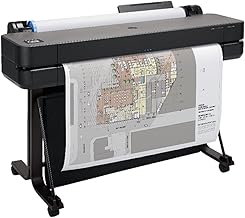
Best for: Architects, engineers, construction professionals, and other users who need to print technical line drawings, renders, posters, or maps. The listing describes support for media rolls up to 36 inches wide and sheets up to 13 by 19 inches with the included automatic sheet feeder.
Why it was selected: It is a related 36-inch-format device for buyers whose project involves producing large-format output. Listed media-handling features include sheet feed, roll feed, automatic sheet/roll switching, a media bin, and an automatic horizontal cutter.
Limitation: This is a plotter printer, not a 36-inch scanner. Choose it for printing; do not assume it can digitize wide originals.
Buying Guide: How To Choose A 36-Inch Scanner
Do you need scanning, printing, or both?
Start by identifying the direction of the workflow. A scanner captures a paper original as a digital file; a printer produces a paper copy from a digital file. The Colortrac SmartLF 36-inch is the direct scanner match in this group. The Canon and HP options are described as printers, so they are not substitutes for a scanner based on the supplied product information.
What document width do you need to capture?
Measure the widest original you expect to scan. A 24-inch scanner may be appropriate for narrower drawings, but it does not satisfy a 36-inch scan-width requirement. The CZUR listing specifies A3 capture, while the Colortrac 36-inch listing identifies a 36-inch-wide format. Confirm the seller’s exact usable scan width and media requirements before ordering.
Which specifications should you verify?
- Resolution and image quality: Check the stated optical resolution and whether color or grayscale scanning meets the intended use.
- Speed: Compare speeds by scan mode. The 24-inch Colortrac listing gives separate grayscale and full-color speeds.
- Document type: Consider whether you scan flat plans, loose sheets, books, or delicate originals.
- Software and file output: Verify the included software, supported file formats, operating-system support, and OCR needs.
- Space and handling: Check equipment dimensions, loading method, and the room needed for wide originals.
Frequently Asked Questions
Is the HP DesignJet T630 a 36-inch scanner?
No. The supplied listing describes it as a 36-inch plotter printer for producing documents such as technical drawings, posters, and maps.
Which listed product is the closest match for a 36-inch scanner?
The Colortrac SmartLF 36-inch wide-format scanner is the closest match because its product name and feature description specify a 36-inch-wide scanner.
Can the 24-inch Colortrac scan a 36-inch-wide document?
The listing identifies it as a 24-inch scanner, so it does not meet a stated 36-inch scan-width requirement. Confirm the maximum supported document width with the seller.
Is the CZUR ET MAX suitable for scanning oversized plans?
The provided description specifies A3 capture and book-scanning features, not 36-inch-wide scanning. It is better matched to books and A3 documents.
What should I check before buying a 36-inch scanner?
Confirm usable scan width, resolution, color performance, speed, supported media, software, file output, and compatibility with your computer and workflow.