Choosing a large-capacity USB drive boils down to speed, durability, and compatibility with your devices. This guide highlights five top options that balance storage space with fast transfers, reliable construction, and broad compatibility for American users. Whether you’re backing up photos, 4K video, or large project files, these picks cover USB 3.0, USB 3.2, and USB-C interfaces across portable form factors.
| Brand | Product | Capacity | Interface |
|---|---|---|---|
| Amazon Basics | 256 GB Ultra Fast USB 3.1 Flash Drive | 256 GB | USB 3.1 |
| SanDisk | 1TB Extreme PRO USB 3.2 Solid State Flash Drive | 1 TB | USB 3.2 |
| SanDisk | 256GB Ultra USB 3.0 Flash Drive | 256 GB | USB 3.0 |
| SanDisk | 2TB Extreme PRO Dual Drive | 2 TB | USB-C / USB-A |
| SSK | 1TB USB Drive – 2-in-1 Dual USB Drive | 1 TB | USB-C / USB-A |
Note: Storage claims depend on device formatting and operating system reporting. Actual usable space may vary by file system and device. All selections offer substantial capacity for multimedia, backups, and large file transfers.
Amazon Basics 256 GB Ultra Fast USB 3.1 Flash Drive

Brand: Amazon Basics. Capacity: 256 GB. Interface: USB 3.1. Features include high-speed transmission with read speeds up to 130 MB/s, suitable for storing videos, photos, and music. The compact drive is designed for quick backups and travel use. Note: Usable capacity may be less than labeled owing to formatting and system reporting differences. This drive focuses on efficiency for everyday data transfer and portable storage needs.
SanDisk 1TB Extreme PRO USB 3.2 Solid State Flash Drive
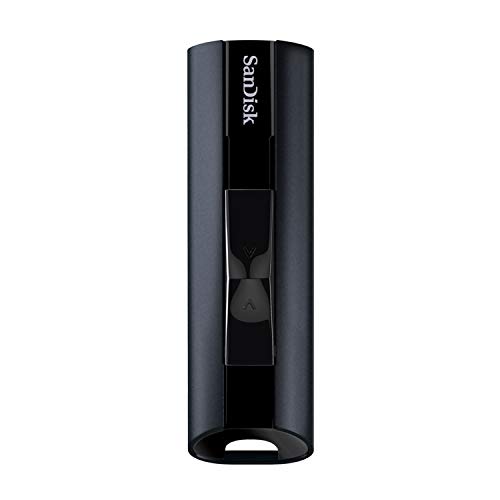
Brand: SanDisk. Capacity: 1 TB. Interface: USB 3.2. Features blazingly fast transfer speeds for photos and 4K video, durable aluminum metal casing, and a design suited for high-demand personal, gaming, and work workflows. The high-capacity form factor supports large media libraries and professional data sets, with rugged construction to withstand daily use.
SanDisk 256GB Ultra USB 3.0 Flash Drive
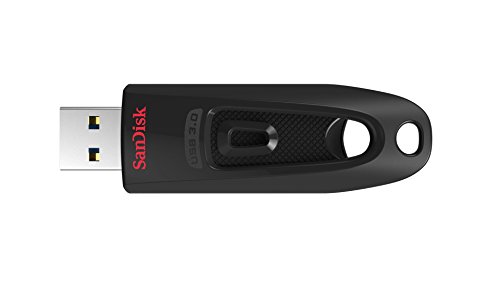
Brand: SanDisk. Capacity: 256 GB. Interface: USB 3.0. Notable for transfer speeds up to 130 MB/s read, with backward compatibility to USB 2.0. Suitable for secure file transfer, backup tasks, and portable data storage while maintaining a compact pocket-friendly design. The drive supports encrypted and password-protected security features on supported devices.
SanDisk 2TB Extreme PRO Dual Drive

Brand: SanDisk. Capacity: 2 TB. Interface: USB-C and USB-A. Features up to 1,000 MB/s read and 900 MB/s write speeds for rapid transfers, big capacity for creative projects and documents, and data protection with recovery and encryption technologies. Supports file transfers across USB Type-C and Type-A devices, offering versatile use between laptops, tablets, and smartphones.
SSK 1TB USB Drive – Dual USB Drive

Brand: SSK. Capacity: 1 TB. Interface: USB-C and USB-A. Features dual-drive design with USB-C and USB-A 3.2 ports, enabling cross-device transfer and expanded compatibility with smartphones, tablets, laptops, and desktops. Read speeds up to 550 MB/s and write speeds up to 500 MB/s, making it suitable for large file transfers and quick backups. Plug-and-play with no software installation required.
Buying Guide
Key purchase considerations help compare high-capacity USB drives across use cases:
- Interface and compatibility: USB-C, USB-A, or dual-interface drives offer broader device compatibility. Choose based on your primary devices (laptops, desktops, smartphones, tablets).
- Capacity vs. performance: Higher capacities are valuable for backups and media libraries, but performance (read/write speeds) determines how quickly data moves. For 4K video and large files, prioritize drives with higher MB/s speeds.
- Durability and form factor: Aluminum enclosures and rugged designs increase durability for on-the-go use. Consider pocketability and keychain compatibility if you travel frequently.
- Security features: Some drives offer built-in encryption and password protection. If securing sensitive data is important, prioritize models with these features and verify OS compatibility.
- Compatibility with operating systems: Ensure the drive supports Windows, macOS, and Android where applicable. Some drives require formatting or software for cross-platform use.
- Data recovery and warranty: Look for manufacturers that offer data recovery services and solid warranties, especially for professional or archival use.
- Real-world performance: Read and write speeds reported by manufacturers may differ in practice due to host device, file types, and USB port versions. Consider user reviews for real-world tests.
- Price-to-capacity value: Evaluate whether the capacity benefits justify the price within your budget, and consider whether you need a dual-drive setup for cross-device usage.