Finding a versatile wall mount that supports both laptops and monitors can transform your workspace. The following selections are among the most adaptable and well-rated options for 10″–17″ laptops and up to large monitors, with full-motion arms, 2-in-1 capability, and thoughtful features like cable management and scratch-resistant trays. This guide highlights five strong choices to help you pick a wall-mount station that fits your equipment, workspace, and ergonomic goals.
Quick comparison
| Product | Brand | Weight Range (Laptops) | Monitor / Laptop Range | Key Feature |
|---|---|---|---|---|
| Putilsen 2-in-1 Laptop Wall Mount | Putilsen Mount | 2.2–9 kg | 12–17″ laptops; 17–32″ monitors | Detachable tray; wide height adjustment |
| WALI GSWM001LP | WALI | 10″–17″ laptops; up to 22 lbs monitors | 17–32″ monitors; 75x75mm / 100x100mm | Full motion, extensive tilt and swivel |
| UPGRAVITY Laptop Wall Mount | UPGRAVITY | 3.3–17.6 lbs | 12–17″ laptops; 13–32″ monitors | Gas-spring, 2-in-1 compatibility |
| PUTORSEN 2-in-1 Wall Mount | PUTORSEN | 2.2–26.4 lbs | 10–17″ laptops; 17–40″ monitors | Gas-spring arm; wide extension |
| VIVO STAND-SIT1L | VIVO | 10″–15.6″ laptops; up to 13.2 lbs | Up to 27″ monitors | Counterbalance and keyboard-friendly tray |
Below are five detailed product profiles, each designed to help you choose a wall-mount station that fits your device sizes, motion needs, and workspace layout. All sections include a link to the product page for quick reference.
Putilsen 2-in-1 Laptop Wall Mount With Detachable Tray

The Putilsen Mount offers a flexible 2-in-1 solution for laptops and monitors. It supports 12–17″ laptops and can adapt to 17–32″ screens via a detachable tray-style platform. The bracket includes a wide height adjustment range and a full left/right rotation of about -90° to +90°, enabling comfortable positioning for various working angles. It uses padded contact points to prevent scratches on the laptop during frequent movement and positioning, making it suitable for daily use in compact spaces. The mount’s VESA compatibility (75 x 75 mm / 100 x 100 mm) expands its potential as a monitor wall mount as well.
Weight handling ranges from 2.2 to 9 kg, which covers many mainstream notebooks while still delivering sturdy support.
Key considerations: Ensure your laptop’s width matches the adjustable platform (276–472 mm). This unit can serve dual roles, but verify the monitor compatibility if you intend to use it strictly for a monitor without the detachable tray.
WALI Laptop Wall Mount, Full Motion Adjustable
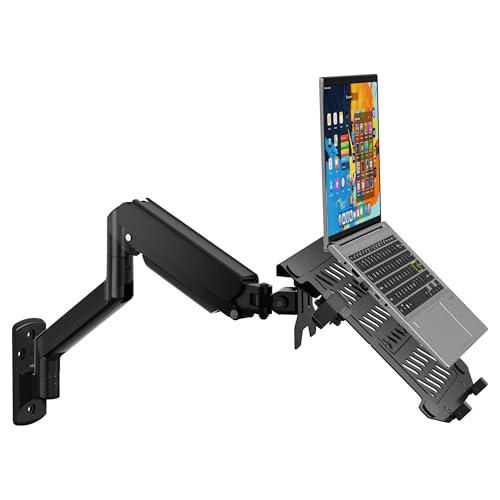
The WALI GSWM001LP is built for broad compatibility, handling 10–17″ laptops and 17–32″ monitors with mounting holes of 75 x 75 mm or 100 x 100 mm. Its gas-spring arm delivers 16.7″ to 19.3″ of extension with a tilt range of +70° to -45°, plus +/-90° swivel and 360° rotation. This makes it easy to adjust for typing comfort, screen visibility, and ergonomic posture. A space-saving design helps free desk real estate while maintaining robust tilt and rotation capabilities, ideal for small workspaces or shared desks where flexibility matters.
Key considerations: Check total reach when extended to avoid collisions with nearby furniture. The combination of monitor and laptop support is strong for mixed setups, but ensure your monitor’s weight sits within the specified limit to maintain smooth motion.
UPGRAVITY Laptop Wall Mount With Vented Tray

The UPGRAVITY model combines a 2-in-1 design with a gas-spring mechanism to support laptops from 12″ to 17″ and monitors from 13″ to 32″. Its vented tray helps with laptop cooling, which is a plus for longer sessions. The mount extends up to 19.7″ and raises up to 16.34″ high, enabling comfortable viewing angles for seated or standing work. Tilt ranges of ±45°, plus 180° swivel and 360° rotation provide flexible orientation for any room layout. An integrated cable management system helps maintain a neat, clutter-free workstation.
Weight capacity spans from 3.3 to 17.6 lbs, making it suitable for a wide range of devices and configurations.
Key considerations: The vented tray supports airflow but verify clearance with your laptop size. The gas-spring action requires balanced installation to avoid abrupt movement when repositioning.
PUTORSEN 2-in-1 Laptop Wall Mount With Gas Spring Arm
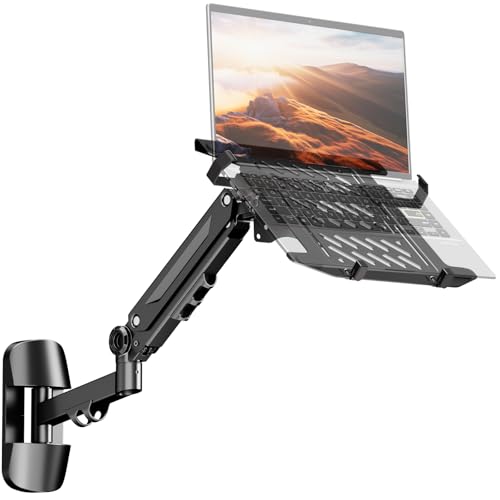
The PUTORSEN mount supports 10–17″ laptops (up to 5 kg) and 17–40″ monitors (up to 12 kg) with VESA 75 x 75 mm or 100 x 100 mm compatibility. Its gas-spring arm provides -90° to +90° rotation, ±45° tilt, and a generous 21.6″ extension range. The height-adjustable arm fosters ergonomic angles for both typing and viewing, helping reduce neck and back strain. The design emphasizes a sturdy, scratch-resistant frame with reinforced steel construction and rubber pads to protect devices. Ventilation is promoted by a ventilated tray to aid cooling during long sessions.
Key considerations: Ensure your monitor screws are compatible since screws are not included. Check that the combination of laptop and monitor sits within the weight limits to avoid poor balance or sluggish motion.
VIVO STAND-SIT1L Sit-Stand Wall Mount

The VIVO STAND-SIT1L combines monitor and laptop support with a counterbalance pneumatic arm for simple height adjustment. It fits laptops from 10″ to 15.6″ and screens up to 27″ with VESA 75 x 75 mm or 100 x 100 mm. The full articulation range includes +85° to -90° tilt, 180° swivel, and 360° rotation, giving you diverse viewing angles. The ventilated, adjustable clamp tray safeguards laptops while promoting airflow. This solution is ideal for users who alternate between sitting and standing, offering ergonomic flexibility and a clean, wall-mounted setup.
Key considerations: Counterbalance arms require a minimum load to function smoothly, so verify your laptop weight. Consider desk and wall mount spacing to ensure full range without interference with nearby furniture.
Buying Guide: Key Purchase Considerations
- Device range and compatibility: Confirm your laptop width (in mm), screen size, and weight fit the mount’s specifications. Many models support 10″–17″ laptops and 17″–40″ monitors, but always verify weight thresholds.
- Motion and reach: Decide how much extension you need. Gas-spring and pneumatic arms offer substantial reach for standing desks but require stable mounting to avoid sway. Consider tilt, swivel, and rotation ranges to achieve comfortable typing angles and viewing positions.
- Mounting options: Look for wall-mount compatibility with VESA patterns (75 x 75 mm or 100 x 100 mm). Some units also offer desk or dual-use mounting, which can increase flexibility if your space evolves.
- Workspace impact: Choose a model that saves desk space without crowding the room. For shared or small offices, a wall mount with a slim profile and cable-management features helps maintain a clean workspace.
- Protection and cooling: A ventilated tray or padding helps prevent scratches and maintains airflow for laptops during extended use. Ensure padding depth and contact points match your device.
- Installation and screws: Some mounts require you to supply monitor screws or use your own for screen mounting. Check included hardware and alignment guides to simplify setup.
- Ergonomics: Prioritize adjustable height, tilt, and rotation to align with your eye level and typing posture. A mount that supports standing and sitting configurations can reduce spinal strain over time.
- Future-proofing: If you foresee upgrading to larger or heavier monitors or laptops, choose a mount with higher weight capacity and broader compatibility to minimize the need for replacements.
All five selections provide solid options for creating a compact, ergonomic wall-mounted workstation. When evaluating, map your current devices and consider how often you adjust height, angle, or orientation. A mount that accommodates future gear while offering reliable motion and protection will deliver the best long-term value for a space-conscious setup.