The best laptop cooling pad with a mouse tray depends on whether you need active fan cooling, a lap-friendly heat shield, adjustable angles, or a portable work surface. The MAX SMART is best for shoppers who want a built-in USB fan and a detachable tray; the adjustable AboveTEK model suits users who prioritize viewing angles. The EHO and standard AboveTEK lap desks offer retractable trays, while the havit is a cooling-only option without a listed mouse tray.
| Product | Best For | Mouse Tray | Cooling Detail |
|---|---|---|---|
| MAX SMART Laptop Lap Pad | Active fan cooling and large laptops | Detachable, left or right | Built-in USB fan and heat shield |
| AboveTEK Portable Lap Desk | Portable lap use | Retractable | Non-slip heat-shield surface |
| EHO Laptop Lap Desk | Laptops up to 16 inches | Retractable, either side | Built-in heat shield |
| AboveTEK Adjustable Lap Desk | Multiple working angles | Retractable | Heat shield |
| havit HV-F2056 | Cooling without a tray | Not listed | Cooling pad format |
MAX SMART Laptop Lap Pad With Fan

Best for: People who work on their lap with a larger laptop and want a fan as well as a separate mouse surface. The 16.5-inch platform is described as supporting laptops up to 17.3 inches. Its detachable mouse pad slides out on either the left or right, so users can choose a layout that suits their handedness.
The built-in USB fan is listed as silent cooling, and the product also has heat-shielding features. Reinforced material is intended to provide a stable base without the weight of a metal stand. Choose this if active fan cooling is a priority. A limitation is that the fan needs a USB power source; the listing does not specify cooling performance measurements.
AboveTEK Portable Lap Desk

Best for: Buyers seeking a portable lap desk with a retractable mouse area for use on a bed, sofa, or during travel. The product name identifies a left- or right-side tray, and its surface is described as non-slip with heat-shield properties.
Choose this model if your main need is a stable work surface and a mouse tray, rather than a fan-based cooling pad. The provided product details do not state a laptop size limit or describe an active fan, so check the current listing for fit information before purchasing. Its tray design is the key reason to consider it for this search.
EHO Lap Desk With Retractable Mouse Pad

Best for: Users with laptops up to 16 inches who want a mouse tray that works on either side. Its listed 14.9-by-10.2-inch platform provides a defined surface, while the retractable pad gives additional room for mouse movement.
The heat shield is intended to improve airflow and reduce heat discomfort when the computer rests on a lap. This is a passive heat-management feature, not a listed powered fan. Choose EHO if size guidance and left- or right-handed tray placement matter more than adjustable angles. Avoid it if your laptop is larger than the stated 16-inch fit.
AboveTEK Adjustable Lap Desk
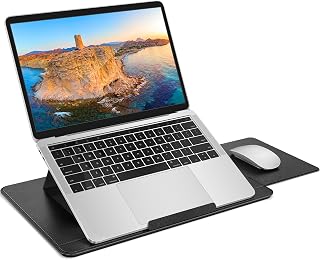
Best for: People who want to change the laptop’s working angle while keeping a mouse tray available. The product listing describes three ergonomic angles, a retractable mouse pad, a heat shield, and a PU leather non-slip surface. These features make it a better fit for angle adjustment than a basic fixed lap desk.
Choose this if positioning is a priority for sofa, bed, or travel use. The provided details do not specify laptop dimensions or include an active cooling fan. Confirm the fit and tray dimensions in the current product listing if your computer is large or you need substantial mouse space.
havit HV-F2056 Cooling Pad

Best for: Buyers who prioritize a portable cooling pad and do not require an attached mouse tray. The listed features include a slim, lightweight design, two adjustable height settings, and a metal-mesh surface that provides a stable laptop platform. It is described for 15.6- to 17-inch laptops.
Unlike the other options here, the supplied product information does not list a mouse tray or heat-shield lap-desk design. Choose it when cooling-pad form and adjustable height matter more than lap use with a separate mouse. Avoid it if an integrated mouse area is essential to your setup.
Buying Guide: How to Choose a Laptop Cooling Pad With a Mouse Tray
Do you need a fan or a heat shield?
A USB fan actively moves air and requires a power connection; the MAX SMART is the only listed option that explicitly includes one. The other tray-equipped models describe heat shields or airflow-oriented surfaces, which can help separate a laptop from your lap but are not listed as powered cooling pads. Match the cooling method to your need rather than assuming every lap desk has a fan.
Will the laptop fit the platform?
Compare the laptop’s size with the stated platform fit before choosing. MAX SMART lists support for laptops up to 17.3 inches, EHO lists up to 16 inches, and havit is described for 15.6- to 17-inch laptops. The provided information does not specify the size limits for both AboveTEK models, so confirm those details if fit is close.
Which mouse tray layout is right?
Retractable trays provide a compact work surface when the mouse is not in use. Check whether the tray slides to the left, right, or both sides: MAX SMART and EHO specify either-side placement. The standard AboveTEK product name identifies left/right retractable placement, while the adjustable AboveTEK listing confirms a retractable tray but does not detail its direction.
Should you prioritize angle adjustment or portability?
For adjustable positioning, the AboveTEK model with three angles is the clearest choice. MAX SMART emphasizes a reinforced but lightweight lap platform, while the basic AboveTEK is described as portable. For cooling on a desk rather than a lap, havit offers two height settings and a metal-mesh surface, but it does not meet the mouse-tray requirement.
Frequently Asked Questions
What is the best laptop lap desk here with a built-in fan?
The MAX SMART lap pad is the listed choice with an explicitly built-in USB cooling fan and a detachable mouse tray.
Can I use a mouse tray on either side?
MAX SMART and EHO specify trays that slide to either side. The standard AboveTEK lap desk name also identifies left/right placement.
Which listed option fits a 17-inch laptop?
MAX SMART lists fit up to 17.3 inches, and havit is described for laptops from 15.6 to 17 inches. Confirm the dimensions of your specific laptop and the platform before buying.
Does every product in this list include a mouse tray?
No. The havit HV-F2056 product details do not list a mouse tray, so it is included as a cooling-focused alternative rather than a full match for the keyword.