For professionals needing centralized control over distant workstations, KVM over IP extenders offer high-definition video, low latency, and reliable USB device support across networked locations. This guide reviews top models that balance performance and ease of use, helping you choose a solution that fits office, data center, or control room setups. Each product below supports HDMI video, USB peripherals, and IP-based operation, with varying distances, resolutions, and port counts to match different network conditions.
Summary at a glance: the following five KVM over IP extenders are highlighted for American buyers seeking plug-and-play deployment, solid compatibility, and scalable setups. The table below lists the core attributes to compare at a glance.
| Product | Brand | Max Resolution / Distance | USB Ports | Notes |
|---|---|---|---|---|
| AV Access 4K HDMI USB KVM Extender | v AV Access | 4K@30Hz; 1080P@120Hz up to 120m | 3 ports on RX, 1 host | Zero latency claim; DIP switch pairing |
| LornCeng 4K HDMI KVM Extender Over Cat5a/6 | LornCeng | 4K×2K@30Hz; 1080P@120Hz up to 150 m | 4 USB 2.0 | Loop-out display; IP KVM features |
| OREI 4K KVM Extender Over IP CAT6 (EXM500-KVM) | OREI | 4K@60Hz; up to 400 feet | 2 USB 1.1 ports | One-to-many capable with network switch |
| OREI 4K KVM Extender Over IP CAT6 (EX-500-KVM) | OREI | 4K@60Hz; up to 400 feet | 2 USB 1.1 ports | HDMI & USB over IP with IR |
| PWAYTEK HDMI KVM Extender Over Cat5e/6 | PWAYTEK | 1080P@60Hz up to 50m | USB keyboard/mouse | HDMI over Ethernet with PoC |
AV Access 4K HDMI USB KVM Extender Overview

The AV Access extender supports 4K at 30 Hz or 1080p at 120 Hz over a single Cat5e/6/6a/7 Ethernet link up to 120 meters (390 feet). It includes a built-in USB-Host transmitter and a 3-port USB devices hub on the receiver. A 4-pin DIP switch allows up to 16 paired transmitters/receivers in the same network, enabling flexible multi-point configurations. The setup aims for low latency and smooth keyboard/mouse operation over IP.
LornCeng 4K HDMI KVM Extender Over Cat5a/6

This model delivers near-zero latency 4K×2K at 30 Hz over a single Cat6 cable up to 150 meters, making it suitable for digital signage, remote monitoring, and conference rooms. It features a loop-out HDMI port on the transmitter for synchronized display mirroring, and it combines HDMI video with independent audio, microphone input, four USB 2.0 ports, RS-232, and IR in a single Ethernet link for streamlined IP KVM control.
OREI 4K KVM Extender Over IP CAT6 (UHD-EXM500-KVM)

OREI’s UHD-EXM500-KVM supports 4K resolution at 60 Hz up to 400 feet via Cat6 and offers point-to-point or one-to-many configurations when used with a 1G network switch. It includes two USB 1.1 ports for keyboard and mouse, and requires a high-quality shielded Cat6 cable for best results. Its design emphasizes low latency and reliable HDMI-to-IP transmission across office or campus networks.
OREI EX-500-KVM Over IP HDMI Extender

This EX-500-KVM model provides 4K@60Hz HDMI over IP up to 400 feet with two USB 1.1 ports for keyboard and mouse. Like other OREI extenders, it supports point-to-point and one-to-many layouts via a network switch, and it emphasizes durable HDMI performance with a non-flat Cat6 infrastructure and IR transmission from receiver to transmitter for remote control of the source device.
PWAYTEK HDMI KVM Extender Over Cat5e/6
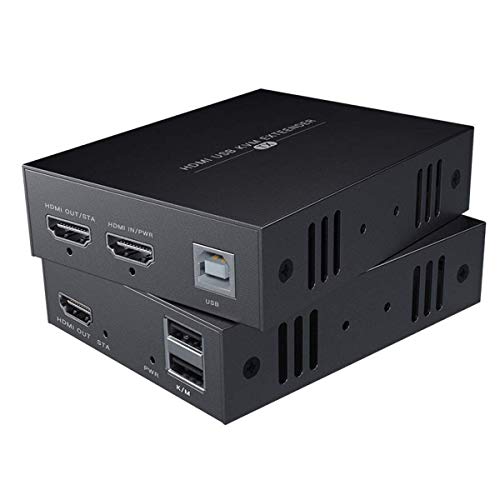
The PWAYTEK extender transmits HDMI video up to 1080P at 60 Hz over Cat5e/6 up to 50 meters (164 feet). It supports keyboard and mouse control and transmits audio/video losslessly. The solution is highlighted for users seeking a cost-effective, reliable way to extend full HD signals over standard Ethernet cables, with guidance recommending Cat6 or Cat7 for longer runs.
Buying Guide
Key purchase considerations for KVM over IP extenders include distance, resolution, latency, and network requirements. If you need 4K video, focus on units rated for 4K at 60 Hz or 4K at 30 Hz depending on distance. For enterprise or multi-location deployments, examine whether the model supports one-to-many configurations via a network switch and how many USB ports are available on the receiver side for peripherals.
- Distance and cable quality: Longer runs demand shielded Cat6 or better; flatter cables may reduce performance.
- Resolution and refresh rate: Decide between 4K at 60 Hz or 4K at 30 Hz, depending on bandwidth and latency tolerance.
- USB device support: Check how many USB ports are on the receiver and whether high-power devices are supported.
- Control features: IR, RS-232, and audio pass-through enhance remote management and integration with existing control systems.
- Topology: Point-to-point versus one-to-many configurations depend on network switches and the number of remote workstations or displays.
- Power and installation: Some models include dual power or PoE-like features; verify power requirements and local plugging needs.