The best iPad wall mount with an arm depends on how far you need to move the screen and whether you prioritize adjustability, case clearance, or security. The Urmust is suited to buyers who want a long, dual-arm design; the OHLPRO offers a stated reach of up to 23.6 inches; and the Lucrave provides aluminum construction with several adjustment points. The Mippko is another foldable option. A low-profile enclosure is included as a fixed-installation alternative, not an articulated arm mount.
| Mount | Best for | Notable feature |
|---|---|---|
| Urmust | Pulling a tablet closer | Dual extension arms |
| OHLPRO | Longer stated reach | Up to 23.6 inches |
| Lucrave | Multi-angle positioning | Aluminum arm and rotating head |
| Mippko | Foldable positioning | Two-screw wall plate |
| Metal enclosure | Public-facing displays | Tamper-resistant design |
Urmust Long-Arm Tablet Wall Mount
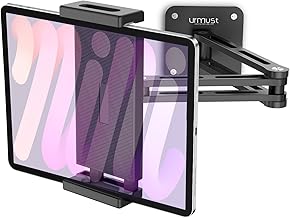
The Urmust is best for someone who wants to pull a tablet toward a chair, counter, or bedside position and push it back when it is not needed. Its dual aluminum extension arms and 360-degree swiveling ball head support reach adjustment and portrait-to-landscape rotation. The listed device range is 4.7 to 13 inches, covering phones and tablets, including iPad, Galaxy Tab, Surface, and Kindle models.
The heavy-duty aluminum construction and reinforced metal base are described as supporting a stable hold. Choose this mount if adjustable distance is a priority. The product details do not give a maximum arm reach, so buyers who need a specific extension should confirm that measurement before choosing.
OHLPRO Extendable Aluminum Wall Mount

The OHLPRO is best for buyers who want a published arm-length figure and flexibility in positioning. Its three-stage retractable design reaches up to 23.6 inches, and the rotating head supports multiple viewing angles. The mount is listed for devices from 5 to 13 inches, with 0.78 inches of side clearance for compatibility with most protective cases.
Its aluminum construction and removable screws allow custom length and orientation adjustments. The included hex key is specified for locking rotating screws to improve stability. Choose this model when reach and case clearance matter; avoid it if the device is outside the stated size range or if you want a fixed, flush mount.
Lucrave Adjustable Aluminum iPad Wall Mount

The Lucrave is best for people who need a mount that can be repositioned across several angles. Its aluminum-alloy base and arm connect to an ABS clamp, and the 360-degree swivel ball head lets the screen turn between portrait and landscape. The listed fit range is 4.7 to 13 inches, making it an option for phones as well as tablets.
The product description also notes 180-degree left-to-right or up-and-down adjustment at the wall bracket. Choose this mount for multi-directional positioning. Installation requires drilling tools that are not included in the described package, and the three shafts should be secured with the included hex screws for added stability.
Mippko Foldable Articulating Wall Mount

The Mippko is best for buyers who want a foldable arm and broad repositioning options. Its arm can fold and extend, while the metal ball head turns 360 degrees and the mount supports portrait and landscape orientations. The stated compatibility range is 7 to 12.9 inches. The aluminum-alloy arm and ball head pair with an ABS clamp that has anti-skid rubber pads.
The base uses two screw holes, with a stated 5.19-inch center distance, and the product listing says screws, screw tubes, and a screwdriver are provided. Choose this model if its mounting-hole spacing suits your wall location. Its stated device range starts at 7 inches, so it is not the best fit for smaller phones or tablets.
Low-Profile Secure Tablet Enclosure

This metal enclosure is best for retail, point-of-sale, or smart-home display setups where limiting tablet removal matters more than arm movement. It uses tamper-proof screws and includes a hex security wrench. The mount sits 1.5 inches from the wall, has a VESA 75-by-75 mounting pattern, and rotates 360 degrees between portrait and landscape orientations.
Its listed device range is 10 to 14 inches. This is a fixed, low-profile alternative rather than an articulated arm mount, so choose it only if a close-to-wall installation and security features matter more than pulling the screen toward you.
Buying Guide: How to Choose an iPad Wall Mount With an Arm
How much reach do you need?
Measure the distance between the wall and the position where you plan to view or touch the screen. The OHLPRO lists a maximum reach of 23.6 inches. The Urmust describes dual extension arms but does not provide a reach measurement in the supplied product details. Compare the stated reach with your setup rather than assuming all articulated mounts extend the same distance.
Will the mount fit your iPad and case?
Check the device-size range before choosing. The Lucrave and Urmust list a 4.7-to-13-inch range, while the OHLPRO lists 5 to 13 inches and the Mippko lists 7 to 12.9 inches. If you use a protective case, check the clamp’s available clearance; OHLPRO specifies 0.78 inches of side clearance.
What kind of adjustment matters?
A 360-degree head can help switch between portrait and landscape, while an extendable or foldable arm changes the screen’s distance from the wall. For a close-to-wall display, consider the enclosure, but it does not provide an articulated arm. Confirm that your intended viewing position can be reached before installation.
What should you check before mounting?
Review the included hardware and installation requirements. Lucrave says drilling tools must be supplied separately and recommends tightening its shaft screws. Mippko lists a two-hole base with 5.19-inch spacing. Check the wall location, hole spacing, and device fit before drilling.
Frequently Asked Questions
Can an iPad wall mount arm rotate between portrait and landscape?
Several options here describe 360-degree rotation, including the Urmust, OHLPRO, Lucrave, and Mippko. Confirm the adjustment style for the mount you select.
Which listed mount gives a specific maximum reach?
The OHLPRO lists a reach of up to 23.6 inches. The supplied details for the other arm mounts do not state a maximum reach.
Are these mounts suitable for phones as well as tablets?
The Lucrave and Urmust list support for devices starting at 4.7 inches. Other models have larger minimum device sizes, so check each mount’s stated range.
Is the low-profile enclosure an arm mount?
No. It is a wall-mounted enclosure designed to sit close to the wall, with rotation between portrait and landscape but no described articulating arm.
Do wall mounts require drilling?
Installation depends on the model and wall setup. The Lucrave listing says drilling tools are needed but not included. Review the product’s mounting hardware and instructions before starting installation.