This guide highlights top USB 3.0 external hard drive docks that support high-capacity SATA drives, including 16–20TB options. Each product below is evaluated for compatibility, speed, and ease of use to help you pick a reliable dock for quick backups, cloning, and data transfer across Windows, macOS, and Linux systems.
Summary of chosen products:
| Product | Drive Capacity | USB Speed | Special Feature |
|---|---|---|---|
| SABRENT EC-HD2B Dual Bay Dock | Up to 10TB per drive | USB 3.0 | Two-bay duplicator/cloner |
| ORICO 6648US3 4-Bay Dock | Up to 80TB total | USB 3.0 (5 Gbps) | 4-bay offline clone function |
| RSHTECH 3.5″ Enclosure | Up to 16TB | USB 3.0 (5 Gbps) / UASP | ASM1153e controller, protective design |
| RSHTECH RSH-339 | |||
| RSHTECH 3.5″ Dock (RSH-339) | Up to 16TB | USB 3.0 (6 Gbps) / UASP | Aluminum housing, multiple protections |
| Tccmebius TCC-S863 | Up to 20TB | USB 3.0 (5 Gbps) | Tool-free HDD docking, sleep function |
Note: All models listed support standard 2.5″ and/or 3.5″ SATA drives and offer plug-and-play operation without driver installation in most environments. Always verify host compatibility for UASP to maximize transfer speeds.
SabreNT USB 3.0 Dual Bay Docking Station

The SABRENT EC-HD2B supports standard desktop 2.5″ and 3.5″ SATA drives and SSDs. It accommodates drives up to 10TB per bay and offers plug-and-play functionality without drivers. This dual-bay dock is suitable for quick backups and cloning tasks, particularly when duplicating drives offline.
ORICO 4-Bay USB 3.0 Docking Station

This 4-bay dock supports up to 80TB total capacity across four drives and delivers up to 5 Gbps transfer speeds with USB 3.0. It includes an offline clone function to duplicate data quickly without connecting to a computer, plus LED indicators for status monitoring.
RSHTECH 3.5″ Enclosure With UASP
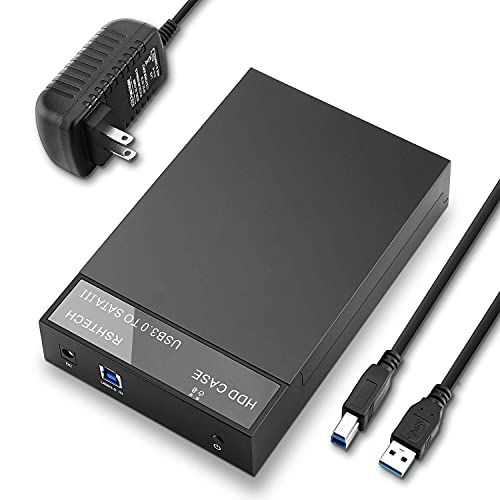
This RSHTECH 3.5″ enclosure supports up to 16TB and uses a high-speed USB 3.0 interface with UASP support for faster data transfers. It features an ASM1153e controller and a 12V 2A power supply to ensure stable operation and protection against power-related issues.
RSHTECH Aluminum 3.5″ Dock (RSH-339)

This aluminum 3.5″ dock supports up to 16TB and is compatible with PS4, Windows, and Mac systems. It emphasizes protection features, including overvoltage, leakage current prevention, and short-circuit safeguards, while delivering up to 6Gbps via USB 3.0 with UASP.
Tccmebius USB 3.0 Docking Station

The Tccmebius TCC-S863 supports both 2.5″ and 3.5″ SATA drives up to 20TB per drive and provides a tool-free installation experience. It includes UASP support for enhanced transfer speeds and an automatic sleep function to save power when idle.
Buying Guide
- Drive compatibility: Confirm whether the dock supports 2.5″ and/or 3.5″ drives and if it handles the drive capacities you plan to use (some docks cap at 10–16TB per bay).
- Data transfer speed: USB 3.0 commonly offers up to 5 Gbps; look for models with UASP support to maximize throughput on compatible hosts.
- Cloning and duplicator features: If you often create offline copies, choose docks with built-in cloning or duplicator functions, ensuring you understand button-press workflows and any limitations.
- Power requirements: External power supplies help maintain stable performance, especially with 3.5″ drives. Check voltage and current specs to ensure compatibility with your setup.
- Protection and durability: Aluminum enclosures and overvoltage/short-circuit protections reduce risk of data loss during transfers.
- OS compatibility: Ensure the dock works reliably with your operating system (Windows, macOS, Linux) and check for any driver requirements beyond plug-and-play.
- Connectivity options: If you need portability, prefer enclosures with compact form factors and simple cable management; if you need speed for desktops, larger multi-bay docks can be advantageous.
- Future-proofing: For expanding storage, consider docks that support higher-capacity drives and maintain firmware support through ongoing updates from the manufacturer.