The best high-range TV antenna depends on your location, nearby broadcast towers, and the obstacles between your home and those towers—not just the advertised mileage. The Qellaff model is best for buyers who want an amplified antenna with a stated long-range claim and a three-step setup. The FGOTV is a better fit for shoppers who want selectable short- and long-range modes, while the ApexWaveTV emphasizes 360-degree reception and flexible placement. Compare the features below, then check local signal availability before choosing.
| Product | Best for | Notable feature |
|---|---|---|
| 2026 Upgraded TV Antenna | 360-degree reception | Signal amplifier and 16.7-foot cable in the product name |
| Qellaff Smart TV Antenna | Amplified long-range setup | USB power cable and tool-free installation |
| FGOTV Indoor Antenna | Matching reception mode to tower distance | Short- and long-range modes |
| ApexWaveTV Digital Antenna | Flexible indoor placement | 3M stick base and 360-degree reception |
| HIDB Indoor Antenna | Simple omnidirectional reception | Magnetic base |
2026 Upgraded TV Antenna

This amplified indoor antenna is best for viewers who want a 360-degree design and a longer cable for trying different positions. Its listed features include a signal amplifier, a 16.7-foot cable in the product name, and support for 1080p, 4K, and 8K reception where broadcasts and equipment allow.
Choose this model if you want to experiment with placement without aiming the antenna toward one direction. The product advertises a 3200-plus-mile range, but that figure should not be treated as a dependable real-world reception distance. Actual channel pickup depends on local towers, terrain, building materials, and signal conditions. Rescan channels after changing the antenna position.
Qellaff Smart TV Antenna

The Qellaff is best for buyers who want an amplified antenna with a USB power cable and a simple installation process. Its listed features include a Smart IC chip, a high-gain amplifier, a coaxial cable, and three-step setup: connect the antenna, place it in an unobstructed spot, and scan for channels.
The manufacturer advertises reception up to 6000-plus miles in optimal conditions and support for several broadcast formats. Treat the range as a marketing claim rather than a guaranteed distance; signal availability varies by location. This model is a practical choice for testing high indoor placement or a window location, but moving it may require another channel scan.
FGOTV Indoor TV Antenna

The FGOTV antenna is best for viewers who want to choose between two reception modes based on tower distance. Its listed short-range mode is for locations within 35 miles, while its long-range mode is described for 35 to 250 miles. The antenna also includes an upgraded Smart IC chip intended to help filter cellular and FM interference.
Choose this model if having explicit mode options is more useful than a large advertised mileage figure. Reception still depends on local conditions, and the product notes that using the wrong mode may result in poor reception. Check tower locations before selecting a mode, place the antenna near a window when practical, and rescan after repositioning.
ApexWaveTV Digital Antenna
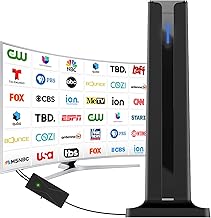
This antenna is best for shoppers who want placement flexibility around a room. Its listed features include a 3M stick base, 360-degree reception, an upgraded Smart IC chip, and placement on a desktop, wall, or window. The setup instructions say to connect it to the TV’s antenna input, select “AIR” mode, and run a channel search.
Its 360-degree design may suit homes where broadcast signals arrive from more than one direction. However, omnidirectional reception does not guarantee reliable channels in a weak-signal location. The product does not provide a specific mileage range in the supplied features, so buyers should compare it based on mounting flexibility rather than an advertised distance.
HIDB Indoor TV Antenna

The HIDB is best for buyers who want a straightforward indoor antenna with an omnidirectional design and magnetic base. Its listed features include dual PC soft material, a magnetic base, and placement on a TV stand or table. The product is intended for receiving available local broadcast channels without a cable subscription.
Choose it if a simple tabletop setup matters more than selectable reception modes or an advertised long-range specification. The supplied product information does not state a specific range or describe an amplifier, so it may be less suitable for buyers who specifically want those features. Channel reception remains dependent on distance, terrain, and indoor obstructions.
Buying Guide: How To Choose A High-Range TV Antenna
What does “high range” mean for an indoor antenna?
Advertised mileage is not a reliable guarantee of how far an antenna will receive channels. Broadcast reception depends on tower location, terrain, buildings, antenna placement, and signal strength. Before buying, check which stations are available in your area and where their transmitters are located. Use range claims as product descriptions, not promised results.
Should you choose an amplified or omnidirectional model?
An amplifier may help manage a weak signal in some setups, but it cannot create a broadcast signal that does not reach the antenna. Omnidirectional designs can receive signals from multiple directions without precise aiming. A mode-selectable antenna such as the FGOTV offers a different approach by letting buyers select a stated short- or long-range mode.
Where should you place an indoor antenna?
Start near a window or in a high, unobstructed location. Test more than one position, then rescan for channels each time the antenna moves. Walls, metal surfaces, and other building materials can affect reception. A longer cable or flexible base can make it easier to try different locations.
What should you check before setup?
- Confirm that the TV has an antenna input or use a suitable TV tuner.
- Connect the antenna and follow its power instructions if it includes an amplifier.
- Select the TV’s antenna or “AIR” input setting, then scan for channels.
- Rescan after changing the antenna location or reception mode.
Frequently Asked Questions
Can an indoor antenna receive local channels for free?
It can receive available over-the-air broadcasts without a cable subscription. Channel availability depends on local signals and the antenna’s placement.
Does 4K support mean the antenna provides 4K channels?
No. The listed resolution support does not guarantee that local stations broadcast in 4K. Available picture quality depends on the broadcast and receiving equipment.
Will a high-range antenna work in every home?
No. Distance from towers, terrain, building materials, and indoor placement affect reception. Check local broadcast availability and test different positions.
Why should I rescan after moving an antenna?
A channel scan updates the TV’s list of receivable stations. A new antenna position may reveal channels the previous scan did not detect.
Is an amplifier always better?
No. An amplifier is a feature to compare, not a guarantee of stronger reception in every setup. Local signal conditions and antenna placement remain important.