For high-quality headphones with a mic, the right pick depends on whether you prioritize comfort, platform flexibility, voice controls, or software-based sound features. The HyperX Cloud III is best for long sessions and broad listed platform support, while the Logitech G PRO X suits PC users who want customizable microphone processing. The Razer BlackShark V2 X emphasizes sound isolation, and the JBL Quantum 100M2 offers a detachable mic. The Logitech G432 is a straightforward choice for players who want a flip-to-mute boom mic and 3.5 mm or USB connections.
| Headset | Best for | Standout feature |
|---|---|---|
| Logitech G432 | Flip-to-mute convenience | USB and 3.5 mm connections |
| Razer BlackShark V2 X | Sound isolation | Closed earcups and 3.5 mm jack |
| Logitech G PRO X | PC voice customization | Detachable mic with Blue VO!CE |
| HyperX Cloud III | Comfort and platform range | Memory foam and USB-C, USB-A, and 3.5 mm |
| JBL Quantum 100M2 | Detachable-mic flexibility | Directional mic with mute option |
Logitech G432 For Flip-To-Mute Control

The Logitech G432 is best for gamers who want a boom mic with a simple physical mute action. Its 6 mm microphone mutes when flipped up, making it easy to silence voice chat without searching for a software control. The listed connection options include USB and a 3.5 mm jack, giving buyers two ways to connect.
Its 50 mm drivers are designed for cinematic sound, and DTS Headphone:X 2.0 provides positional audio when used with Logitech G HUB software. Choose this headset if you value the flip-up mute and want surround-sound features for supported PC use. A limitation is that DTS Headphone:X 2.0 requires the software, so the feature is not simply a plug-and-play setting.
Razer BlackShark V2 X For Sound Isolation

The Razer BlackShark V2 X is best for players who prefer closed earcups and a headset that is described as lightweight and comfortable. Its earcups cover the ears, and the cushions help create a closer seal for passive noise isolation. A cardioid mic is included for voice communication, while the 3.5 mm connection supports the listed PC, Mac, PS4, PS5, and Switch use.
Razer’s TriForce 50 mm drivers are designed to tune high, mid, and low frequencies separately. The listed 7.1 surround sound feature is available only on Windows 10 64-bit. Choose this model if sound isolation is a priority; avoid it if you specifically need a detachable microphone, which is not listed as a feature.
Logitech G PRO X For PC Mic Customization

The Logitech G PRO X is best for PC players who want adjustable microphone processing. Its detachable boom mic uses Blue VO!CE features such as noise reduction, compression, and limiting to shape voice communications. The headset also includes 50 mm drivers, a USB DAC, and 3.5 mm audio connection options.
Memory foam ear pads are supplied in leatherette and breathable velour styles, so buyers can choose between the listed materials. DTS 7.1 and Blue VO!CE features require the included USB sound card, a Windows PC, and Logitech G HUB software. This makes the G PRO X a better fit for software-ready PC setups than for buyers seeking advanced mic processing without setup requirements.
HyperX Cloud III For Comfort And Flexibility
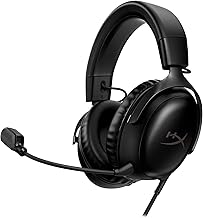
The HyperX Cloud III is best for buyers who want a comfort-focused headset with several connection types. It has memory foam, angled 53 mm drivers, and a noise-cancelling 10 mm microphone with a built-in mesh filter. An LED mute indicator provides a visible cue when the mic is muted.
Listed platforms include PC, PS5, and Xbox Series X|S, and listed connections include USB-C, USB-A, and 3.5 mm. This combination makes it a practical choice for users who want more than one connection option and a mic suited to clear chat and calls. The product details do not specify software requirements for its spatial audio, so check the intended setup before relying on that feature.
JBL Quantum 100M2 For A Detachable Mic

The JBL Quantum 100M2 is best for people who want to remove the microphone when they are not using voice chat. Its directional voice-focus mic detaches and includes a mute option. The headset also features memory foam padding, breathable fabric ear cushions, and a 3.5 mm jack.
JBL lists PC, PlayStation, Xbox, and Nintendo Switch among the supported platforms. QuantumSound Signature is described as emphasizing audio from quiet footsteps to louder effects. Choose this model if a removable mic is more useful than a permanently attached boom. Its listed connection is 3.5 mm, so buyers who need USB connectivity should consider another option in this group.
Buying Guide: How To Choose Headphones With A Mic
Which microphone design fits your routine?
A flip-up mic, such as the G432’s, offers a quick physical mute action. The G PRO X and HyperX Cloud III provide boom mics with listed voice-processing or noise-cancelling features. The JBL mic detaches, which is useful when you want to use the headset without a microphone attached. Check whether the control you prefer is a flip, mute button, or removable mic.
Do you need USB, 3.5 mm, or both?
Connection type affects how you can use a wired headset. The G432 lists USB and 3.5 mm, the G PRO X includes USB and 3.5 mm options, and the Cloud III lists USB-C, USB-A, and 3.5 mm. The Razer and JBL models list 3.5 mm connections. Match the connection to the ports on your intended device rather than assuming an adapter is included.
How important are comfort and noise isolation?
For extended sessions, compare ear-cushion materials and padding. The Cloud III and JBL Quantum 100M2 list memory foam, while the G PRO X includes leatherette and velour ear-pad choices. The BlackShark V2 X emphasizes closed earcups and passive noise isolation. These descriptions indicate different design priorities, but fit is personal, so consider how a headset’s shape and materials suit your needs.
Do surround-sound features need software?
Some audio features depend on a specific computer setup. Logitech lists G HUB and a Windows PC for the G PRO X’s Blue VO!CE and DTS features, while the G432’s DTS Headphone:X 2.0 requires G HUB. Razer specifies Windows 10 64-bit for its 7.1 surround sound. Confirm the requirement if you plan to use these features on a console or another operating system.
Frequently Asked Questions
What is the best headset here for a detachable microphone?
The JBL Quantum 100M2 is the clearest match because its directional microphone detaches and includes a mute option.
Which option is best for PC microphone customization?
The Logitech G PRO X is designed for this use with Blue VO!CE processing. Its listed features require the included USB sound card, a Windows PC, and Logitech G HUB software.
Which headset offers the most listed connection types?
The HyperX Cloud III lists USB-C, USB-A, and 3.5 mm connections.
Which model has a flip-to-mute microphone?
The Logitech G432’s boom mic mutes when flipped up.
Which headsets list console support?
The product details list console support for the Razer BlackShark V2 X, HyperX Cloud III, and JBL Quantum 100M2. Check the exact device and connection requirements before purchasing.