When expanding a laptop’s connectivity, a compact HDMI SD card reader hub can streamline work and entertainment. The following five USB-C hubs combine 4K HDMI output with SD/microSD card readers, plus multiple USB ports and power delivery. Each product is selected for reliable performance, broad compatibility, and practical features for everyday use.
| Product | Brand | HDMI | SD/microSD | Power Delivery | USB Ports |
|---|---|---|---|---|---|
| Anker USB C Hub (7-in-1) | Anker | 4K HDMI | SD & microSD | 85W PD | 2 USB-A, 1 USB-C |
| Hiearcool USB C Hub – 7-in-1 | Hiearcool | 4K HDMI | SD/TF Card | 100W PD Pass-Through | 2 USB 3.0 / USB-C |
| SABRENT 4K HDMI USB-C Hub | SABRENT | 4K HDMI | SD/microSD | 60W Power Delivery | 1 USB 3.0, 1 USB 2.0 |
| Acer USB C Hub 7-in-1 | Acer | 4K HDMI | SD/TF Card Slots | 100W PD | 2 USB 3.1 |
| Acodot 9-in-1 USB C Hub | Acodot | 4K@60Hz HDMI | SD/TF Card | PD 100W | 3 USB 3.0, 2 USB 2.0 |
These hubs are designed for travelers, students, and professionals who need quick access to external displays and fast memory card transfers without carrying multiple adapters.
Anker USB C Hub (7-in-1) Review
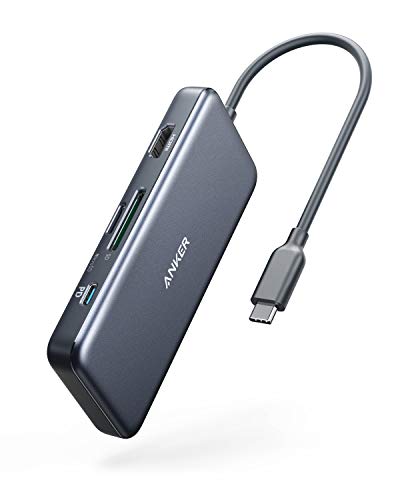
The Anker hub combines seven ports in a compact design, including USB-C, dual USB-A ports, HDMI, and SD/microSD readers. It supports high-speed data transfer up to 5 Gbps and outputs 4K video to an external display, making it suitable for presentations, media streaming, and multitasking. The 85W Power Delivery ensures the connected laptop remains charged while the hub is in use, which is helpful during long work sessions. It’s a versatile option for MacBook Air/Pro, Dell XPS, and similar devices that rely on USB-C for expansion.
Hiearcool USB C Hub – 7-in-1 Review

The Hiearcool 7-in-1 hub is designed for macOS and Windows laptops with USB-C. It adds HDMI output (4K at 30Hz), USB 3.0 ports, PD charging, and SD/TF card slots. The device supports 100W PD pass-through, letting you power a connected laptop while running multiple peripherals. This makes it a practical choice for office setups, online meetings, and multimedia tasks, with a focus on stable power delivery and clear 4K visuals for presentations or streaming.
SABRENT Multi-Port USB Type-C Hub Review

The SABRENT hub focuses on port expansion with a USB 3.0 and a USB 2.0 port alongside HDMI 4K output and SD/microSD card readers. It supports 4K HDMI output up to 30Hz and provides a dual card reader experience, ideal for quickly transferring photos or videos from memory cards to a laptop. The compact design makes it a common pick for travelers who need reliable multimedia connectivity in one dongle.
Acer USB C Hub 7-in-1 Review

The Acer 7-in-1 hub expands a USB-C port to a multi-port setup with HDMI 4K output, two USB 3.1 ports, a PD charging port, and SD card slots. It supports 4K output at 30Hz and is designed for laptops that require reliable power delivery for long work sessions. This hub is positioned for home offices and travel setups that benefit from a stable, all-in-one connectivity solution.
Acodot 9-in-1 USB C Hub Review

Acodot’s 9-in-1 hub provides a broad port set including HDMI 4K@60Hz, three USB 3.0 ports, two USB 2.0 ports, SD/TF card readers, and PD charging. It supports high-refresh-rate HDMI output for detailed presentations or gaming, and the dual SD/TF slots offer flexible memory card workflows. The hub emphasizes plug-and-play usability with a wide compatibility range for MacBook Pro/Air, HP, Dell, and other USB-C devices.
Buying Guide: HDMI SD Card Reader Hubs
- Video output capabilities: Check HDMI version and max resolution/frame rate (4K@30Hz vs 4K@60Hz). If you work with high-refresh-rate monitors or gaming, prioritize 4K@60Hz compatibility.
- Power delivery: For laptops that charge via USB-C, ensure the hub provides PD passthrough with enough wattage to keep the device charged during use (common ranges are 60W–100W).
- Memory card performance: Look for SD and microSD slots with UHS speed support (Class 10, UHS-I/II) to optimize photo and video transfers.
- USB port variety and speed: Assess the need for USB-A vs USB-C, and whether USB 3.0/3.1 data rates meet your workflow (5Gbps is typical for quick file transfers).
- Build and compatibility: Aluminum enclosures tend to dissipate heat better; confirm compatibility with your laptop’s USB-C Alternate Mode support and operating system (Windows, macOS, or Chrome OS).
- Use case considerations: For business meetings, prioritize stable HDMI output and reliable PD charging. For creators and photographers, emphasize fast SD card readers and multi-port expandability.
- Port density vs size: Higher-port-count hubs offer more versatility but can be bulkier; choose based on travel needs and desk space.
All five selected hubs provide a balance of 4K HDMI output, SD/microSD card reading capabilities, and additional USB ports, making them suitable for a wide range of setups—from office workstations to on-the-go media editing. When selecting, match the hub’s output and power delivery to your laptop’s requirements and your typical peripheral load.