The following handpicked tablets excel at converting handwriting to text while delivering a natural writing feel. From premium paper-like tablets to AI-powered notetakers, these devices balance comfort, transcription accuracy, and long battery life for work, study, and creative drafting. Each option supports smooth handwriting, easy conversion, and organized note management so you can capture ideas and turn them into searchable text.
| Product | Brand | Key Note |
|---|---|---|
| reMarkable Essentials Bundle | reMarkable | Paper-like writing, handwriting to typed text, organized folders |
| reMarkable Paper Pro Bundle | reMarkable | 11.8” color display, color writing, full paper-like experience |
| AINOTE 2 | iflytek | AI-assisted notes, 16-language transcription, light and thin |
| AINOTE Air 2 | iflytek | 8.2” AI note-taking, voice-to-text and multilingual support |
| Amazon Kindle Scribe | Amazon | AI notebook features, handwriting to text, built-in AI tools |
reMarkable Essentials Bundle

The Essentials Bundle from reMarkable centers on a 10.3” digital notebook that aims to replicate paper writing while offering robust organization. The bundle includes Marker Plus with eraser and a Book Folio Cover in Gray Weave, creating a compact system for capturing handwritten notes, converting them to typed text, and keeping everything in labeled folders and tags. Its core workflow emphasizes a distraction-free environment with high-fidelity writing feel, file export, and easy PDF markup. Users who want a focused writing device with strong text conversion capabilities will find this bundle particularly compelling.
Key features focus on converting handwriting to typed text and keeping documents organized. The ability to annotate PDFs directly and tag notes helps users retrieve information quickly. The device prioritizes a clean interface without apps and notifications, which supports deep work sessions. This model is best for users who value a tactile writing experience as a primary input method and want reliable conversion to digital text within a structured workflow.
reMarkable Paper Pro Bundle

The Paper Pro Bundle expands to an 11.8” color display, offering color writing alongside the traditional paper-like experience. Included are Marker Plus with eraser, six spare tips, and a Mosaic weave Book Folio in Basalt. This kit is designed for users who need larger canvases, color highlights, and more expressive notes. The color display supports richer annotations and sketches, while the writing feel remains natural and responsive, closely mimicking real pen-on-paper friction.
Transcription and organization continue to be strong points, with a focus on maintaining a seamless workflow from writing to reading and archiving. The bundle emphasizes portability and durability, with a slim form factor and a protective folio. It’s well-suited for students or professionals who work with extensive documents, markups, and notes requiring quick conversion to text without sacrificing the tactile experience.
AINOTE 2

The AINOTE 2 from iflytek is a 10.65” e-ink tablet designed for AI-assisted note-taking and transcription. It features an ultra-thin profile and a handwriting-writing experience that mirrors pen-on-paper friction. Its AI-powered functions can help with study, summaries, and organization, though it is noted that some features require an online connection. The device supports 16-language transcription and handwritten-to-text conversion, making it a practical option for multilingual users and classrooms or meetings where rapid digitization is valuable.
Users should consider connectivity needs, as some AI features function best with internet access. The device is designed for focused note-taking with a simple interface, minimizing distractions while maximizing the speed and accuracy of conversion. It is a strong choice for students and professionals who frequently switch between languages or require efficient organization of handwritten notes into searchable text.
iFLYTEK AINOTE Air 2
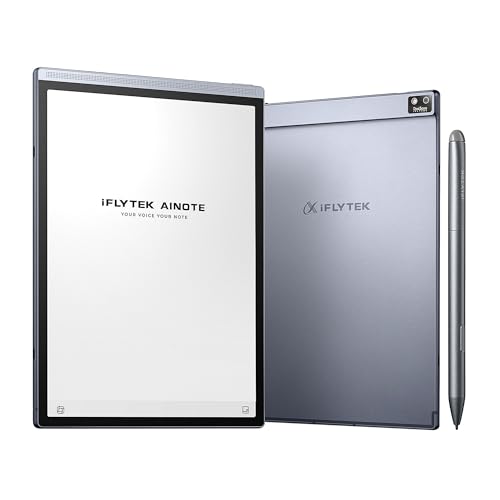
The AINOTE Air 2 Bundle brings an 8.2” E Ink panel with AI note-taking capabilities, including real-time voice-to-text and multilingual support across 16 languages. The device emphasizes a paper-like feel with 4,096 pressure levels and near-zero latency, supporting smooth handwriting and easy transcription to digital text. It also highlights meeting summaries powered by AI, making it attractive for professionals who attend frequent meetings or lectures and need a lightweight, portable solution for capturing and converting notes on the go.
Prospective buyers should weigh the balance between screen size and portability with transcription needs. While the compact form factor improves transportability, users with extensive writing sessions may prefer the larger canvases offered by other models. The bundled features focus on transcription accuracy and language versatility, which can deliver strong value for international teams or multilingual learners.
Amazon Kindle Scribe

Kindle Scribe combines note-taking with reading and document management in one device. Its AI notebook tools enable handwriting-to-text conversion, summarization, and the ability to adjust the length and tone of notes through AI features. The device emphasizes a distraction-free writing environment and a premium pen that feels close to traditional pen-on-paper. This makes Kindle Scribe a versatile option for those who want a single device for reading, writing, and quick text transformations without juggling multiple tools.
Considerations include AI-assisted features and how heavily you rely on them for study or work. Users should assess battery life, screen size, and the overall ecosystem for document storage and retrieval. Kindle Scribe appeals to readers who want integrated note-taking with their digital library and want AI-assisted productivity tools to enhance their notes and summaries.
Buying Guide: Key Purchase Considerations And Comparisons
Writing Experience And Display
Choose a device that feels natural to write on, with a friction that closely mimics pen on paper. Larger displays provide more room for diagrams and long-form notes, but can reduce portability. Consider whether color or grayscale better suits your note style and whether you need a color display for highlights and drawings.
Handwriting To Text Accuracy
Look for robust handwriting recognition and transcription features, especially if you work with multiple languages. Some devices support 16-language transcription and can interpret cursive or print with high accuracy. Online connectivity may be required for AI-assisted transcription, so factor your usage environment.
AI Features And Offline Use
Many models offer AI-based summaries, text enhancement, and searchability. Decide if you need real-time AI assistance or if offline note-taking with later synchronization is sufficient. Some features may deactivate without internet access or require a subscription.
File Management And Export Options
Note-taking works best when it integrates with folders, tags, PDF annotation, and easy export to standard formats. Prioritize devices that support straightforward export of handwritten notes to text, PDFs, or Word documents, and ensure cloud or local storage aligns with your workflow.
Portability And Battery Life
Consider thinness, weight, and battery longevity for daily travel or campus use. Some tablets deliver weeks of battery life with light usage, while color displays or AI-heavy devices might consume battery more quickly. Balance portability with screen and feature needs for your routine.
Price, Ecosystem, And Support
Prices vary by display size, color capabilities, and bundled accessories. Evaluate the ecosystem: compatibility with other devices, cloud storage, and customer support quality. A reliable warranty and accessible service can influence long-term satisfaction, especially for intensive note-taking.