The best gaming mouse with programmable buttons depends on how many shortcuts you need and whether you prefer a wired or wireless connection. The Logitech G502 HERO and Razer Basilisk V3 suit players seeking 11 accessible controls; the Redragon M908 offers 18 buttons for MMO-style commands. The GravaStar Mercury M2 is the wireless option, while the Redragon M612 provides 11 programmable buttons in a wired design. Compare the listed features below to match button count, scroll-wheel style, and connection type to your setup.
| Mouse | Best For | Connection | Programmable Buttons |
|---|---|---|---|
| Logitech G502 HERO | Adjustable weight and control | Wired | 11 |
| Razer Basilisk V3 | Ergonomic grip and scroll options | Wired | 11 |
| Redragon M908 | Many MMO shortcuts | Wired | 18 |
| GravaStar Mercury M2 | Wireless flexibility | Wireless, wired | 5 |
| Redragon M612 | Customizable controls for gaming or work | Wired | 11 |
Logitech G502 HERO Wired Gaming Mouse
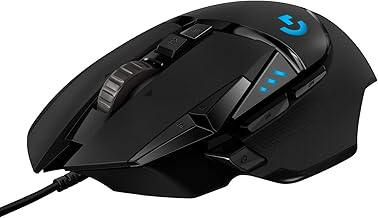
The Logitech G502 HERO is best for players who want a wired mouse with programmable controls, adjustable weight, and a dual-mode scroll wheel. Its 11 programmable buttons let users customize controls for gameplay, while the HERO sensor is specified for tracking up to 25,600 DPI without smoothing, filtering, or acceleration.
It includes five removable 3.6-gram weights, allowing buyers to adjust the mouse’s weight and balance. The hyper-fast scroll wheel offers another control option beyond the programmable buttons. This combination makes it a strong choice for players who want to tailor both button assignments and mouse feel.
Limitation: This is a wired model, so choose another option if wireless connectivity is a priority.
Razer Basilisk V3 Ergonomic Gaming Mouse

The Razer Basilisk V3 is best for players who value an ergonomic shape with a thumb rest and readily accessible controls. It has 11 programmable buttons for assigning macros or secondary actions, such as push-to-talk and ping. The thumb-rest design and button placement are intended to support quick access during play.
Its HyperScroll tilt wheel switches between free-spinning and tactile modes. Free spin can help move through long content, while tactile feedback may suit precise selection or cycling through in-game items. Choose this model if scroll-wheel behavior matters alongside button customization.
Limitation: The listed product is wired, and its button count is lower than the 18-button Redragon M908.
Redragon M908 MMO Gaming Mouse

The Redragon M908 is best for MMO players and other users who want the largest number of programmable controls in this group. It has 18 programmable buttons, five memory profiles, and profile lighting for identification. Its 8-piece, 2.4-gram weight set lets buyers adjust the mouse’s weight.
The optical sensor is listed at up to 12,400 DPI, with five specified preset levels and software adjustment in 100-DPI increments from 200 to 12,400. That makes this a better fit for buyers who want extensive button mapping and adjustable sensitivity than for someone seeking a minimal layout.
Limitation: Its 18-button layout may be more than a player needs for games that use few shortcuts.
GravaStar Mercury M2 Wireless Gaming Mouse

The GravaStar Mercury M2 is best for buyers who prioritize wireless flexibility and a lightweight, hollowed-out design over a high button count. It has five programmable buttons, a listed 1,000 Hz polling rate, and up to 26,000 DPI. The product description identifies a PAW3395 sensor and describes the open design as supporting airflow around the grip.
Connection options include 2.4 GHz wireless, Bluetooth, and wired use. That range can suit users who want to choose between connection types for different situations, while the five-button layout covers a more limited set of custom actions than the wired alternatives above.
Limitation: It has fewer programmable buttons than the other models in this selection, so it may not suit players who need many mapped commands.
Redragon M612 Wired Gaming Mouse

The Redragon M612 is best for buyers who want 11 programmable buttons for gaming and everyday computer tasks. The product description says every button can be reassigned and identifies one rapid-fire button and two side macro buttons. Its frosted surface coating and textured left side are specified as grip details.
The mouse has five default DPI levels from 500 to 4,000, with software options available between 500 and 8,000 DPI. It is a practical alternative to the M908 for users who want a substantial number of customizable controls without choosing an 18-button MMO layout.
Limitation: The M612 is wired, and its listed maximum DPI is lower than the G502 HERO, Basilisk V3, and Mercury M2.
Buying Guide: How To Choose A Programmable Gaming Mouse
How many programmable buttons do you need?
Start with the actions you expect to map. Five buttons on the Mercury M2 may be enough for a small set of shortcuts. The 11-button G502 HERO, Basilisk V3, and M612 provide more assignments, while the M908’s 18 buttons are aimed at users who need a dense set of commands. More buttons are useful only if they are comfortable to reach and you can remember their assignments.
Should you choose wired or wireless?
Four options here are wired, while the Mercury M2 lists 2.4 GHz wireless, Bluetooth, and wired connectivity. Choose wired if you prefer a direct cable connection. Choose the M2 if having multiple connection options is a priority, and check the product listing for the connection details that matter to your devices.
Which features affect comfort and control?
Shape, grip details, scroll behavior, and weight adjustment can affect how a mouse feels in use. The Basilisk V3 lists a thumb rest; the M612 lists a textured side; and the G502 HERO and M908 include removable weights. The Basilisk V3 also offers tactile and free-spinning scroll modes. Consider which of these features address your preferences rather than choosing by DPI alone.
Does maximum DPI determine the best mouse?
Maximum DPI is only one specification. These models list different maximum sensitivities, but the right setting depends on the user’s preferred cursor or aim movement. Button count, grip, connection type, and adjustable settings may matter more to everyday use. Compare the specific DPI ranges and preset levels when sensitivity adjustment is important.
Frequently Asked Questions
Which mouse has the most programmable buttons?
The Redragon M908 has 18 programmable buttons, the highest listed count among these five products.
Which option is wireless?
The GravaStar Mercury M2 lists 2.4 GHz wireless and Bluetooth connections, as well as wired use.
Which mouse has adjustable weights?
The Logitech G502 HERO includes five 3.6-gram weights. The Redragon M908 includes an 8-piece set of 2.4-gram weights.
Which models have 11 programmable buttons?
The Logitech G502 HERO, Razer Basilisk V3, and Redragon M612 each list 11 programmable buttons.
Is a higher DPI always better for gaming?
No. A higher maximum DPI provides a wider sensitivity range, but the preferred setting depends on the player and the game. Compare the mouse’s available adjustments with your control preferences.