For flight sim enthusiasts seeking a tangible cockpit feel, instrument panels add immediate realism and hands-on control. This guide highlights five top options that integrate with common simulators, offer real-time data displays, and enhance immersion whether you’re building a full cockpit or a compact sim setup. Each entry includes key features to help you compare usability, compatibility, and value.
| Product | Brand | Notes |
|---|---|---|
| Logitech G Pro Flight Instrument Panel | Logitech G | Colorful LCD, real-time updates |
| Flight Simulator Instrument Panel Six Pack | AltMot | Built-in monitor; multiple instruments |
| Logitech G USB G Pro Flight Radio Panel | Logitech G | Twin dials, standby frequency |
| Logitech G USB G Pro Flight Multi Panel | Logitech G | Switches and LED display |
| Desktop Pilot – Ignition Panel Flight Sim | Desktop Pilot | Magneto-style switch, ignition key |
Logitech G Pro Flight Instrument Panel

The Pro Flight Instrument Panel from Logitech G is a compact, multi-functional device featuring a vibrant 3.5-inch LCD screen. It integrates smoothly with flight sim software to provide real-time access to essential flight data and aircraft information. The panel automatically updates in response to software events, enhancing situational awareness without adding unnecessary complexity to the cockpit layout.
Flight Simulator Instrument Panel Six Pack

This six-pack combines multiple instruments with an integrated monitor and dedicated software. It is designed for Windows-based PCs and supports popular simulators such as X-Plane 11, X-Plane 12, and Microsoft Flight Simulator. Its range of operational knobs and buttons covers airspeed, altitude, heading, attitude, and clock functions, enabling a more tactile flight deck experience.
Logitech G USB G Pro Flight Radio Panel

The Radio Panel offers twin concentric adjustment dials for frequency changes and a standby switch to preset frequencies before activating them. It supports a wide range of simulators, including Flight Simulator X, X-Plane 11, X-Plane 10, and Prepar3D 2.2+. The panel is designed to streamline radio management and create a more authentic comms workflow within the cockpit.
Logitech G USB G Pro Flight Multi Panel

The Multi Panel provides a set of switches and an LED display to control various flight sim aspects. It is compatible with Microsoft Flight Simulator X and 2004 and can be mounted on the Pro Flight Yoke System or integrated into a home cockpit. This panel offers expandability for additional cockpit functionality alongside a primary yoke setup.
Desktop Pilot – Ignition Panel Flight Sim
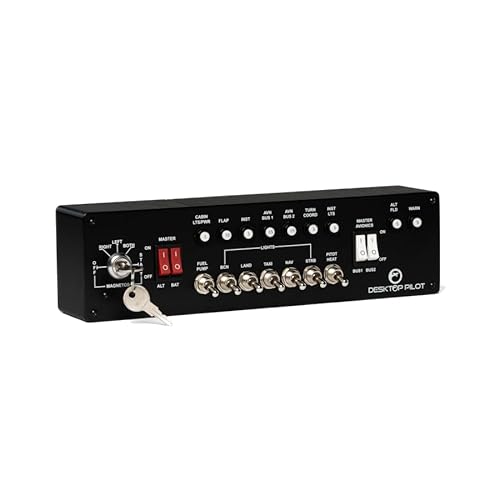
The Desktop Pilot Ignition Panel emphasizes top-tier craftsmanship with a spring-loaded key switch and a high-quality stainless steel magneto switch. Its ignition key mirrors real aircraft controls, contributing to an authentic start-up sequence and cockpit ambiance for serious sim enthusiasts who prioritize tactile realism.
Buying Guide
Key considerations when choosing an instrument panel for a flight sim setup:
- Compatibility: Verify supported simulators (X-Plane, Microsoft Flight Simulator, Prepar3D) and whether hardware is plug-and-play or requires software integration.
- Display and feedback: Decide between simple LED indicators, color LCDs, or integrated monitors based on how much data you want visible at a glance.
- Physical footprint: Consider the layout and space available in your sim room or cockpit frame; some panels stack or mount onto existing yokes.
- Tactile realism: Magneto switches, push buttons, and dials can greatly enhance immersion but may require calibration or fine-tuning for smooth operation.
- Expandability: If building a larger cockpit, choose panels that can be combined with other modules (radio, multi-panel, and yoke systems) without compatibility issues.
- Power and drivers: Some panels rely on specific drivers or USB power; ensure your PC ports and power supply meet the device requirements.
- Durability: Look for high-quality materials (metal switches, robust housings) if you plan long-term use or frequent handling.
When selecting, balance realism with usability. A single-purpose instrument may be enough for basic learning, while a full suite of panels enables a more faithful cockpit environment. Consider your preferred flight profiles, space constraints, and the level of hands-on interaction you desire during sessions.
Across these options, most users prioritize real-time data presentation, ease of integration with common sims, and the ability to customize controls to match their aircraft of choice. For smaller setups, a single instrument panel with a clear display may suffice, whereas larger home cockpits benefit from a combination of radio and multi-panel modules to mimic your favorite aircraft’s cockpit layout.