The best external webcam with a microphone depends on whether you prioritize simple video calls, privacy, or advanced camera movement. The TRAUSI and NexiGo N60 explicitly list built-in noise-canceling microphones, while the EMEET PIXY lists three microphones and advanced tracking. Logitech’s Brio 101 and C920x offer useful video features, but the supplied product details do not confirm their microphone specifications.
| Webcam | Best For | Microphone Information |
|---|---|---|
| TRAUSI 1080P | Calls in changing light | Noise-reducing built-in mic |
| Logitech Brio 101 | Privacy-conscious meetings | Not specified in supplied details |
| NexiGo N60 | Everyday calls and broad OS support | Built-in noise-canceling mic |
| EMEET PIXY | Moving presenters and streaming | Three microphones |
| Logitech C920x | Low-light video and autofocus | Not specified in supplied details |
TRAUSI 1080P Webcam With Noise-Reducing Mic
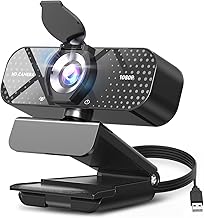
Best for: People who want a straightforward 1080p camera with a microphone described as noise-reducing. The listed features include 30 frames-per-second video, a wide-angle lens, automatic light correction, and a privacy cover. These features make it a flexible option for video calls, online teaching, streaming, and meetings.
Choose this model if lighting varies between calls or you want a camera with an integrated privacy cover. Its listing specifically says the microphone is designed to reduce background noise, which makes it more directly suited to buyers seeking an external webcam with a mic.
Limitation: The supplied details do not state the lens’s exact field of view or provide specific operating-system compatibility information. Check device requirements before buying.
Logitech Brio 101 Full HD Webcam

Best for: Buyers who prioritize an integrated privacy cover and automatic brightness adjustment for meetings. Logitech’s listed RightLight feature boosts brightness by up to 50% and reduces shadows compared with previous-generation Logitech webcams. The slide cover provides a physical way to block the camera when it is not in use.
This is a reasonable choice for a simple Full HD meeting setup when privacy and image brightness matter. The listing also identifies compatibility with Nintendo Switch 2’s GameChat mode.
Limitation: The supplied feature information does not specify a built-in microphone. If you need audio captured directly by the webcam, verify that detail before choosing this model.
NexiGo N60 1080P Webcam With Microphone

Best for: Everyday video calls and buyers who want microphone details plus broad listed operating-system support. The N60 captures up to 1920-by-1080 video at 30 frames per second and includes a built-in noise-canceling microphone and privacy cover. Its software control and plug-and-play design add flexibility for common computer setups.
The stated compatibility includes Windows, Mac OS X, Android, Linux, Chrome OS, and Ubuntu, along with USB 2.0 and 3.0. Choose this webcam if you need a clearly identified mic and want a camera described for conferencing, online school, streaming, and recording.
Limitation: The listing says it is not compatible with Xbox, PS4, or PS5. Its 3.6 mm lens is optimized for fixed distances from 19.6 inches to 13 feet.
EMEET PIXY Dual-Camera AI PTZ Webcam

Best for: Presenters, instructors, and streamers who move while on camera. The PIXY combines a 4K main camera, AI-assisted autofocus, and pan-and-tilt movement with three built-in microphones. Its listed tracking range is 310 degrees horizontally and 180 degrees vertically, and the camera supports presets and gesture control.
Choose this model when automatic framing and subject tracking matter more than a basic fixed webcam. Its software includes controls for presets and framing, plus a whiteboard mode. The listed field of view can be adjusted in 1080p and 2K at 30 frames per second.
Limitation: Field of view is locked in 4K at 30 frames per second and 1080p at 60 frames per second. The product description says a remote is sold separately.
Logitech C920x HD Pro Webcam

Best for: Buyers looking for 1080p video with automatic lighting adjustment and autofocus. The listed features say the camera fine-tunes lighting for bright, sharp images in low-light settings. Logitech also describes advanced capture software for creating and sharing video content.
This model may suit a desktop or laptop setup where video quality and focus are the main priorities. The listing also identifies compatibility with Nintendo Switch 2’s GameChat mode.
Limitation: The supplied details do not confirm a built-in microphone. Confirm audio capture specifications before purchasing if you do not plan to use a separate mic.
Buying Guide: How To Choose An External Webcam With A Microphone
Do you need a microphone built into the camera?
Look for explicit microphone details rather than assuming every webcam includes one. The TRAUSI and NexiGo N60 list noise-reducing or noise-canceling microphones, and the EMEET PIXY lists three microphones. The supplied Brio 101 and C920x information does not confirm microphone specifications.
Is 1080p enough, or do you need 4K?
For typical meetings and online classes, 1080p at 30 frames per second is a clear, commonly listed option on the TRAUSI, NexiGo, and Brio 101. The EMEET PIXY offers 4K, which may be useful for content creation, but its framing controls vary by resolution and frame rate.
Will the camera suit your room and setup?
Automatic light correction or brightness adjustment can help when room lighting changes. Check camera placement and lens details as well: the NexiGo N60 specifies an optimized distance range, while the TRAUSI lists a wide-angle lens without an exact field-of-view figure. A privacy cover is useful when you want to block the lens between calls.
Do you need tracking or a fixed view?
A fixed webcam is simpler for seated meetings. A pan-and-tilt model such as the EMEET PIXY is better suited to presenters who move around, but its tracking and controls add setup considerations. Also confirm the product’s operating-system and connection requirements for your computer.
Frequently Asked Questions
What is the best external webcam with a built-in microphone for everyday calls?
The NexiGo N60 is a practical option based on its listed 1080p video, built-in noise-canceling microphone, privacy cover, and broad operating-system compatibility.
Which webcam is better for a presenter who moves around?
The EMEET PIXY is designed for movement, with AI tracking and pan-and-tilt control. Its listing also specifies three microphones.
Do all five webcams in this guide confirm a built-in microphone?
No. The TRAUSI, NexiGo N60, and EMEET PIXY list microphone details. The supplied feature information for the Logitech Brio 101 and C920x does not specify a microphone.
Does a webcam privacy cover improve microphone privacy?
No. A camera cover blocks the lens, but it does not mute a microphone. Use your video-call app’s mute control or another appropriate audio control when you want to stop audio capture.