The best desktop external hard drive depends on how much storage you need and whether you want a stationary drive or portable alternative. The Western Digital Elements 18TB is best for very large archives, while the 8TB Elements suits everyday computer backups. Seagate’s 16TB One Touch is a high-capacity USB-C option; the 2TB Seagate and 320GB slim drive are better suited to people who prioritize portability over desktop capacity.
| Drive | Listed Capacity | Best For |
|---|---|---|
| Western Digital Elements | 18TB | Large archives |
| Seagate One Touch | 16TB | USB-C-powered storage |
| Western Digital Elements | 8TB | General desktop storage |
| Seagate Portable | 2TB | Storage for travel |
| Ultra Slim Portable Drive | 320GB | Small, basic storage needs |
Western Digital Elements 18TB
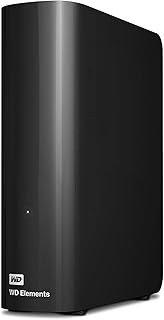
Best for: Users who need a large desktop archive for substantial collections of files. This Western Digital Elements drive offers 18TB of listed capacity and USB 3.0 connectivity for plug-and-play storage, making it the largest-capacity option in this selection.
Choose this drive if capacity is the main priority and the drive will stay near a computer. It is a desktop model, so avoid it if your main need is a compact drive to carry around. The listed product details do not specify operating-system setup or power requirements, so check the product information for those details before buying.
Seagate One Touch 16TB

Best for: Buyers seeking high-capacity storage with USB-C bus power. Seagate lists 16TB of storage for keeping files in one place and describes the drive as suitable for backing up assignments, projects, and sensitive files.
The product listing says it does not require a wall outlet, but the connected device must provide 15-watt USB power output. That requirement matters: choose this drive if your computer or host can supply the specified power, and avoid it if you cannot confirm that requirement. Its capacity is lower than the 18TB Elements drive but higher than the other listed options.
Western Digital Elements 8TB

Best for: Home or business users who want roomy add-on storage without choosing the largest drive available. The 8TB Elements model has USB 3.0, is described as plug-and-play ready for Windows PCs, and is intended for personal or business use.
It is a practical middle-capacity desktop choice for storing files and expanding computer storage. Choose it if Windows plug-and-play setup and a substantial capacity fit your needs. The listed features specifically name Windows PCs, so buyers using another system should verify setup requirements rather than assume compatibility.
Seagate Portable 2TB

Best for: Buyers who need storage they can take on the go rather than a high-capacity desktop unit. Seagate lists 2TB capacity, Windows and Mac support, automatic recognition after connecting to a computer, and drag-and-drop backup without software installation.
Its portability and simple setup make it better for moving files between locations than maintaining a large stationary archive. Choose it if 2TB is enough and carrying the drive matters. Avoid it if you need desktop-class capacity; its listed storage is much less than the 8TB, 16TB, and 18TB choices.
Ultra Slim Portable 320GB Drive

Best for: Buyers seeking a compact, lower-capacity drive for basic storage. The listing describes a 320GB USB 3.0 portable drive for PC, laptop, Mac, Xbox One, and PS4 or PS5.
This option is better for light storage needs than for backing up a large computer library. The product details list several device categories, but do not explain setup steps or platform-specific requirements. Confirm that the listed capacity and intended device use meet your needs before choosing it as a desktop storage replacement.
Buying Guide: How To Choose A Desktop External Hard Drive
How much capacity do you need?
Estimate the total size of the files you plan to store, then leave room for future additions. The options here range from 320GB and 2TB portable models to desktop drives with 8TB, 16TB, and 18TB. For extensive photo, video, or work archives, compare the three higher-capacity choices first. For transferring a smaller set of files, a portable model may be more practical.
Should you choose desktop or portable?
Desktop drives are a better fit when they will remain near a computer and capacity is the priority. Portable drives suit travel and moving files between locations. The 2TB Seagate listing specifically emphasizes portability and Windows or Mac use. For the USB-C Seagate, verify the connected device meets the stated 15-watt power requirement.
What connection and setup details matter?
Compare the connection type with the ports and power capabilities of your computer. The Western Digital Elements drives list USB 3.0, and the 8TB model is described as plug-and-play ready for Windows PCs. The 2TB Seagate advertises automatic recognition and drag-and-drop backup. Check product details for any operating system or setup conditions not stated in the supplied features.
Frequently Asked Questions
What is the highest-capacity drive in this selection?
The Western Digital Elements desktop drive has the highest listed capacity at 18TB.
Which option is best for a Windows PC?
The 8TB Western Digital Elements model is described as plug-and-play ready for Windows PCs. The 2TB Seagate listing also names Windows support.
Which drive is intended for travel?
The Seagate 2TB and Ultra Slim 320GB models are described as portable drives. They provide less listed capacity than the desktop options.
Does the Seagate One Touch need a wall outlet?
The listing says it is USB-C bus-powered and does not require a wall outlet, but the connected device must provide 15-watt USB power output.
Is a portable drive the same as a desktop drive?
No. A portable drive is positioned for carrying and on-the-go storage, while desktop models in this selection emphasize higher-capacity stationary storage.