When you need extra storage that’s fast, dependable, and easy to use with Windows, Mac, or gaming consoles, a 4TB external hard drive is a practical choice. This guide reviews top 4TB options, highlighting portability, durability, and setup convenience. Each product section includes a quick overview and practical factors to consider, helping you pick the right solution for everyday backups, media libraries, and on-the-go file access.
Summary of chosen products
| Product | Brand | Capacity | Connection | Notes |
|---|---|---|---|---|
| Seagate Portable 4TB External | Seagate | 4 TB | USB 3.0 | Plug-and-play, rescue service included |
| WD 4TB Elements Portable | Western Digital | 4 TB | USB 3.0/3.2 Gen 1 | Lightweight, high capacity |
| Toshiba Canvio Basics 4TB | Toshiba | 4 TB | USB 3.0 | Sleek, no software needed |
| WD 4TB My Passport | Western Digital | 4 TB | USB 3.0/3.1 | Ransomware defense, password protection |
| Western Digital 4TB Elements Desktop | Western Digital | 4 TB | USB 3.0 | Desktop form factor, plug-and-play |
Seagate Portable 4TB External Drive

The Seagate Portable Drive provides a straightforward solution for on-the-go storage with 4TB of capacity. It is designed for Windows or Mac computers and makes backups simple with drag-and-drop file management. The device is USB-based and offers automatic recognition without requiring extra software, streamlining setup for users who want instant expansion for photos, videos, and documents. Compatibility with gaming consoles like Xbox and PlayStation makes it a versatile option for media libraries and game saves, all in a compact, travel-friendly enclosure.
Key considerations: USB 3.0 compatibility ensures decent transfer speeds on most systems; no software installation reduces setup friction. The included 1-year rescue service adds a level of protection, useful for users prioritizing data reliability. Potential buyers should note the drive is best for portable use rather than heavy-write workloads or long-term desktop setup.
WD 4TB Elements Portable External Drive

Western Digital’s Elements Portable 4TB drive emphasizes high capacity in a compact, lightweight form. It’s described as plug-and-play, making it easy to add extra space for photos, videos, and documents on the go. With USB 3.0/3.2 Gen 1 compatibility, it delivers reliable performance across Windows and Mac systems. The emphasis on portability means it’s well-suited for travelers, students, and professionals who need a robust secondary storage solution without bulk.
Key considerations: while portability is a strength, potential users should consider usage patterns—heavy continuous reads/writes may benefit from a desktop drive. The drive’s simple form factor helps with on-the-road backups and compatible device pairing, but it lacks some advanced security features found in higher-end models.
Toshiba Canvio Basics 4TB
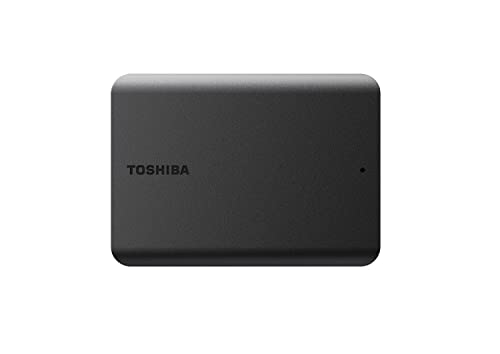
The Toshiba Canvio Basics 4TB option is crafted for simple, straightforward storage. Its matte, smudge-resistant finish offers a practical, low-maintenance exterior. Plug-and-Play capability means users can add capacity quickly to PCs or other compatible devices without installing software. This makes it a reliable choice for expanding a laptop’s storage, archiving media libraries, or supporting backups with minimal setup time.
Key considerations: the Canvio Basics emphasizes ease of use and portability, but users should assess whether they need additional security features or encryption. If security is a priority, pairing with compatible software or a different model with built-in encryption may be worth considering as a follow-up purchase.
WD 4TB My Passport External Drive

WD’s My Passport 4TB model blends a slim, durable profile with robust data protection features. It includes password protection and 256-bit AES hardware encryption, helping safeguard sensitive information. The drive supports USB 3.0/3.1 interfaces for compatibility with a wide range of devices, including Windows PCs and Macs. This model is designed for users who want greater control over data security alongside substantial portable storage capacity.
Key considerations: encryption and password protection add a security layer, but those seeking maximum ruggedness might explore drives with ruggedized housings. For users who prioritize data integrity and easy recovery, WD’s My Passport line is a balanced choice with practical software that supports backups and ransomware defenses.
WD 4TB Elements Desktop

Western Digital’s Elements Desktop 4TB variant offers a desktop-form factor with ample space for expanding a home or small office storage setup. It’s designed for plug-and-play use, enabling quick backups and easy access to large media libraries from a stationary computer. Fast data transfers support quick file moves, making it suitable for archiving video projects or large photo libraries. The desktop design tends to accommodate sustained storage operations more reliably than portable drives in some workloads.
Key considerations: desktop drives generally require more space and a dedicated power supply. They are ideal for permanent setups, but less convenient for frequent transport. If you need a balance between portability and capacity, a portable 4TB model may suit more mobile users better, while desktop models shine in constant-use environments.
WD 4TB My Passport Ultra for Mac

WD’s My Passport Ultra for Mac blends style with practical security features. It is USB-C and USB 3.1 compatible, supporting newer MacBook and iMac workflows as well as Windows devices with appropriate adapters. The Ultra line features a refined metal cover and 256-bit AES hardware encryption for password protection, which helps safeguard data on the go. This model is well-suited for Mac users seeking a portable, stylish backup companion that integrates smoothly with USB-C ecosystems.
Key considerations: compatibility with non-Mac systems may require formatting or adapters. If you rely on Time Machine or other Mac-native tools, confirm compatibility and backup workflows before purchase. The premium design and encryption emphasize security alongside convenience for Mac-centric users.
Buying Guide: Key Purchase Considerations for a 4TB External Drive
- Portability vs. desktop form factor: Portable drives (4TB) are ideal for on-the-go storage and quick backups, while desktop drives offer higher reliability and sustained performance for fixed setups and large media libraries.
- Interface and speed: USB 3.0/3.1/3.2 Gen 1 provide solid performance for most users. If your system supports USB-C or USB 3.2, choose a drive that maximizes transfer speeds on compatible devices.
- Compatibility: Most drives work with Windows and Mac; some may require formatting for cross-compatibility. Ensure your primary devices are supported and consider future OS updates.
- Security features: Built-in encryption and password protection add a critical security layer, particularly for portable drives containing personal or business data.
- Backup software and recovery options: Some drives include bundled backup software or ransomware protection. Decide if you want additional software assistance or prefer a device with minimal software.
- Durability and build: For portable use, consider shock resistance and protective casings. Desktop drives emphasize stability for long sessions and heavy data transfers.
- Brand and support: Well-known brands offer clearer warranties and easier service. Look for models with warranty coverage and reputable customer support.
- Future scalability: If planning larger libraries (photos, videos, 4K content), ensure the drive’s capacity aligns with long-term growth and consider additional backups or cloud redundancy as part of a storage strategy.