Remote power switches fed over Ethernet give IT managers and home lab enthusiasts reliable control over plugged-in devices. The following selections emphasize automatic reboot, monitoring, and cloud or app-based control. Each product below provides network-connected power outlets to reboot routers, modems, modems, servers, or security cameras with minimal on-site visits. This guide compares key features to help you choose the right model for your environment.
| Product | Brand | Model | |
|---|---|---|---|
| MSNSwitch2 UIS-722b | Proxicast | UIS-722b | 2 independently controlled outlets; internet connectivity monitoring; auto-outlet cycling; smartphone/app/cloud/API control |
| ezOutlet5 EZ-72b | Proxicast | EZ-72b | Single outlet; internet monitoring; automatic reboot for broadband devices; LAN via Wi‑Fi or Ethernet |
| MSNSwitch2 UIS-722T | Proxicast | UIS-722T | Two outlets; auto-reboot upon connectivity loss; scheduling; cloud/app/remote access; TAA compliant |
| ezOutlet5-2R EZ-73a | Proxicast | EZ-73a | Dual outlets; internet monitoring; automatic reboot; LAN via Wi‑Fi or Ethernet |
| iBoot-G2 Basic | Dataprobe | iBoot-G2 | Remote power control via web/cloud; simple setup; one outlet; centralized management |
Introduction
For reliable remote management, Ethernet-connected power switches offer automated reboot, scheduled power cycling, and cloud or app-based control. The selections below emphasize ease of deployment, continuous monitoring, and multi-outlet configurations ideal for routers, modems, cameras, and small servers. Each entry includes its core capabilities to help you align with your networking and facility needs.
Proxicast UIS-722b: Dual-Outlet Auto-Reboot

The MSNSwitch2 UIS-722b provides two independent AC outlets with built-in Internet connectivity monitoring and automatic cycling when the connection is lost. It supports user-definable scheduled power cycling and can be controlled via a smartphone app, cloud service, web browser, or API. Its auto-reset function is accessible via a single button, making it suitable for diverse environments such as computers, modems, routers, DVRs, PLCs, and industrial equipment. This model emphasizes out-of-the-box readiness and broad remote management options.
Proxicast EZ-72b: Internet-Enabled Outlet
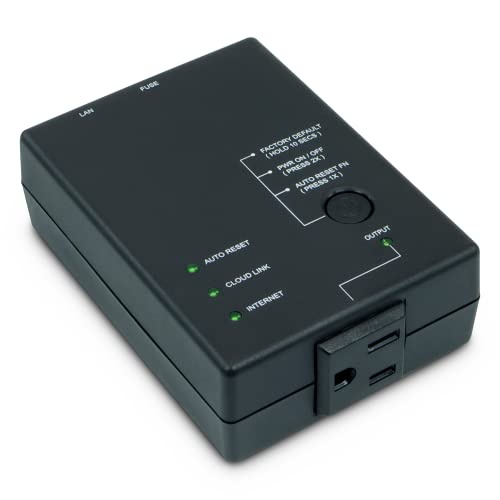
The ezOutlet5 EZ-72b offers an internet-connected single outlet with automatic reboot when broadband connections crash. It can restart equipment such as modems, routers, PCs, or security cameras when they freeze. It connects to a LAN via 2.4 GHz WiFi or 10/100 Ethernet, enabling flexible placement and simple integration into existing networks while maintaining remote control and monitoring capabilities.
Proxicast UIS-722T: TAAl-Approved Dual Outlet
Like the UIS-722b, the UIS-722T adds two outlets with enhanced reliability and a focus on regulatory compliance (TA A compliant). Outlets can be cycled automatically upon connectivity loss, with predefined power cycling schedules. Users can manage the device via smartphone apps, cloud services, a web browser, or API access, enabling seamless remote reboot for critical devices and industrial equipment.
Proxicast EZ-73a: Dual Outlet Remote Reboot

The EZ-73a model provides two web-controllable AC outlets with automatic reboot capabilities when broadband connections drop. It supports LAN access via WiFi or Ethernet, enabling remote power management and continuous operation of essential devices like modems, routers, and cameras. It emphasizes robust connectivity and straightforward control from multiple platforms.
Dataprobe iBoot-G2: Simple Remote Power
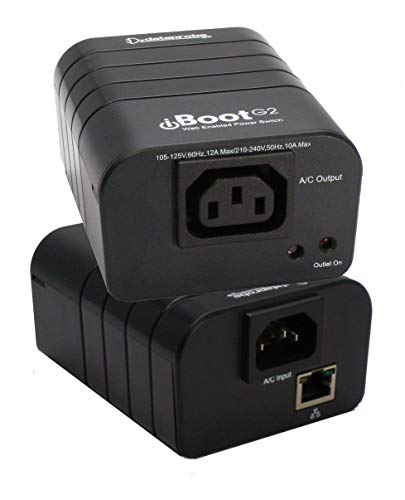
The Dataprobe iBoot-G2 Basic Network Power Switch focuses on remote power control via a web browser or Dataprobe’s cloud service. It is designed for straightforward deployment with a single outlet and an intuitive web interface, enabling secure, centralized power control and monitoring for remote devices. The model is suitable for small-scale deployments requiring reliable off-site reboot capabilities without heavy infrastructure.
Buying Guide: Key Considerations for Ethernet Remote Power Switches
When selecting an ethernet-connected power switch, consider the following factors to ensure the device fits your use case and provides durable, manageable power control.
- Number of outlets and independent control: If you need to reboot multiple devices or run diverse equipment, a multi-outlet unit with independent switching is preferable.
- Connectivity and control methods: Look for cloud, app, web, and API access to enable flexible management from anywhere and automation via scripts or integrations.
- Automatic reboot and monitoring: Devices that monitor connectivity and auto-cycle power can reduce downtime by resetting devices without manual intervention.
- Scheduling and automation: User-definable power cycles and schedules help maintain network uptime and perform routine reboots during maintenance windows.
- Security and compliance: Consider devices with secure cloud access, encrypted communication, and regulatory compliance as needed for business environments.
- Installation and network compatibility: Ensure LAN connectivity options (WiFi vs. Ethernet) and ease of setup align with your existing network.
- Remote hardware compatibility: If you manage routers, modems, cameras, or servers, verify that the switch supports rapid reboot of those device types and is compatible with your management stack.
- Pricing and scalability: For evolving networks, choose models that can scale by adding more outlets or upgrading to higher-tier features without replacing hardware.
Overall, Proxicast models emphasize automatic reboot, scheduling, and remote control, making them strong options for home labs and small networks. Dataprobe offers a straightforward remote power solution with cloud access for centralized control. When choosing, balance the number of outlets, your preferred control methods, and the level of automation you require to keep critical devices running smoothly without on-site visits.