The best encrypted USB memory stick depends on how you want to unlock it, how much storage you need, and whether you need protection against physical damage. The Kingston IronKey Keypad 200 is best for keypad-based, device-independent access; the IronKey Vault Privacy 50 and Locker+ 50 G2 offer hardware encryption with password options. Integral adds a stated data-erasure response to repeated failed access attempts. The Lexar drive is included as a non-encrypted alternative for everyday transfers, not for protecting sensitive files.
| Product | Best suited for | Listed security or storage detail |
|---|---|---|
| Kingston IronKey Keypad 200 | Keypad access without relying on a device keyboard | XTS-AES 256-bit; 16GB |
| Integral Crypto-197 | Compact storage with failed-attempt protection | FIPS 197; 4GB |
| Kingston IronKey Vault Privacy 50 | Flexible password configuration | XTS-AES 256-bit; 16GB |
| Kingston IronKey Locker+ 50 G2 | Users seeking multiple password modes | FIPS 197; 32GB |
| Lexar D40E | Convenient transfers between USB-C and USB-A | 128GB; not listed as encrypted |
Kingston IronKey Keypad 200

Best for: People who want to enter an access code on the drive itself. Its alphanumeric keypad supports device-independent access, so unlocking does not depend on typing a password on the connected computer or device.
The listed features include XTS-AES hardware encryption and FIPS 140-3 Level 3 certification marked as pending. This makes it a strong option for buyers prioritizing keypad access and a stated security certification pathway. The product listing also identifies brute-force and BadUSB protection.
Consideration: The listed capacity is 16GB, which may be limiting for large media collections or extensive backups. The certification should be understood as pending, not as a completed certification.
Integral Crypto-197

Best for: Buyers seeking a compact encrypted drive with a stated response to repeated incorrect access attempts. The listing identifies FIPS 197 certification and protection against brute-force password attacks.
According to the product details, data is automatically erased after six unsuccessful access attempts, and the cryptographic drive is reset. Its double-layer waterproof design combines a hardened internal case with a rubberized silicone outer case, providing additional physical protection as described by the manufacturer.
Consideration: The listed capacity is 4GB, substantially less than the other encrypted options here. Because repeated failed attempts trigger erasure, keep a separate secure backup of important files.
Kingston IronKey Vault Privacy 50

Best for: Users who want hardware encryption and a choice of password styles. The drive is listed with XTS-AES 256-bit encryption and FIPS 197, along with complex-password and passphrase modes.
Its multi-password option is intended to provide flexibility in how access is configured. The listing also states that the drive has brute-force protection and digitally signed firmware to guard against BadUSB attacks. Choose this model if those specific safeguards and password choices match your security needs.
Consideration: This listing is for a 16GB model. Buyers who need more capacity should compare the 32GB Locker+ 50 G2 or consider whether a larger encrypted drive is available.
Kingston IronKey Locker+ 50 G2
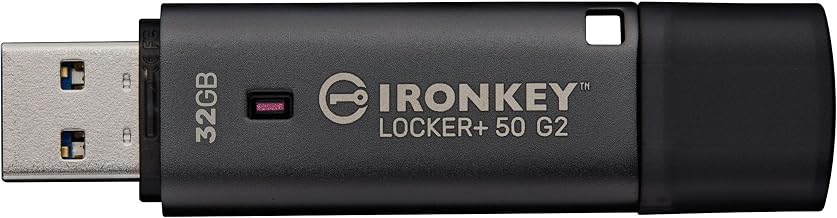
Best for: Buyers who want 32GB of storage alongside hardware encryption and multiple password roles. Listed features include XTS-AES 256-bit hardware encryption, FIPS 197 certification, and Admin and User password options.
The complex-password and passphrase modes give users alternatives for setting credentials. Compared with the 16GB Vault Privacy 50 in this selection, this model provides twice the listed capacity and is a better fit when storage space is a priority alongside encryption.
Consideration: The provided feature information does not specify the same brute-force or BadUSB protections listed for the Vault Privacy 50. Compare the exact security features you require before choosing between them.
Lexar D40E Dual USB Drive

Best for: Everyday file transfers between devices with USB Type-A and USB Type-C ports. The 128GB drive has a 360-degree swivel design, plug-and-play operation, and listed transfer speeds up to 100MB/s under internal testing. Actual performance may vary by host device and conditions.
This is a useful capacity and connector-flexibility alternative, but the supplied product details do not list encryption. It is therefore not a substitute for an encrypted drive when files contain sensitive personal, work, or financial information.
Consideration: Choose it for convenience and general storage, not for built-in encrypted protection.
Buying Guide: How to Choose an Encrypted USB Drive
Do you need encryption or just extra storage?
For sensitive files, look for explicit hardware-encryption details in the product specifications. A USB drive with convenient connectors or ample capacity is not automatically encrypted. The Lexar D40E, for example, lists USB-A and USB-C connectors but does not list encryption in the provided features.
Which access method fits your routine?
A keypad drive such as the IronKey Keypad 200 lets you enter a code on the device. Other models in this selection use password options, including complex-password or passphrase modes. Consider where you will unlock the drive and which method you can use consistently without exposing credentials.
How much capacity should you choose?
Match capacity to the files you plan to carry. The encrypted choices listed here range from 4GB to 32GB. Documents need less room than large photo, video, or project collections. Keep a separate backup of important data, especially when a drive’s security behavior may erase data after failed attempts.
What do certification and attack protections tell you?
Check the exact standard and status in the listing. FIPS 197 appears on several products here; the Keypad 200’s FIPS 140-3 Level 3 status is described as pending. Features such as brute-force protection and BadUSB protection are product-specific, so do not assume every encrypted drive includes them.
Should physical durability affect your choice?
If the drive will travel frequently, consider stated physical protections. Integral describes a dual-layer waterproof design with a hardened internal case and silicone outer case. Do not infer a particular drop or immersion rating unless the product specifications provide it.
Frequently Asked Questions
What is an encrypted USB memory stick?
It is a USB storage device that uses encryption to protect stored data. Depending on the model, access may require a password or keypad entry.
Is every USB-C flash drive encrypted?
No. USB-C describes a connector, not a security feature. Verify that the product explicitly lists encryption.
What does XTS-AES 256-bit mean on these listings?
It identifies the listed hardware-encryption method and key length. Compare this specification alongside access controls and other protections.
Can I use an encrypted drive for ordinary files?
Yes. It can store ordinary files as well as sensitive data, but follow the manufacturer’s instructions for setting up and unlocking the drive.
Why keep a backup if the drive is encrypted?
Encryption protects access; it does not replace a backup. A separate copy helps preserve files if the drive is lost, damaged, or reset after failed access attempts.