The best electronic restaurant menu board depends on where customers view it and how often your menu changes. The Canlarriz 18.5-inch display is best for compact counters and remote updates, while the YIXZSWD 27-inch screen suits businesses that need a larger menu view. EZ-AD players are better for turning an existing screen into digital signage. VEVOR’s illuminated writing board is a manual, changeable alternative rather than a digital screen.
| Product | Best For | Format |
|---|---|---|
| Canlarriz 18.5-inch Display | Compact counters and remote management | Digital screen |
| EZ-AD Signage Player | Template-based content and playlists | Media player |
| YIXZSWD 27-inch Display | Larger counter menus | Digital screen |
| EZ-AD Signage Stick | PowerPoint and 4K playback | Media player |
| VEVOR LED Writing Board | Handwritten specials and visual effects | Illuminated writable board |
Canlarriz 18.5-Inch Digital Signage Display

Best for: Cafes, bakeries, and restaurants that need a compact countertop menu with remote content controls. This unit combines an 18.5-inch display with a desktop stand and landscape or portrait placement, making it suitable for counters, checkout areas, and reception desks.
Its listed specifications include 700-nit brightness, Android 12, 2GB of RAM, and 32GB of storage. The built-in cloud CMS supports remote uploads, playlists, scheduling, split screens, and managing multiple displays. USB plug-and-play is also available for local content changes.
Why it was selected: It offers both a dedicated display and tools for updating restaurant content remotely. Limitation: Its 18.5-inch size is more suited to countertop viewing than showing a menu across a large dining room.
EZ-AD Digital Signage Display Player
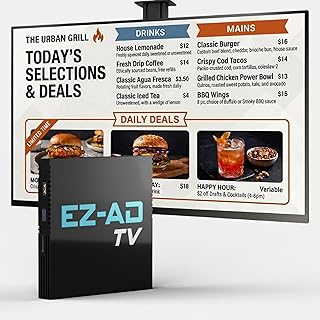
Best for: Restaurant owners who want to create and manage promotional content with templates and mobile tools. The player supports 4K content, and its listed software features include a Template Builder, Video Studio, YouTube Loader, and mobile app for content creation and management.
The free plan supports image and video formats, technical support, and up to 50 slides per EZ-AD TV box. The product also describes an extensive video gallery with more than 250,000 options. These features make it a flexible option for rotating menus, promotions, and other business messaging.
Why it was selected: It offers content-management tools and a free plan, which may suit restaurants building a digital signage workflow. Limitation: The free plan is limited to 50 slides per box, and some full features require a premium plan.
YIXZSWD 27-Inch Desktop Menu Board

Best for: Restaurants and milk tea shops that want a larger countertop screen for menus and promotions. Its 27-inch desktop format is intended for ordering counters and front desks, while the 16:9 Full HD resolution is 1920 × 1080.
The listed features include an Android system, a CMS for centralized content management, and remote updates for menus, promotions, videos, and images. The manufacturer also describes a wide viewing angle and color presentation intended to keep content visible from different positions.
Why it was selected: Its larger screen and remote content management make it a better fit than a compact display when customers need to read more information at the counter. Limitation: The 27-inch desktop size takes more counter space than a smaller menu display.
EZ-AD Digital Signage Stick Player

Best for: Restaurants that want to display menu slides on an existing TV or screen. The stick supports 4K image and video playback and lets users upload PowerPoint presentations and select which slides to show without converting them.
An AI image enhancer is listed for filling blank spaces when image dimensions do not match the screen layout. This can help adapt menu artwork to a display, while the PowerPoint support may be useful for teams that already prepare menu or promotion slides in that format.
Why it was selected: It provides a player-based option for businesses that already have a screen and want 4K signage or direct PowerPoint playback. Limitation: This is a signage stick player, not a standalone display; the listing describes using it with a TV.
VEVOR LED Illuminated Writing Board

Best for: Restaurants that want a manually updated specials board with colorful lighting. This 32-by-24-inch board includes fluorescent chalk markers and offers 16 colors, four lighting modes, and five brightness levels, controlled by an infrared remote.
Its listed power options include an AC plug, USB, power bank, or battery box, giving businesses several ways to power the board. Unlike the digital screens above, the VEVOR board relies on writing and erasing rather than uploading a menu file or scheduling digital content.
Why it was selected: It offers a visibly different option for specials or handwritten menu messaging. Limitation: It is not an electronic digital menu display with remote menu uploads, so staff must change its written content manually.
Buying Guide: Choosing a Restaurant Menu Board
Do you need a screen or a player?
A digital display includes the screen; a signage player is designed to send content to a separate display. Choose the Canlarriz or YIXZSWD if you need a listed screen-and-display solution. Consider an EZ-AD player if you already have a TV or compatible display available. Check the product details for the connections and setup requirements that fit your equipment.
How large should the menu appear?
Match screen size to viewing distance and counter space. A compact 18.5-inch display can fit a smaller service area, while a 27-inch model offers more physical viewing area for menus and promotions. Consider how much text customers must read and whether the board will sit on a counter or elsewhere.
How often will you change the menu?
For frequent updates, look for remote CMS controls, scheduling, and playlist features. The Canlarriz and YIXZSWD listings describe remote CMS management. EZ-AD players emphasize content creation and playback tools, while the VEVOR board requires manual writing and erasing.
What content will you show?
Check whether the product’s listed features match your menu workflow. The EZ-AD stick specifically supports PowerPoint slides and 4K playback; the other EZ-AD player offers templates and mobile content tools. For simple specials that change by hand, an illuminated writing board may be enough.
Frequently Asked Questions
What is an electronic restaurant menu board?
It is a screen or signage system used to display menus, prices, promotions, images, or video electronically. Some products include a screen, while others are players that connect to a separate display.
Can I update a digital menu remotely?
Some products in this guide list remote content management. The Canlarriz and YIXZSWD displays describe CMS-based remote updates; confirm the setup and plan details before choosing a system.
Should I choose a menu display or a signage player?
Choose a display if you need a screen included. Choose a signage player if you already have a screen and want a device to deliver digital content to it.
Is the VEVOR board a digital menu screen?
No. It is an illuminated, erasable writing board with markers and lighting controls. It is suited to manually written specials, not uploaded digital menu content.
What should I check before buying?
Compare screen size, placement, content-management features, playback formats, and whether a display is included. Also verify that the product’s listed content workflow suits how your restaurant creates and changes menus.