The best electronic entrance door lock depends on how you want to enter and manage access. The TEEHO TE001 is best for households that want keypad access and temporary guest codes, while the Philips WiFi deadbolt suits buyers who want remote app control. The Yamiry handle adds fingerprint entry, and the Veise set combines keypad access with lever handles. The two TEEHO options offer the same listed features in different finishes.
| Lock | Best For | Notable Feature |
|---|---|---|
| TEEHO TE001 Matte Black | Keypad access with a dark finish | 20 codes and one-time guest PINs |
| Philips WiFi Keypad Deadbolt | Remote app management | Built-in Wi-Fi; no hub required |
| TEEHO TE001 Satin Nickel | Keypad access with a lighter finish | Adjustable auto-lock timing |
| Yamiry Fingerprint Handle | Fingerprint and app-based entry | Stores passwords and fingerprints |
| Veise KS01B Keypad Lock | Keypad entry with matching levers | 20 codes and two physical keys |
TEEHO TE001 Matte Black Keypad Deadbolt

The TEEHO TE001 is best for households that want keyless PIN entry without needing the listed features of a Wi-Fi-connected lock. It supports 20 access codes for family members and a temporary one-time code for a guest. The one-time PIN is automatically deleted after use, which provides a straightforward way to grant limited access.
Its auto-lock can be set to engage after 10 to 99 seconds, and users can lock the door by holding any keypad key for two seconds. Choose this model if those keypad functions and its matte black finish suit your entryway. One limitation is that automatic locking is off by default, so it must be enabled if you want that feature.
Philips WiFi Keypad Deadbolt With Handle

This Philips lock is best for buyers who want to manage access from a smartphone while away from home. It connects directly to a 2.4 GHz Wi-Fi network without an additional hub or bridge. Through the Philips Home Access app, users can lock or unlock the door, manage user codes and fingerprints, check lock status, and review access history.
Voice commands are also supported through Alexa and Google Assistant for locking or checking status. Choose this option if remote app control is a priority. Its listed limitation is network range: the lock should be within 33 feet of the router, with obstacles and interference minimized for a stronger connection.
TEEHO TE001 Satin Nickel Keypad Deadbolt

The satin nickel TE001 is best for buyers seeking the same listed keypad functions as the matte black version in a different finish. It supports 20 family access codes and a temporary one-time PIN that deletes itself after use. That makes it suitable for homes that need to provide guests with limited access without sharing a permanent household code.
Users can set auto-lock timing from 10 to 99 seconds or activate one-touch locking by holding a keypad key for two seconds. Choose this model if satin nickel better matches the door hardware or home style. The key limitation is that auto-lock is off by default, so buyers who want timed locking need to turn it on.
Yamiry Fingerprint Keyless Entry Handle

The Yamiry handle is best for buyers who want fingerprint access along with passwords and app-based programming. The product listing says it stores 50 passwords, fingerprints, and key fobs. It connects through Bluetooth, and the manufacturer describes it as compatible with most American standard doors and installable with a screwdriver.
Choose this model if biometric entry and a handle-style lock suit your needs. The listed limitation is that remote control requires a Wi-Fi gateway, which is sold separately. Without that gateway, the stated connection is Bluetooth, so do not choose it expecting remote access as supplied.
Veise KS01B Keypad Lock With Lever Handles
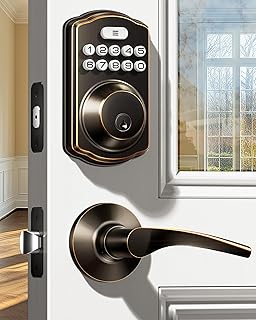
The Veise KS01B is best for buyers replacing a lock and handle set who want coordinated lever hardware. It includes two ergonomic lever handles, supports 20 permanent codes, and comes with two physical keys. One-time guest passwords expire after use, while auto-lock can be set for 10 to 99 seconds. Pressing any outside keypad key for two seconds also locks the door.
Choose this model if a full lever-handle set and both keypad and physical-key access fit your needs. Its limitation is that the listed features do not include app control or remote access, so buyers seeking smartphone management should compare it with the Philips or Yamiry options.
Buying Guide: How to Choose an Electronic Entrance Door Lock
Do you need remote access or local keyless entry?
Keypad locks such as the TEEHO and Veise provide code-based entry and listed auto-lock features. The Philips model is the clearest choice here for remote app management because it connects to Wi-Fi and supports status checks and access history. The Yamiry lock uses Bluetooth; its listing specifies that a separate gateway is needed for remote control.
Which access methods matter most?
Count the ways people in your household prefer to enter. Keypads work for people who want PIN access, while the Yamiry adds fingerprint entry. The Veise includes physical keys, and the TEEHO models offer temporary one-time codes. Compare the access methods listed for each product rather than assuming every electronic lock includes an override key or the same entry options.
Will the lock suit your door and routine?
Check the product’s door requirements and installation details before buying. Yamiry describes compatibility with most American standard doors, but buyers should still verify their own door dimensions and hardware arrangement. Consider whether you want a deadbolt or a handle set, and whether automatic locking is important. The TEEHO models have auto-lock off by default; Veise lists a 10-to-99-second setting.
Do finish and connectivity affect your choice?
For a keypad deadbolt with identical listed features, choose between the TEEHO matte black and satin nickel finishes based on your hardware. The Veise set is oil rubbed bronze and includes lever handles. For Wi-Fi access, confirm that the Philips lock can stay within the specified 33 feet of the router. For Yamiry remote access, account for the separately sold gateway.
Frequently Asked Questions
Can electronic entrance door locks provide temporary guest access?
Yes. The TEEHO models and Veise list one-time codes that expire after use, making them options for temporary access.
Which lock listed here supports remote app control?
The Philips lock supports remote management through its app over 2.4 GHz Wi-Fi. Yamiry requires a separately sold Wi-Fi gateway for remote control.
Do the TEEHO locks automatically lock the door?
They include adjustable auto-lock timing from 10 to 99 seconds, but the feature is off by default. They also support one-touch locking from the keypad.
Which option includes fingerprint access?
The Yamiry handle lists fingerprint entry and storage, along with passwords and key fobs.
Which lock includes physical keys?
The Veise KS01B listing specifies two physical keys. Check the individual product details for any other model before purchase.