Discover top e-ink display tablets that pair paper-like writing with long battery life and legible screens for work, study, and casual reading. This guide highlights five standout models that blend handwriting comfort, AI features, and versatile notes capabilities. Each entry includes core specs, standout features, and practical use cases to help you compare options at a glance.
| Product | Brand | Display size | Key strengths |
|---|---|---|---|
| AINOTE 2 | iflytek | 10.65″ | Frontlight-free display, AI note-taking, multi-language transcription |
| reTerminal E1002 | Seeed Studio | 7.3″ | Color E Ink, ultra-low power, no-code SenseCraft HMI |
| eNote 2 Bundle | Penstar | 10.3″ | PureView display, handwriting-to-text, real-time voice-to-text |
| Note Air 4C | BOOX | 10.3″ | Color E Ink, Android 13, extensive file support |
| AINOTE Air 2 Bundle | iflytek | 8.2″ | AI note-taking, multi-language transcription, 16-language support |
The following sections summarize each model’s core features and typical use cases, helping you decide which device best fits your reading, note-taking, or digital notebook needs.
AINOTE 2: AI Notebook on 10.65″ E Ink

The AINOTE 2 from iflytek offers a paper-like writing experience with 8 brush styles and low-latency handwriting. Its frontlight-free E Ink display is designed for comfortable daytime viewing without eye strain. AI-powered note-taking features help with study, summarization, and organization, though an active internet connection is required for transcription and AI assistance. It supports 16 languages for transcription, making it suitable for multilingual settings. This device emphasizes a natural handwriting feel and smooth AI-assisted workflow for work and study sessions.
reTerminal E1002: Color E Ink Dashboard
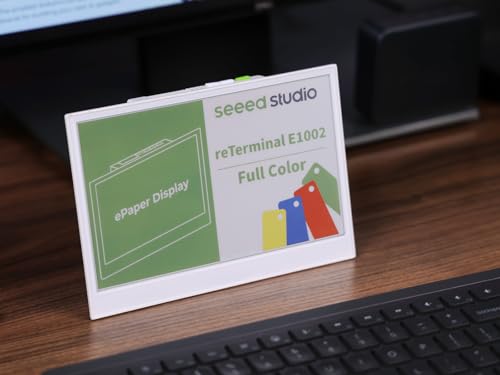
The reTerminal E1002 uses a 7.3-inch Color E Ink Spectra 6 display to deliver vibrant colors with ultra-low power needs. It is designed as a dashboard and information board with no-code SenseCraft HMI for creating custom dashboards. The device is Bluetooth/Wi‑Fi capable, and its long battery life (up to three months in deep-sleep) makes it ideal for kitchen dashboards, home automation displays, and informational panels in busy workspaces.
Penstar eNote 2 Bundle: 10.3″ Paper Tablet
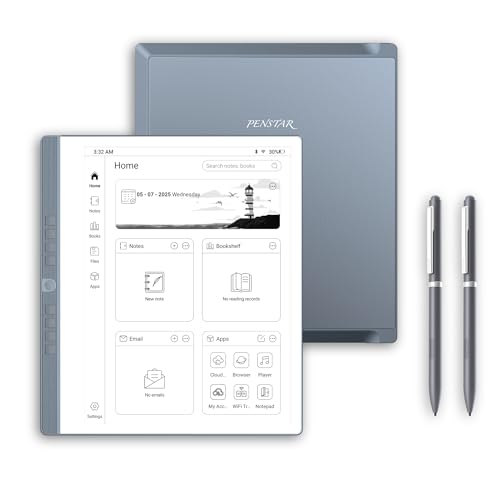
The Penstar eNote 2 Bundle focuses on a PureView 10.3″ ePaper display that mimics real paper for comfortable handwriting. It pairs this with MyScript handwriting-to-text conversion and real-time voice-to-text in multiple languages. The bundle includes a folio cover and stylus options to support professional note-taking, meeting notes, and academic work where clear handwriting and quick transcription are essential.
BOOX Note Air 4C: Color E Ink Notebook

The BOOX Note Air 4C is a 10.3-inch E Ink device running Android 13, offering full app compatibility, PDF and EPUB support, and a flexible ecosystem for reading, note-taking, and document management. Its Kaleido 3 color-capable display provides color-accurate visuals for light tasks like diagrams and highlights. The device combines a large display with strong file support, a capable stylus, and a robust software environment for productivity and study.
AINOTE Air 2 Bundle: 8.2″ AI Notebook
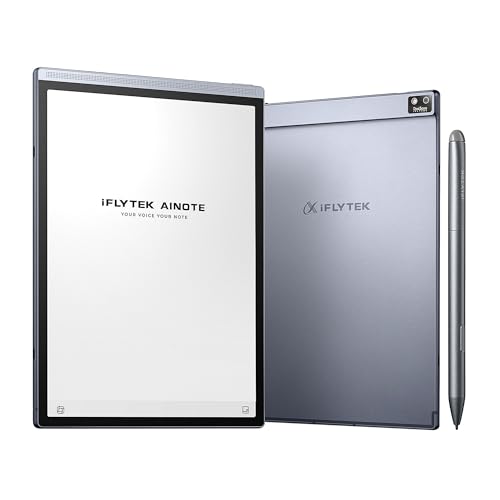
The AINOTE Air 2 Bundle centers on 8.2-inch E Ink with 4,096 pressure levels and real-time voice-to-text transcription. It supports multi-language transcription (16 languages) and separate handwriting-to-text conversion, which requires a network connection. The device is designed for meetings and study, with AI features to summarize meetings and manage schedules, making it a practical digital notebook for professionals and students who value quick capture and organization of ideas.
Buying Guide: Key Purchase Considerations
When selecting an e-ink display tablet, consider screen size, handwriting comfort, AI capabilities, language support, and battery life. Larger displays improve readability and note-taking comfort, especially for extended sessions, while smaller devices excel in portability. Look for low-latency stylus input and multiple pen shapes for different writing styles. AI features can boost productivity through smart summaries and search, but may require internet connectivity and raise privacy considerations.
- Display quality and lighting: Frontlight-free vs. front-lit screens affect eye comfort and use in various lighting conditions. Consider outdoor readability and glare resistance.
- Handwriting and transcription: Evaluate the pen technology, sensitivity levels, and whether handwriting can be converted to text or used for real-time voice-to-text.
- AI and offline use: Some AI features require online access. Decide if offline performance is important for meetings or confidential notes.
- File support and ecosystem: E Ink devices vary in PDF, EPUB, and document format compatibility. Some run a lightweight OS (or Android) for apps and cloud access.
- Battery life and charging: Ultra-low power displays excel in long-term use; check battery capacity and refresh frequency for your habits.
Overall, the best e-ink tablet depends on your priorities: raw note-taking comfort, color display needs for dashboards or diagrams, or a versatile ecosystem for reading and editing documents. The models highlighted above balance handwriting realism with AI-assisted productivity, offering a spectrum of choices for students, professionals, and avid readers alike.