Finding a reliable dual USB-C docking station can streamline a busy workspace, letting you run multiple displays, connect external drives, and power charge your laptop simultaneously. This guide highlights five top picks, covering mixed Windows and macOS compatibility, multiple display outputs, USB-C power delivery, and fast data transfer. Each option balances performance, portability, and value, helping you choose the right dock for everyday productivity, content creation, or on-the-go setups.
| Product | Brand | Ports & Display | PD Power | Key Benefit |
|---|---|---|---|---|
| Lionwei 13 in 1 | LIONWEI | 2x HDMI 4K, DisplayPort, 2x USB-C, 3x USB 3.0/2.0, Ethernet, Audio | 100W | Triple display capability with wide compatibility |
| Anker 8-in-1 | Anker | 2x HDMI 4K60, 2x USB-A, Ethernet, SD card reader | 85W | Solid reliability and dual 4K output |
| Acer Premium 13-in-1 | Acer | 2x HDMI, DP 1.4, USB-C, 3x USB-A, Ethernet, SD/TF | 110W | Triple monitor support on Windows |
| Baseus 9-in-1 | Baseus | 2x HDMI up to 4K120, Ethernet, 3x USB, SD | 85W | High-refresh dual displays and fast data |
| Selore 14-in-1 | Selore&S-Global | 2x HDMI, VGA, 3x USB-C/A, 4x USB-A, SD/TF, PD 100W | 100W | Expanded ports for a versatile desk |
Below are five carefully chosen docking stations that excel in dual-monitor setups and broad compatibility, with practical features for everyday tasks, content creation, and office work.
LIONWEI Dual Monitor Docking Station

The LIONWEI USB-C hub provides a broad 13-in-1 feature set including two 4K HDMI outputs, a DisplayPort output, USB-C ports with Power Delivery and high-speed data transfer, plus a mix of USB-A ports and an Ethernet jack. It supports triple display configurations on Windows with MST and SST, and notes that macOS extend mode is limited to a single 4K display. The 100W PD port helps to keep a connected laptop charged while under heavy use, though the dock itself consumes power during operation.
Anker 8-in-1 USB C Docking Station
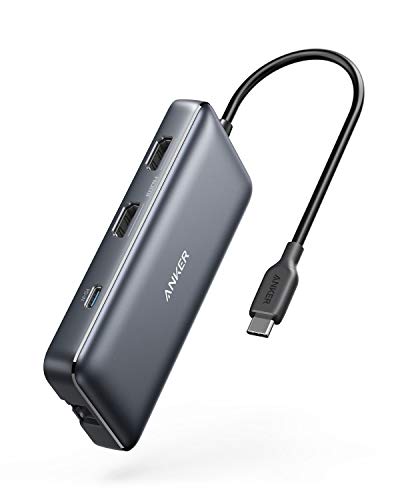
The Anker dock emphasizes expansion and reliability with dual HDMI 4K outputs, GB-level Ethernet, SD card reading, and a 85W Power Delivery input. It’s designed to support simultaneous high-resolution displays and data transfer from multiple devices via a single USB-C port. macOS users should note that display mirroring may occur across both external monitors, depending on system configuration.
Acer Premium 13-in-1 Docking Station

Acer’s dock offers robust triple display support using two HDMI ports and DP 1.4 with an optional Extended Desktop for Windows. It includes a 110W power adapter to deliver dependable charging for laptops during heavy multitasking. For macOS, it mirrors displays rather than extending across multiple screens, reflecting platform limitations that vary by host GPU and drivers.
Baseus 9-in-1 Laptop Dock

This Baseus option emphasizes high-refresh dual HDMI output with 4K60 and 4K120 capabilities, a 1000 Mbps Ethernet connection, and a burst-friendly PD charging port. It is designed to reduce desk clutter while supporting a range of devices including iPhone, Mac, Dell, and Lenovo machines. The hub consumes power itself, so using a higher-wattage charger ensures the laptop receives ample energy during busy work sessions.
Selore USB C Docking Station Dual Monitor 14-in-1

Selore’s 14-in-1 dock provides triple display features with two HDMI outputs, VGA, and a mix of USB-C/USB-A ports plus SD/TF slots and 100W PD for charging. The setup notes Windows MST compatibility for extending displays, while macOS users may experience mirror mode only. Practical for users needing a broad array of ports in one compact hub, especially for docking large peripherals and data devices.
Selore USB C Docking Station Dual HDMI

This 8-in-1 hub offers dual HDMI, PD charging, SD/TF slots, USB-A/C 3.0 ports, and a robust performance profile for business laptops and home offices. It emphasizes dual-monitor support with MST on Windows and mirror-only behavior on macOS. Power delivery is sufficient to keep devices charged during typical work tasks, while a dedicated second USB-C port aids data transfer and peripheral connectivity.
Buying Guide: Key Factors When Choosing a Dual USB-C Docking Station
- Display outputs: Consider how many displays you need and whether you require two HDMI ports, DP, or VGA. Check refresh rates and resolutions (4K vs 1080p) and note any OS-specific limitations for extended vs mirror modes.
- Power delivery: Look for docks offering enough wattage to power your laptop while connected peripherals. If your laptop delivers 100W PD, ensure the dock’s PD rating leaves headroom for device charging.
- Data transfer and ports: Evaluate the mix of USB-A, USB-C, SD/TF card readers, and Ethernet. USB 3.0/3.1 and 10Gbps USB-C are ideal for fast file transfers and periphery connectivity.
- Operating system considerations: Some docks support true triple-monitor extension on Windows only; macOS users may experience mirror mode or limited SST/SST+MST functionality depending on host hardware.
- Build and compatibility: Check your laptop’s USB-C port capabilities ( Thunderbolt vs. standard USB-C) as some features require full-featured USB-C or DP Alt Mode. Ensure drivers are minimal or plug-and-play where possible.
- Port clustering and heat: Heavier hubs can generate heat under load. Look for compact designs with adequate ventilation and cables that minimize desk clutter.
For most users, a dual-monitor docking station that offers 4K-capable HDMI outputs, a solid PD charging option, multiple USB ports, and a gigabit Ethernet jack provides a well-rounded solution for home offices, corporate desks, and on-the-go setups. Always verify display behavior with your specific computer model to confirm whether you will experience extended or mirrored displays across multiple screens.