The best drop down projector mount depends on your ceiling type, projector mounting-hole pattern, and desired hanging distance. The VIVO MOUNT-VP10DP is designed for suspended ceiling grids, while the VIVO MOUNT-VP08DP replaces a 2-by-2-foot ceiling tile. For flat ceilings or wall mounting, Mount-It! and WALI offer adjustable configurations, and DYNAVISTA provides a longer extension range for placement flexibility.
| Mount | Best For | Key Detail |
|---|---|---|
| VIVO MOUNT-VP10DP | Suspended metal grids | 15.5-inch drop |
| VIVO MOUNT-VP08DP | Replacing a 2-by-2-foot tile | 15- to 23-inch extension |
| DYNAVISTA | Longer drop from a flat ceiling | Extends up to 43.6 inches |
| Mount-It! | Multiple installation styles | Ceiling, wall, or flush setup |
| WALI PM-003-W | Higher stated load capacity | Supports up to 44 pounds |
VIVO MOUNT-VP10DP Drop Ceiling Mount

This model is made for installation on a suspended metal drop-ceiling grid. Its scissor-clamp design attaches to the grid, and the mount hangs the projector 15.5 inches from the ceiling. The stated maximum load is 29.7 pounds.
Best for: Rooms with compatible suspended metal ceiling grids, including offices and classrooms. Adjustable arms fit mounting-hole ranges from 5.25 to 12.5 inches. The arms can also be removed to fit mini projectors with 1.5-by-1.5-inch hole spacing.
Limitation: This is a grid-specific mount, so it is not the right choice for a standard flat ceiling without a compatible suspended grid.
VIVO MOUNT-VP08DP Tile-Replacement Mount

The MOUNT-VP08DP is designed to replace a 2-by-2-foot ceiling tile, offering another option for suspended-ceiling rooms. Its telescoping arm positions the projector 15 to 23 inches from the ceiling surface. The mount provides plus-or-minus 15-degree tilt and swivel, as well as 360-degree rotation.
Best for: Buyers who want a tile-replacement mounting system with adjustable height and viewing angle. Adjustable mounting points support projectors with diagonal mounting-hole measurements up to 12.5 inches; one arm can be removed for a three-hole pattern.
Limitation: Check that the ceiling uses a 2-by-2-foot tile and that the projector’s mounting pattern fits before choosing this model.
DYNAVISTA Full Motion Ceiling Mount
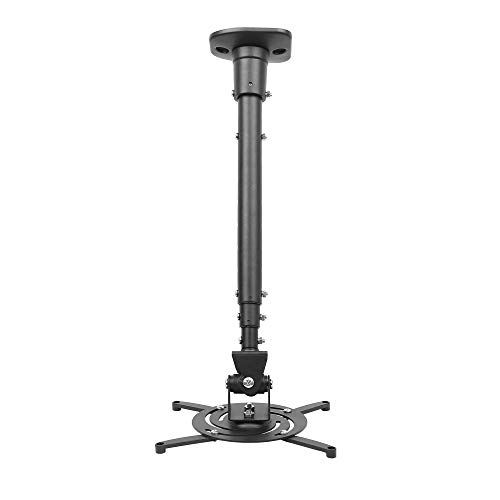
DYNAVISTA is a full-motion option for flat ceilings. Its extendable arm ranges from 23 to 43.6 inches from the ceiling, or 8.9 inches without the arm. The mount supports up to 30 pounds and fits projectors with mounting holes no more than 12.1 inches apart.
Best for: Buyers who need a longer drop and flexible alignment. It tilts 25 degrees up or down, swivels 90 degrees from left to right, and rotates 360 degrees.
Limitation: Its listed flat-ceiling use and mounting-hole limit mean it may not suit a suspended grid or a projector with a wider hole pattern.
Mount-It! Adjustable 3-in-1 Projector Mount

This mount supports flush ceiling, telescoping ceiling, and wall-mounted configurations. The ceiling arm adjusts from 4.5 to 25.5 inches, while the wall-mounted extension adjusts from 13.5 to 22.5 inches. Its removable arm allows a low-profile flush setup, and built-in cable management helps route cables.
Best for: Buyers who want one mount with several installation options for a home, business, or classroom. It fits projector mounting-hole patterns between 8.85 and 12.44 inches and is designed for installation on wood studs, concrete, and flat ceilings.
Limitation: The listed compatibility range excludes projectors with mounting patterns outside 8.85 to 12.44 inches.
WALI PM-003-W Heavy-Duty Mount

The WALI PM-003-W supports ceiling or wall installation and has a stated maximum load of 44 pounds. Its pole adjusts from 16.9 to 25.6 inches for ceiling installation or 13.8 to 22 inches for wall mounting. It fits projector mounting-hole distances from 8.9 to 12.4 inches.
Best for: Buyers seeking a 3-in-1 mount with a higher stated load capacity and adjustable pole length. The steel mount allows plus-or-minus 15-degree tilt and plus-or-minus 8-degree swivel.
Limitation: The product information states that it does not support vaulted ceilings or regular drywall. It is specified for regular concrete, brick, or wooden studs.
Buying Guide: How to Choose a Drop Down Projector Mount
Does your ceiling use a suspended grid or ceiling tiles?
Choose a grid or tile-specific mount if you have a suspended ceiling. The VIVO MOUNT-VP10DP uses a scissor clamp for a metal grid, while the MOUNT-VP08DP is designed to replace a 2-by-2-foot tile. Confirm the ceiling structure and tile dimensions before buying; these mounts are not interchangeable with every ceiling style.
How far should the projector hang from the ceiling?
Measure the drop needed to center the image and avoid obstructions. DYNAVISTA offers the longest listed extension in this selection, at up to 43.6 inches. The VIVO tile-replacement model adjusts from 15 to 23 inches, and the Mount-It! ceiling arm adjusts from 4.5 to 25.5 inches.
Will the mount fit the projector?
Compare the projector’s mounting-hole spacing with the mount’s stated range. Also check the projector’s weight against the mount’s listed capacity. Do not assume that a mount’s “universal” description guarantees fit; the listed dimensions and load limits are the useful checks.
Do you need wall mounting or angle adjustment?
For a wall installation or multiple mounting configurations, consider a 3-in-1 model such as Mount-It! or WALI PM-003-W. Compare the listed tilt, swivel, and extension ranges if precise screen alignment is important. Installation surface requirements also matter: confirm the ceiling or wall can support the intended mounting method.
Frequently Asked Questions
What is a drop down projector mount?
It is a mount that suspends a projector below a ceiling or mounting point, often using an extension pole or adjustable arm. Drop distance varies by model.
Can I use a drop ceiling mount on a flat ceiling?
Not necessarily. Grid-specific and tile-replacement mounts are designed for suspended ceilings. For a flat ceiling, select a model whose product information supports flat-ceiling installation.
How do I know whether a mount fits my projector?
Check the projector’s mounting-hole spacing and weight, then compare both with the mount’s stated compatibility range and load capacity.
Is a longer drop always better?
No. Choose a drop length that positions the projector correctly for the room and screen. A longer pole can help when the ceiling is high, but it is unnecessary if a shorter extension provides the required placement.