Modern homes benefit from smart door locks that combine convenience with robust security. This guide highlights five top digital door lock options, drawing on features like app control, biometric access, keypad entry, and voice integration. Each pick offers different unlock methods, installation ease, and compatibility with popular ecosystems. Whether you want remote access, guest codes, or hands-free entry, these locks are designed to fit American doors and daily routines while maintaining strong protection against unauthorized entry.
Summary of selected products:
| Product | Brand | Key Features | Connectivity |
|---|---|---|---|
| Philips Wi-Fi Door Lock | Philips | Remotely lock/unlock, fingerprint, passcode, voice control, auto lock | Built-in Wi-Fi |
| Philips Smart Lock With Handles | Philips | Four unlock methods, two lever handles, remote control with gateway | Bluetooth + Optional Wi-Fi gateway |
| Yamiry Fingerprint Smart Door Lock | Yamiry | 8+ unlock modes, fingerprint, Bluetooth app, codes, remote capabilites | Bluetooth (gateway optional) |
| Yamiry Keypad Door Lock With Knob | Yamiry | Fingerprint, codes, app control, key fobs, remote unlock | Bluetooth (gateway optional) |
| Philips WiFi Keypad Door Lock With Handle | Philips | 2.4 GHz Wi-Fi, keypad and fingerprint, voice assist, auto lock | Wi-Fi Direct |
Philips Wi-Fi Door Lock, Keyless Entry

The Philips Wi-Fi Door Lock combines flexible unlock options with built-in Wi-Fi that enables remote control via a smartphone without an extra hub. It supports app-based unlocking, passcodes, fingerprints, a physical key, and voice control through Alexa or Google Assistant. A notable benefit is remote access from anywhere, making it easy to let family members or trusted visitors in while you’re away. The system operates on 2.4 GHz networks and notes a typical range of about 65 feet for stable remote performance. Battery operation requires fresh batteries to ensure consistent performance.
Security and convenience come from multiple layers: biometric fingerprint recognition, a PIN/password system, and the option to use a physical key as a fallback. Voice control adds hands-free entry when your hands are full. To maintain performance, ensure the app is up to date and monitor network stability. In daily use, you can customize entry methods per user, rotate codes, and review unlock history to detect any unusual activity. This model is well suited for households seeking flexible, remote-ready access without a central smart home hub.
Installation is straightforward on standard doors, and the inclusion of a built-in Wi‑Fi module means less clutter and fewer compatibility concerns. Potential buyers should confirm 2.4 GHz Wi‑Fi compatibility in their home network and understand that remote features may require stable internet access. Given its broad unlock methods and remote capabilities, this Philips model is a solid choice for users who value convenience alongside security.
Philips Smart Lock With Handles
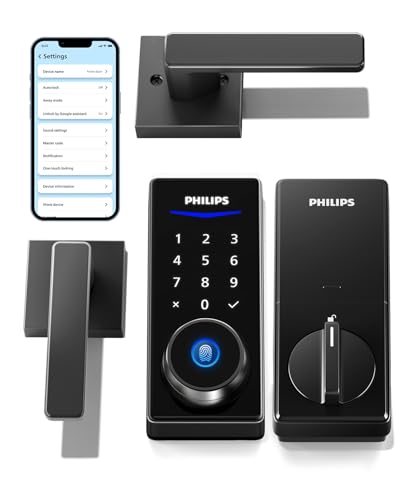
This smart lock is designed as a two-handle set, enabling a stylish upgrade of your existing door hardware along with advanced security. It offers four unlocking methods—fingerprints, PIN codes, keys, and a dedicated smartphone app—catering to varied user preferences. The built-in Bluetooth support allows close-range control, while a separate Philips Wi-Fi gateway (sold separately) opens up remote operation and permission sharing. The presence of auto-locking adds a layer of convenience for busy households, ensuring doors are secured automatically after a set interval.
Security considerations include managing access permissions through the app, issuing time-based or permanent codes, and promptly replacing batteries when a low-battery alert appears. The dual-handle configuration makes installation straightforward for most standard doors and can be a good fit for homes modernizing their hardware without undertaking major door modifications. This model stands out for households that want a blend of modern keyless convenience and simple, stylish hardware integration.
In performance terms, Bluetooth unlock works within a typical short-range distance, with remote control enabled through a compatible gateway. If your home already uses Philips devices, this lock integrates smoothly into a broader security ecosystem. Prospective buyers should consider whether they prefer 2.4 GHz Wi-Fi independence or the potential benefits of a gateway for full remote capability and access sharing. Overall, a practical option for families prioritizing multiple unlocking methods and a sleek, modern aesthetic.
Yamiry Fingerprint Smart Door Lock

Yamiry’s 8-in-1 entry system emphasizes versatility, offering fingerprint recognition, app control via Bluetooth, personalized passcodes, key fobs, mechanical keys, and voice unlock with Alexa (gateway required). Its flexible user management supports issuing temporary access for guests or service providers, with on-device fingerprint AI that learns and refines recognition to improve accuracy over time. The app can store numerous user credentials and permissions, supporting remote sharing of access codes for visitors or house-sitters.
Installation is designed for standard American doors, with emphasis on hassle-free DIY fitting. The reversible handle accommodates both left- and right-handed doors, and Bluetooth connectivity supports immediate local control. For remote use, a gateway is needed to unlock and manage access from a distance. The 8-in-1 design makes this option appealing to multi-occupant homes or short-term rental scenarios where varied access methods are beneficial. Buyers should evaluate whether they want biometric security paired with app-based management and the potential need for a gateway for remote operation.
From a security perspective, monitoring unlock history and controlling permissions via the app provides transparency for households. The combination of biometrics and codes can help minimize lost keys while enabling quick entry for trusted users. While Bluetooth-only operation is suitable for local control, the gateway requirement for remote access is an important consideration for buyers planning to monitor entry from afar. Overall, Yamiry’s fingerprint-based smart lock offers a comprehensive feature set for flexible, modern access control.
Yamiry Keypad Door Lock With Knob

This Yamiry model combines a keypad with a traditional knob design for a familiar entry experience enhanced by modern security features. It supports fingerprint access, codes, and Bluetooth app control, with optional remote unlock via gateway. The lock stores multiple passwords and fingerprints, enabling flexible access management for households, roommates, or rental scenarios. A notable benefit is the ability to store up to a substantial number of credentials, facilitating easy on-boarding of new users without compromising security.
Installation is designed for standard doors and is described as straightforward, often requiring just a screwdriver. The product emphasizes a robust aluminum construction for increased resistance to tampering from the exterior. The combination of app control and local keypad makes it adaptable for users who want both remote management and immediate on-device entry. Prospective buyers should consider battery life, the need for a gateway to unlock remotely, and how many user profiles they plan to store for ongoing access management. This lock is well-suited for shared living arrangements or households seeking a practical, secure keypad solution.
Philips WiFi Keypad Door Lock With Handle

This Philips model pairs built-in Wi‑Fi with a keypad and fingerprint authentication, enabling remote control and real-time access monitoring. The device connects directly to a home Wi-Fi network (2.4 GHz) without requiring a separate hub, simplifying setup and integration with the Philips Home Access App. Users can lock or unlock remotely, manage who has access through codes and fingerprints, and view access history in real time. Voice compatibility with Alexa or Google Assistant adds hands-free convenience for busy households.
Key considerations include ensuring a stable Wi‑Fi connection, confirming compatibility with existing Philips devices, and understanding how access permissions are issued and revoked. Auto-lock adds a convenience layer that reduces the risk of leaving doors unsecured, particularly when family members forget to lock up after leaving. This option is ideal for homeowners who want an accessible, networked solution that emphasizes remote oversight and voice-enabled operation, all while maintaining a familiar keypad interface.
Biquole Keyless Entry Door Lock With App Control

Biquole’s smart deadbolt emphasizes rapid biometric recognition alongside multiple unlocking methods, including codes, keys, fobs, and Bluetooth app control. The lock supports remote management via a Tuya gateway (not included) and can store a large number of user codes and fingerprints for flexible access control. It also offers remote sharing of access permissions, which is useful for managing entry for guests, staff, or rental occupants. Real-time unlock records and alerts help maintain situational awareness for property owners and managers.
Security considerations include monitoring wrong passcode attempts, configuring codes for guests, and ensuring the gateway is configured correctly for remote access. The device is designed for robust multi-user environments and is suitable for homes, offices, and short-term rental properties. Potential buyers should assess whether they require gateway-based remote control, local Bluetooth use, and the capacity to store numerous credentials. Biquole provides a feature-rich option for users who need extensive access management with biometric entries and remote capabilities.
Buying Guide: Key Purchase Considerations
- Unlocking methods: Choose a lock that supports a mix of biometrics (fingerprint), codes, keys, and app or voice control to suit different scenarios and accessibility needs.
- Connectivity: Consider whether you want built-in Wi-Fi for remote access (no hub), Bluetooth for local control, or require a gateway to enable full remote management and guest code sharing.
- Smart home compatibility: Check compatibility with Alexa, Google Assistant, and any existing security ecosystem you use for a seamless experience.
- Security features: Look for tamper alerts, activity logs, auto-lock timers, and the ability to revoke or modify access permissions quickly.
- Installation and door compatibility: Ensure the lock fits standard American doors and is easy to install with common tools. Reversible handles can help with door orientation.
- Battery life and maintenance: Review battery requirements and alerts to prevent lockouts. Some models require batteries that are readily available or rechargeable options.
- Remote access considerations: If you plan to monitor entry while away from home, confirm the gateway or hub requirements, and understand data privacy implications of access logs.
- Guest management: For homes with frequent visitors or renters, select a system that supports temporary codes and time-based access windows.
- Build quality: Aluminum or zinc-alloy construction improves resistance to tampering and weather, increasing longevity for exterior doors.
- Price vs. features: Balance unlock flexibility, remote capabilities, and hardware aesthetics with budget, prioritizing features that matter most for your household.
In summary, the best digital smart door lock choice depends on how you balance remote access, biometric security, and everyday convenience. If you value hub-free Wi‑Fi, fingerprint entry, and voice control, Philips models provide strong all-around performance. For households needing a broader array of unlock methods and robust guest access, Yamiry options offer versatile control with app-based management. When evaluating products, consider installation ease, door compatibility, and whether remote access aligns with your privacy and security preferences. This approach helps ensure a secure, convenient front door that fits your lifestyle and technology setup.