The best digital fingerprint door lock depends on whether you need basic keyless entry, remote access, or user management. The Philips Wi-Fi Smart Deadbolt is suited to buyers who want built-in Wi-Fi and multiple entry methods, while the Veise VE017 is a stronger fit for managing access through an app. For a simpler keypad-and-fingerprint setup, consider the four-in-one biometric knob. The options below compare the listed access methods and note where product details are limited.
| Product | Best For | Standout Feature |
|---|---|---|
| Philips Wi-Fi Smart Deadbolt | Remote access | Built-in Wi-Fi; no extra hub needed |
| Veise VE017 | App-based user management | Access permissions and activity logs |
| Four-in-one biometric knob | Multiple local entry methods | Fingerprint, password, key, and IC card |
| Veise VE017-L | Buyers seeking a lever-handle set | Fingerprint smart lock with two levers in the name |
| Veise VE027 WiFi Deadbolt | Buyers comparing Wi-Fi deadbolts | Fingerprint and keyless entry in the name |
Philips Wi-Fi Smart Deadbolt

Best for: Households that want several ways to unlock a front door and remote smartphone control. Listed methods include app, passcode, fingerprint, physical key, and voice control through Alexa or Google Assistant.
The built-in Wi-Fi supports remote locking and unlocking without an extra hub. The product requires a 2.4 GHz network, and the listing recommends keeping the router and lock within 65 feet for better remote control. Voice control requires signing in to the relevant assistant account and maintaining a stable network connection.
Limitation: Batteries are not included, and the lock supports only 2.4 GHz Wi-Fi. Choose this if remote access is important; avoid it if your network requirements do not match.
Veise VE017 Fingerprint Smart Lock

Best for: Property owners who need to grant, change, pause, or remove users’ access through an app. The listing describes remote user management and activity logs that show who accessed the property and when.
Unlock options include fingerprint, app, authorized access, fob card, code, code sharing, and mechanical key. Its listed locking methods include auto-lock adjustable from zero to 180 seconds in the app, fingerprint, key, app, and mechanical key. The product also describes a self-learning fingerprint system and app controls for adding, renaming, or deleting prints.
Alexa and Google Assistant compatibility requires a G1 Gateway, according to the listing. Limitation: Voice-assistant use depends on an additional gateway. Choose this model if access permissions and entry records matter more than avoiding app setup.
Four-In-One Biometric Door Knob
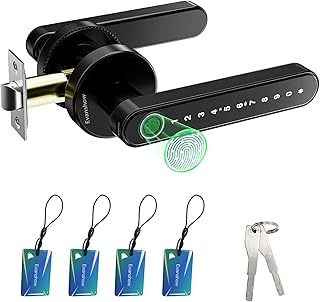
Best for: Buyers who want fingerprint access with several backup methods for a bedroom, office, apartment, or other listed use. It supports fingerprints, passwords, two mechanical keys, and four IC cards. The listing says it can store up to 100 fingerprints and 50 passwords.
The fingerprint sensor is described as recognizing prints in less than a second. A USB port can provide emergency power from an external power bank, but it cannot charge the lock’s internal batteries.
Important limitation: Register an administrator fingerprint before first use. Until an administrator is set, any fingerprint can unlock the door. Follow this setup step before relying on the lock for access control.
Veise VE017-L Fingerprint Lever Set

Best for: Buyers specifically comparing a fingerprint lock supplied as a two-lever-handle set. The product name identifies it as a Veise VE017-L fingerprint smart lock in matte black with two lever handles.
The supplied product information does not include detailed features beyond the name. That means entry methods, app functions, user capacity, network requirements, and installation details cannot be confirmed from the provided information. Check the product listing for those specifics before choosing it over a model with clearly documented features.
Limitation: Feature details are limited here, so this is a less evidence-rich choice for shoppers comparing access management or connectivity.
Veise VE027 WiFi Fingerprint Deadbolt

Best for: Shoppers comparing a Wi-Fi deadbolt with fingerprint keyless entry and a satin nickel finish. These features are stated in the product name, making it a potential candidate for buyers who want to investigate a connected deadbolt style.
The supplied information does not specify whether Wi-Fi is built in, whether a hub is needed, what other unlocking methods are available, or which network bands it supports. Confirm those details in the full listing before comparing it with the Philips deadbolt, whose Wi-Fi requirements are provided.
Limitation: The available feature information is limited to the product name. Do not assume remote-control functions or compatibility details without confirming them.
Buying Guide: How To Choose A Fingerprint Door Lock
Do you need remote access or only fingerprint entry?
A fingerprint reader can provide convenient local entry without a phone. Remote locking and unlocking require connected features. The Philips model lists built-in Wi-Fi and remote app control, while the Veise VE017 describes remote user management through its app. Check network, hub, and app requirements before buying a connected lock.
Which backup entry methods matter?
Fingerprint locks can offer different alternatives if a print is not recognized or a user does not want to use biometrics. Compare physical keys, passcodes, cards, fobs, and app access. The four-in-one knob explicitly lists mechanical keys, passwords, and IC cards alongside fingerprints.
Who needs access, and how often will it change?
For a household with occasional visitors, multiple stored fingerprints or codes may be enough. A rental or shared property may benefit from permission controls and activity records, such as those described for the Veise VE017. Confirm the number of supported users and the process for removing access before purchase.
What should you check before installation?
Confirm whether the product is a knob, lever set, or deadbolt and check the full listing for fit and installation requirements. The product names identify different hardware styles, but the supplied details do not establish door measurements or compatibility. Also check battery requirements and emergency access options; the Philips listing says batteries are not included, and the four-in-one knob’s USB port is for emergency power rather than charging its batteries.
Frequently Asked Questions
Can a fingerprint door lock also use a key?
Some models can. The Philips deadbolt lists a physical key, and the four-in-one biometric knob includes two mechanical keys. Check the specific model’s listed backup methods.
Can I unlock a fingerprint lock remotely?
Only if the lock supports a connected remote-control feature. The Philips deadbolt lists remote app control through built-in Wi-Fi. A fingerprint reader alone does not establish remote access.
Does every fingerprint lock need Wi-Fi?
No. Fingerprint entry can be offered without Wi-Fi. Connectivity is a separate feature, so compare the product’s listed network and app functions if remote access is a requirement.
What setup step is essential for the four-in-one biometric knob?
Register an administrator fingerprint before first use. The listing warns that any fingerprint can unlock the knob until an administrator is set.
Are voice assistants included with every smart fingerprint lock?
No. Voice-assistant support varies by model and may require setup or extra equipment. The Philips listing names Alexa and Google Assistant, while the Veise VE017 specifies that a G1 Gateway is required.