The best digital conference room schedule display depends on how your office books rooms and where you can install a screen. The PoE Texas 8-inch scheduler is best for offices that want a wired, calendar-synced touchscreen without a subscription. Joan 6 Pro is better for teams seeking a wireless e-paper display. The Joan 13 Pro and RT13 are alternatives to investigate when you need a different display format or room-control panel; the supplied product details do not confirm their integrations. A large floor-standing signage kiosk may suit venue-wide announcements, but it is not presented as a dedicated room scheduler.
| Product | Best suited for | Key distinction |
|---|---|---|
| PoE Texas 8-inch Scheduler | Calendar-connected room booking | PoE, touchscreen, no subscription required |
| Joan 6 Pro | Wireless room scheduling | E-paper screen and battery operation |
| Joan 13 Pro | Buyers considering a larger Joan display | Listing provides limited specifications |
| RT13 Touch Panel | Touch-panel use cases | Listing identifies a touchscreen |
| MWE 65-inch Digital Signage | Venue information and announcements | Floor-standing signage format |
PoE Texas 8-Inch Conference Room Scheduler

Best for: Offices that want a room-entry display with real-time availability, touchscreen booking, and business calendar synchronization. This is the most fully specified dedicated scheduler in this selection.
The 8-inch touchscreen displays room schedules and availability. Its pre-installed DASH app is listed as compatible with Zoom Rooms, Microsoft Teams, Outlook 365, Google Workspace, Robin, Skedda, and YAROOMS. The product description says no subscription is required.
For installation, Power over Ethernet supplies power and data over one network cable. The listing also describes an included power adapter with wired data or Wi-Fi as alternatives. Consideration: PoE installation requires a suitable network connection; confirm that the intended location and network setup support the chosen power and data method.
Joan 6 Pro Wireless E-Paper Scheduler

Best for: Teams that prefer a wireless room display and want to avoid running a cable to the meeting-room entrance. Its 6-inch E Ink Carta screen and battery operation distinguish it from the PoE Texas touchscreen.
The product description lists calendar synchronization with Workspace, Exchange, Office 365, and iCalendar. Rooms can be reserved through the calendar, the device touchscreen, or the JOAN mobile app. The display uses a magnetic mount and is described as having up to six months of battery life per charge.
Consideration: The listing describes three subscription options, so buyers should check which service option fits their booking needs. Battery operation also means the display must eventually be recharged.
Joan 13 Pro Multifunctional E-Ink Display

Best for: Buyers comparing a larger-format Joan room-scheduling display with smaller options such as the Joan 6 Pro. The provided product title identifies it as a multifunctional room scheduling E-Ink display and gives its color as graphite black.
The supplied listing information does not specify calendar integrations, mounting method, power source, booking controls, or subscription requirements. Its selection here is based on the stated room-scheduling purpose and E-Ink display format, not on confirmed feature comparisons.
Consideration: Do not assume it shares the Joan 6 Pro’s integrations or battery details. Verify those requirements in the current product information before choosing it for a particular office.
ROCWARE RT13 Touch Panel
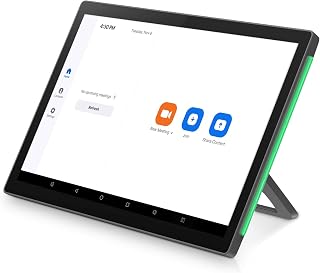
Best for: Buyers specifically seeking a touch panel for room scheduling and meeting control. The available product information identifies it as a touch screen and names room scheduling and meeting control as its intended use.
The supplied details do not establish which calendars or booking platforms it supports, how it connects, or whether it can display live room availability. It may be worth considering when a touch panel is the priority, but those details should be confirmed before deployment.
Consideration: The listing provides only limited feature information here. Avoid selecting it as a confirmed calendar-integrated scheduler without checking the required software and network support.
MWE 65-Inch Floor-Standing Digital Signage

Best for: Large indoor venues that need a floor-standing screen for announcements, event schedules, or wayfinding rather than a dedicated room-entry booking panel. The product description lists an LCD display, Android system, auto media player, HDMI, USB, and Wi-Fi.
Its stated uses include advertising, brand information, public messages, event schedules, and directions in settings such as malls, hospitals, and exhibition halls. That makes it a possible complement to room schedulers when visitors need broader venue information.
Consideration: The supplied details do not describe room-booking software or calendar synchronization. Choose it for general digital signage, not as a confirmed replacement for a conference room scheduler.
Buying Guide: How To Choose A Room Schedule Display
Do you need calendar synchronization?
Start with the calendar platform your organization uses. The PoE Texas model lists several business-calendar and room-management integrations, while Joan 6 Pro names Workspace, Exchange, Office 365, and iCalendar. For products without published integration details in the supplied information, verify compatibility before buying.
Should the display use PoE, Wi-Fi, or a battery?
A PoE display uses one Ethernet cable for power and data, which can simplify wiring where suitable network cabling is available. A battery-powered model avoids a cable at the screen but requires periodic charging. Check the installation location and maintenance plan, not just the screen size.
Is the screen for booking or general information?
A dedicated scheduler should clearly support room availability or reservations. A large signage display can present announcements and wayfinding, but its presence alone does not establish booking capability. Match the product to the task: room status at the door, meeting control, or venue-wide communication.
What should you confirm before ordering?
- Supported calendars, booking apps, and any subscription requirements.
- Power, network, mounting, and connection options.
- Whether users can book on the display, through a calendar, or in an app.
- Whether the product description provides enough detail for your deployment needs.
Frequently Asked Questions
What is a digital conference room schedule display?
It is a screen used to show meeting-room schedules or availability, often near a room entrance. Some models also let users reserve a room through the screen or a connected calendar.
Which option lists the most calendar integrations?
The PoE Texas 8-inch scheduler lists Zoom Rooms, Microsoft Teams, Outlook 365, Google Workspace, Robin, Skedda, and YAROOMS.
Which display is described as wireless?
The Joan 6 Pro is described as battery-powered, with a magnetic mount and up to six months of battery life per charge.
Does a digital signage kiosk automatically support room booking?
No. The MWE kiosk listing describes signage, announcements, schedules, and wayfinding, but the supplied information does not specify room-booking or calendar-sync features.
Should I choose a product with limited feature details?
Only after confirming its calendar support, power and connection requirements, mounting, and booking functions meet your needs.