The best device to record audio depends on whether you need straightforward recording, long storage capacity, or AI-assisted meeting notes. The Tonfarb recorder is best for extended sessions, the Sunlan model suits buyers who want simple controls, and Plaud Note Pro is designed for AI-supported meeting workflows. Compare the five options below by storage, operating style, and listed recording features before choosing.
| Device | Best For | Standout Feature |
|---|---|---|
| Tonfarb 136GB Recorder | Long sessions | Up to 68 hours of continuous recording |
| Sunlan 16GB Recorder | Simple playback and operation | One-button recording and A-B playback |
| HoTiyan 8GB Recorder | Basic portable recording | Up to 20 hours of continuous recording |
| Plaud Note Pro | AI-assisted meeting notes | Transcription and recording-based questions |
| Tallkcoder 72GB Recorder | Hands-free placement | Magnetic design and slide-to-record control |
Tonfarb 136GB Digital Voice Recorder
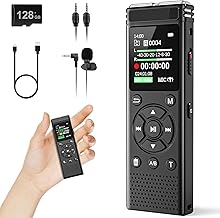
Best for: Students, journalists, and others who record long classes, interviews, or meetings. It combines 8GB of built-in storage with a supplied 128GB TF card, for 136GB total capacity as described by the listing.
The recorder supports 1536 kbps PCM recording, dual microphones, automatic noise reduction, and voice activation. Its 1100mAh rechargeable battery is listed for up to 68 hours of continuous recording. A side switch starts recording and saves it when moved back, including when the device is powered off. USB-C supports file transfer to a computer.
Why it stands out: Its stated storage and continuous recording time make it a strong choice for frequent or extended recording. Limitation: The long-duration file estimate is based on MP3 format; higher-quality settings may use storage differently.
Sunlan 16GB Recorder With Playback

Best for: Buyers who value simple recording controls and want to review audio directly on the device. The listed controls are straightforward: press REC to record, STOP to end, and PLAY to listen.
This USB-rechargeable recorder has 16GB of storage, a sensitive microphone, noise reduction, and voice-activated recording. It includes an internal speaker and supports external-speaker playback. The A-B function lets users select a section to repeat, which can help when reviewing a particular passage from a lecture or interview.
Why it stands out: Its simple controls and A-B playback make it better suited to users who want to record and review without a complicated workflow. Limitation: The supplied details do not state continuous battery life or a maximum recording duration.
HoTiyan 8GB Voice-Activated Recorder

Best for: People seeking a compact, basic recorder for lectures, interviews, or meetings. Its listed features include a higher-sensitivity microphone, a recording chip, noise reduction, and stereo recording.
Voice activation starts capturing audio when sound reaches a selected level and pauses when it falls below that threshold. The 8GB device supports different recording bit rates, with listed capacities ranging from 128 hours at 192 kbps to 560 hours at 32 kbps. Battery life is listed as up to 20 hours of continuous recording or eight hours of playback with earphones.
Why it stands out: The adjustable recording quality gives buyers a choice between longer storage and higher bit rates. Limitation: The listing says it supports up to 199 recording files, so it may be less suitable for users who divide a large archive into many separate files.
Plaud Note Pro AI Voice Recorder

Best for: Professionals and teams who want recording paired with transcription, summaries, and AI-supported follow-up. The listing describes support for 112 languages and tools for asking questions about recordings, extracting key points, and drafting emails.
Its multimodal features let users add typed notes and images, while a button marks important moments during recording. AI directional audio and spatial awareness are intended to help capture voices, and the device automatically switches between call and meeting modes according to the product description.
Why it stands out: Choose this if reviewing and working with recorded content matters as much as capturing it. Limitation: The supplied product details do not specify storage capacity or continuous battery life, so buyers prioritizing those figures should compare other options.
Tallkcoder 72GB Magnetic Voice Recorder

Best for: Users who want flexible placement on compatible metal surfaces. Built-in magnets let the recorder attach to surfaces such as desks, shelves, rails, and refrigerators.
The listing states 72GB of storage and capacity for up to 8,400 hours at 32 kbps. Slide-to-record operation starts capture with the side switch and saves the file when switched off. Voice activation and AI noise reduction are also listed features.
Why it stands out: Its magnetic design is useful when hands-free placement is a priority, and the simple switch avoids navigating menus to start recording. Limitation: Magnetic attachment is only useful on compatible metal surfaces; the stated maximum hours are specifically tied to 32 kbps recording.
Buying Guide: How To Choose An Audio Recording Device
How much storage do you need?
Match capacity to how often you record and how long you keep files on the device. The listed capacities range from 8GB to 136GB. Maximum-hour estimates depend on recording settings: the Tallkcoder estimate, for example, is specified at 32 kbps. Higher bit rates can produce larger files, so do not compare hour estimates without checking the stated format or bit rate.
Do you need recording or transcription?
A conventional digital recorder captures audio for later playback or transfer. Plaud Note Pro adds transcription, summaries, and AI tools described as grounded in recordings. Choose an AI-focused device if those functions fit your workflow; choose a standard recorder if your main need is audio capture and the listed controls or storage capacity suit you.
Which controls and recording features matter?
For quick capture, look for one-switch or one-button operation. Voice activation can reduce recording of quiet periods, but it relies on sound reaching a set level. Noise reduction and sensitive or directional microphones are listed on several models, but the supplied descriptions do not provide a common test standard for comparing their performance.
Check battery and file management details
Consider stated continuous recording time, charging method, and transfer options. Tonfarb lists up to 68 hours and USB-C file transfer; HoTiyan lists up to 20 hours. The Sunlan details describe USB recharging but do not state runtime. If you record away from a computer or power source, prioritize devices with clearly stated endurance and a transfer method that fits your routine.
Frequently Asked Questions
What is a digital voice recorder used for?
A digital voice recorder captures audio for later playback, review, or transfer. Common uses include recording lectures, interviews, meetings, and personal voice notes.
Is voice-activated recording useful?
It can reduce recording during quiet periods by starting or continuing capture when sound reaches a set level. Check the device’s activation controls if consistent capture of quiet speech is important.
Does more storage always mean more recording hours?
No. Recording hours also depend on file format and bit rate. A lower bit rate can fit more hours into the same storage, while recording settings affect file size.
Can these devices record meetings?
The listed products are described for uses including meetings, lectures, or interviews. Choose based on the controls, battery details, storage, and additional features you need.
What is the difference between an audio recorder and an AI note taker?
An audio recorder captures sound for playback. An AI note taker may also provide features such as transcription, summaries, or questions about recorded content, as described for Plaud Note Pro.