Protecting memories and important files requires reliable, versatile storage. This guide highlights five dependable options, spanning USB flash drives, external hard drives, and portable SSDs, to help you keep data safe and accessible across devices. Each pick prioritizes compatibility, speed, and ease of use for American consumers navigating multiple ecosystems.
| Product | Brand | Capacity | Type | Key Benefit |
|---|---|---|---|---|
| iDiskk External Hard Drive | iDiskk | 2TB | External Hard Drive | One-tap backup with strong encryption |
| NEWQ Portable SSD | NEWQ | 1TB | Portable SSD | Fingerprint and password encryption on device |
| Amazon Basics USB 3.1 Drive | Amazon Basics | 256GB | Flash Drive | High-speed, reliable data transfer |
| Techkey 256GB 3-in-1 Drive | Techkey | 256GB | 3-in-1 Flash Drive | Multi-port compatibility (USB/Lightning/Type-C) |
| TEARMOS 512GB Photo Stick | TEARMOS | 512GB | Photo Stick | No-app plug-and-play with fast transfers |
iDiskk MFi Certified 2TB External HDD

The iDiskk 2TB external hard drive supports iPhone, iPad, Android, Mac, and PC devices. It features built-in backup capabilities via a dedicated app, with a one-tap backup to streamline workflows. The device emphasizes data protection with optional encryption and a long battery for on-the-go use, making it suitable for business travel and family backups.
Key features include one-tap automatic backup, cross-device compatibility, and password-protected encryption options. The integrated battery supports on-the-go use without constant outlet access, allowing users to back up photos, videos, and documents quickly and securely.
NEWQ 1TB Touch Portable SSD

The NEWQ portable SSD provides 1TB of fast storage with USB-C connectivity, optimized for quick backups and transfers across iPhone, Android, and computer platforms. It includes fingerprint and password encryption to protect data, adding an extra layer of security for sensitive files and personal media. The compact design makes it easy to carry for remote work or travel.
Amazon Basics 256 GB USB 3.1 Flash Drive

The Amazon Basics 256GB flash drive offers high-speed USB 3.1 performance for quick transfers of videos, photos, and documents. It is a straightforward plug-and-play option ideal for expanding storage on laptops, desktops, and some mobile devices with OTG support. Its simplicity and reliability make it a solid everyday backup tool.
SUDEHO 256GB MFi Certified Flash Drive
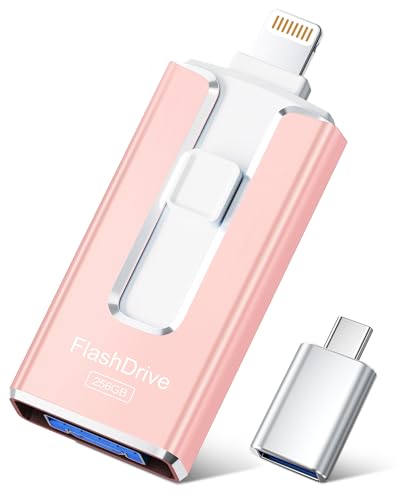
The SUDEHO 256GB flash drive is MFi-certified for iPhone compatibility and supports iOS devices (iOS 12.1 and above). It offers multi-port design with USB, Lightning, and Type-C adapters, enabling cross-device data transfers. The drive supports easy one-click backup or sharing of photos and videos, with OTG support on Android for quick file access.
TEARMOS 512GB Photo Stick

The TEARMOS 512GB photo stick provides plug-and-play storage with no app required. It supports multiple USB interfaces and is designed for immediate expansion of iPhone and iPad storage, making it a convenient option for travelers or photographers who need instant access to large media files without complex setup.
Buying Guide: Key Purchase Considerations
- Storage capacity vs needs: Assess how much data you routinely backup. High-capacity options (1TB–2TB) are ideal for media-rich libraries, while 256GB–512GB fits general document and photo backups.
- Device compatibility: Consider whether you need USB-C, USB-A, Lightning, or multi-port compatibility. Evaluate whether you need OTG support for Android devices and iOS compatibility with required apps.
- Speed and interface: USB 3.0/3.1 and NVMe-based portable SSDs offer faster transfers than older USB standards. For large video files or frequent backups, speed matters more than price alone.
- Portability and durability: If you travel frequently, a compact, rugged drive or a USB stick with a robust build is beneficial. Look for metal housings and dust/drop resistance ratings if available.
- Security features: Encryption, password protection, and biometric authentication add protective layers for sensitive files. Decide if built-in encryption aligns with your security priorities.
- Backup workflow and software: Some devices include companion apps for automatic backups, photo organization, and easy sharing. Verify compatibility with your OS and the need for cloud integration.
- Redundancy vs single-point storage: For critical data, consider a multi-device backup strategy (local plus cloud) to mitigate device failure or loss.
- Price and warranty: Compare warranty terms and long-term reliability. More affordable drives may offer adequate performance for casual backups, while premium options provide durability and consistent speeds.
Using these considerations helps tailor a backup strategy to your daily workflow. For users who frequently shift data between iPhone, Android, and computers, multi-port drives and 3-in-1 flash drives provide convenient cross-device coherence. For those prioritizing large media libraries, external HDDs and high-capacity SSDs deliver scalable space with robust transfer performance.