The simplest way to connect one USB device to two computers is a USB switch: plug the peripheral into the switch, connect each computer, and press a button to choose which computer controls it. The USB 3.0 options below are best for everyday peripherals such as printers, keyboards, mice, and scanners. The Sabrent model is an alternative when you need to share a device among as many as four computers.
| Product | Best for | Key distinction |
|---|---|---|
| USB 3.0 Bi-Directional Switch | Included cables and two-way switching | Includes two USB A-to-A cables |
| Viagkiki USB 3.0 Switch | Simple button-based sharing | Aluminum shell |
| AUKOKIOULA USB 3.0 Switch | Cross-platform use | Lists Windows, Mac, Linux, and Chrome OS |
| SABRENT USB 2.0 Sharing Switch | Sharing among up to four computers | Four-computer model |
USB 3.0 Bi-Directional Switch With Cables

This switch is best for someone who wants to share one USB peripheral between two computers and values a flexible second operating mode. It can also connect one computer to two USB devices, with the user selecting which device is active. That makes it useful for more than the main two-computer use case.
The listed features include USB 3.0 data transfer up to 5Gbps, backward compatibility with USB 2.0 and 1.1 devices, plug-and-play operation, and compatibility with Windows, macOS, Linux, and Chrome OS. Two USB A-to-A cables are included, and blue LEDs indicate the active channel.
- Best for: Buyers who want both 2-computer-to-1-device and 1-computer-to-2-device switching.
- Limitation: It switches between channels; it does not provide simultaneous output to both computers. It also does not support HDMI video.
Viagkiki USB 3.0 Switch

The Viagkiki switch is best for a straightforward setup in which two computers take turns using one USB peripheral. Its one-button selector and LED indicators make it clear which computer is active. The product also supports the reverse arrangement: one computer can switch between two USB devices.
It supports transfer speeds up to 5Gbps and is backward compatible with USB 2.0 and USB 1.1. Listed compatible peripherals include printers, scanners, mice, keyboards, card readers, flash drives, external hard drives, and webcams. The aluminum shell is described as helping with durability and heat dissipation. No driver installation or extra power supply is required according to the product details.
- Best for: A shared desk setup using common USB peripherals and a physical button to change computers.
- Limitation: This is a USB switch, not a video switch; it does not support HDMI or video output.
AUKOKIOULA USB 3.0 Switch Selector

This model is best for buyers who want a USB 3.0 switch with listed support for multiple operating systems. It connects two computers to one USB device, or lets one computer select between two USB devices. The product lists Windows, Mac OS, Linux, and Chrome OS compatibility.
Its stated maximum transfer rate is 5Gbps, with backward compatibility for USB 2.0 and USB 1.1 devices. The blue LED indicates the active computer. Supported device examples include printers, scanners, card readers, mice, keyboards, and flash drives. The aluminum housing is another stated feature.
- Best for: Households or offices where computers use different operating systems and need to share a peripheral.
- Limitation: The listed switching modes are alternatives, not simultaneous access for both computers.
SABRENT USB 2.0 Sharing Switch
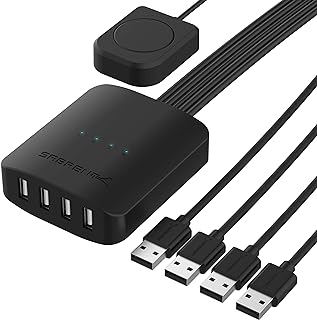
The SABRENT USB-USS4 is best for a setup that needs to share one USB device among more than two computers. Its name identifies it as a USB 2.0 sharing switch for four computers, and it has LED indicators. Choose it when the four-computer capacity matters more than choosing a USB 3.0 model.
- Best for: A shared USB peripheral used by as many as four computers.
- Limitation: It is identified as USB 2.0, unlike the USB 3.0 options above. The supplied product details do not specify its switching controls or supported operating systems.
Buying Guide: How To Choose A USB Switch
Do you need a USB switch or a KVM switch?
A USB switch shares USB peripherals such as a keyboard, mouse, printer, or scanner. It does not necessarily switch a monitor or video signal. If you also need to share a display, check for a KVM switch that explicitly supports the video connections and resolution you need. The USB switches listed here should not be treated as video switches.
How many computers need access?
For two computers sharing one peripheral, select a two-computer switch. If more computers need access, consider a model specifically described for that number, such as the four-computer SABRENT. Check the product’s exact port arrangement before buying; “two computers share one device” differs from “one computer selects between two devices.”
Does USB 3.0 matter for your device?
USB 3.0 models in this list state transfer speeds up to 5Gbps and backward compatibility with older USB devices. This can be useful when transferring files from compatible storage. For a basic keyboard or mouse, maximum transfer speed may be less important than the right port type, included cables, and convenient switching.
Will you need extra power or cables?
Check whether the switch includes host cables and whether it requires external power. The first listed model includes two USB A-to-A cables. The Viagkiki product states that no extra power supply is required. Confirm that the cable ends match the computers and peripheral before setting up.
Frequently Asked Questions
Can one USB device be connected to two computers at the same time?
These switches let the user select which computer is connected to the device. They do not provide simultaneous control from both computers.
Will a USB switch share a printer?
The USB 3.0 switches listed here name printers among their supported peripheral examples. Connect the printer to the switch’s device port, then select the computer that should use it.
Does a USB switch also share a monitor?
Not unless the product specifically supports video switching. The USB 3.0 switches described here do not provide HDMI video output.
Can a USB 2.0 switch work with a USB 3.0 device?
USB 2.0 and USB 3.0 devices may be physically compatible in many setups, but a USB 2.0 switch does not provide USB 3.0 transfer speeds. Check the device and switch specifications before purchase.