The best computer-controlled milling machine depends on your materials, workspace, and experience. The Genmitsu Cubiko is best for beginners who want an enclosed, pre-assembled desktop machine; the LUNYEE 3018 PRO MAX offers a 500W spindle and all-metal frame; and the WolfPawn 4040-PRO provides a larger work area. For advanced desktop projects, the Carvera Air adds a 4th axis, while the Genmitsu 3018-PRO is a compact entry point for learning GRBL-controlled CNC work.
| Machine | Best suited for | Standout feature |
|---|---|---|
| Genmitsu Cubiko | Beginners and home makers | Enclosure and automatic Z-probing |
| LUNYEE 3018 PRO MAX | Users seeking a sturdy 3018 format | 500W spindle and all-metal construction |
| WolfPawn 4040-PRO | Projects needing more work area | 15.7-by-15.7-inch working area |
| Carvera Air | Multi-step and rotary machining | Quick tool changer and 4th axis |
| Genmitsu 3018-PRO | Learning CNC fundamentals | GRBL workflow and broad material range |
Genmitsu Cubiko Desktop CNC Router

The Genmitsu Cubiko is best for first-time CNC users who want a simpler path from setup to a first project. It arrives pre-assembled, reducing the assembly work associated with traditional CNC kits. Its integrated enclosure is designed to contain chips and debris and reduce operating noise, which can be useful in a home workshop or maker space.
Automatic Z-probing is another practical feature: users enter material thickness, and the machine sets the tool height. The cover also automatically pauses operation when opened. Choose this machine if enclosure and beginner-oriented setup are priorities. The provided product details do not state its working area or spindle specifications, so compare those requirements before choosing it for a particular project.
LUNYEE 3018 PRO MAX CNC Machine
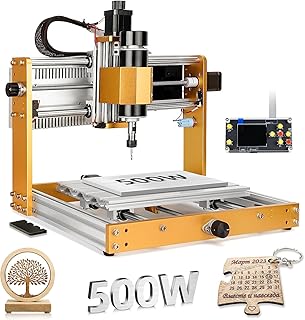
The LUNYEE 3018 PRO MAX is best for buyers who want a compact machine with a metal frame and a stated 500W spindle. Its listed working area is 300 x 180 x 80 mm. The manufacturer describes an all-metal structure with reinforced aluminum profiles, limit switches, and an emergency stop. Its spindle speed range is listed as 0–12,000 RPM.
The product description identifies wood, acrylic, MDF, and plastic as target materials and also describes cutting aluminum and copper. Choose it if the 3018 footprint fits your projects and you value the listed Z-axis travel. The optional 12mm-axis upgrade kit is sold separately, so factor that in if you need that upgrade.
WolfPawn 4040-PRO CNC Router

The WolfPawn 4040-PRO is best for users who need more XY workspace than a typical 3018-format machine provides. Its listed working area is 15.7 x 15.7 x 2.9 inches, and it includes a 500W spindle. The drive and guide design uses belts and V-wheels on the X and Y axes, with a round linear guide and lead screw on the Z axis.
Two spindle clamp sizes, 52mm and 65mm, are included for stated upgrade flexibility. Choose this model if a larger work area is more important than a smaller desktop footprint. The product information does not specify enclosure features, so plan separately for managing chips and debris in your workspace.
Carvera Air Desktop CNC With 4th Axis

The Carvera Air is best for makers who want a more feature-rich desktop mill for multi-step work. Its listed features include a quick tool changer, automatic probing and leveling, and Makera Studio software with all-in-one CAM software. The included 4th-axis module supports cylindrical machining, double-sided objects, and 3D shapes; the stated rotary work area is 3.6 inches in diameter by 7.9 inches long.
Tool changes are described as taking about 10 seconds, which may help streamline jobs that require multiple tools. Choose this machine if rotary capability and guided workflow matter to your projects. Its added features may be unnecessary for simple beginner engraving, so compare the capability set with the work you actually plan to do.
Genmitsu CNC 3018-PRO Router Kit

The Genmitsu 3018-PRO is best for beginners, makers, and DIY users learning CNC carving, engraving, and milling. It uses GRBL control and can be operated with Candle to control movement and run G-code files. The listed material range includes wood, acrylic, PVC, plastic, PCB, and soft aluminum, using suitable bits and cutting settings.
The raised base is described as improving stability, and the upgraded assembly is intended to simplify setup. Choose this model if you want to learn a familiar open-source CNC workflow and explore varied small projects. Cutting results depend on selecting appropriate bits and settings; the product details do not provide a working-area measurement here.
Buying Guide: How to Choose a Computer-Controlled Milling Machine
What materials and project sizes do you need?
Start with the material and largest workpiece you expect to machine. Compare each machine’s stated working area with your project dimensions. The WolfPawn lists a 15.7 x 15.7-inch area, while the LUNYEE lists 300 x 180 x 80 mm. For other models, check the full product specifications before assuming they will accommodate a particular part.
Do you need an enclosure or a larger frame?
An enclosure can help contain chips and debris and may be more appropriate for a shared home workspace. The Cubiko specifically lists an integrated enclosure and a cover-triggered pause. A larger open-frame machine can suit projects that need more workspace, but plan for chip management and safe operation.
Which controls and setup features matter?
GRBL-based machines can suit users who want to work with G-code and CNC control software. Automatic probing can simplify tool-height setup, while a quick tool changer can help on projects that use multiple tools. Match these features to your experience and workflow instead of paying attention to spindle wattage alone.
Is a 4th axis necessary?
A 4th axis is useful for cylindrical machining and other rotary work, such as shaping objects from multiple sides. For flat signs, engravings, and basic parts, a standard three-axis machine may be sufficient. Confirm the rotary work area and included accessories when comparing machines.
Frequently Asked Questions
What is a computer-controlled milling machine?
It is a CNC machine that follows programmed instructions to move a cutting tool and remove material from a workpiece.
Is a desktop CNC mill suitable for beginners?
Yes. Beginner-oriented options include the pre-assembled, enclosed Cubiko and the GRBL-based Genmitsu 3018-PRO. Users should still learn safe setup, workholding, and tool selection.
Can these machines cut metal?
Some product descriptions list metal capability. The LUNYEE description mentions aluminum and copper, while the Genmitsu 3018-PRO lists soft aluminum. Material, tool, and cutting settings affect suitability.
What does a 4th axis do?
A 4th axis rotates the workpiece, enabling rotary machining such as cylindrical features and some multi-sided shapes.
Why does working area matter?
Working area sets the maximum space available for a job. Compare it with the part dimensions, including required clearance for tool movement and workholding.