Choosing the right computer-controlled cutting machine can transform how you design, prototype, and produce crafts, signage, and custom decor. This guide highlights five capable models that blend scanning, plotter precision, and broad media support to serve hobbyists and small studios alike. Each option emphasizes accuracy, ease of use, and integration with digital workflows, helping you decide which machine best fits your materials, project types, and budget.
Product Summary
| Product | Brand | Key Strength |
|---|---|---|
| Brother ScanNCut SDX125E | Brother | Built-in scanner, 682 designs, auto blade with material sensing |
| LOKLiK Cutting Machine 2 | LOKLiK | 5-in-1 capabilities, free design library, AI painting |
| VEVOR Vinyl Cutter 53 Inch | VEVOR | Large format, floor stand, high precision |
| VEVOR 34 Inch Vinyl Cutter | VEVOR | Bluetooth and USB connectivity, strong control panel |
| Silhouette Cameo 4 Plus | Silhouette | 15-inch cutting width with roll feeder and dual carriage |
These selections cover built-in scanners, large-format capability, wireless workflows, and software ecosystems that support beginners through advanced makers. They offer varying balances of speed, accuracy, and cost, enabling you to compare options without guessing about core features.
Brother ScanNCut SDX125E: All‑In‑One Scanning Cutting

The SDX125E integrates a built-in scanner to convert drawings into cut files, enabling direct printing and precise placement without separate tracing. This model supports a broad library of designs and fonts, expanding DIY projects from vinyl decals to greeting cards and fabric art. The 5-inch touchscreen provides intuitive navigation for crafting workflows, and the auto blade with material sensing reduces setup time by adjusting to material thickness automatically. A compact choice for versatile cutting needs.
Key features at a glance
- Built-in scanner for converting drawings into cut files
- 682 built-in designs, 100 quilting patterns, 9 fonts
- USB and wireless pattern access for customization
- 5″ touchscreen LCD for easy project management
Ideal for crafters who value seamless integration between drawing and cutting, plus a sizeable design library. Performance hinges on reliable automatic blade sensing and consistent material handling for repeatable results.
LOKLiK Cutting Machine 2 By HTVRONT: 5‑In‑One Creativity Center

The LOKLiK cutting machine blends five functions in one device and supports a rich software ecosystem. It pairs with an expansive idea library via LOKLiK IdeaStudio and includes AI painting features for rapid design generation. In addition to cutting, it offers writing, drawing, deep cutting, scoring, and foil printing (tools sold separately). This versatility suits makers who frequently switch between textile, cardmaking, scrapbooking, and decor projects.
What to consider
- No-subscription design access with a large free design pool
- Precise 0.5 mm print-then-cut accuracy for complex graphics
- Quiet operation and upgraded motors to speed up projects
In practice, this machine is a strong option for creative teams or hobbyists who want broad functionality without ongoing software fees. Works well for mixed-media crafts where both cutting and embellishment are common.
VEVOR Vinyl Cutter 53 Inch: Large-Format Sign Making

The 53-inch VEVOR vinyl cutter offers substantial cutting width and a robust feeder system for signs, banners, decals, and wall art. It features a long paper feed with precise positioning and a backlit LCD for straightforward control. The machine supports a wide range of materials and comes with a floor stand for stable operation in workshop environments. This option prioritizes precision and throughput for larger-format jobs.
Key considerations
- Maximum cutting width of 49.6 inches; ideal for large designs
- Digital control with adjustable cutting pressure and speed
- Stable rollers to minimize drift during long runs
Because of its size and capabilities, this cutter suits makers producing multiple large decals or signage. Ensure sufficient workspace and ventilation for extended operation periods.
VEVOR 34-Inch Vinyl Cutter: Compact Yet Capable

This 34-inch VEVOR model blends compact form with strong performance, including Bluetooth compatibility, USB or COM cable connections, and a substantial control panel. It emphasizes precise cutting with 0.01 mm blade accuracy and a broad speed range for diverse applications. The strong modular design supports sign making, label production, and craft projects that benefit from wireless or wired control.
Key practical angles
- Bluetooth, USB, and COM connectivity for flexible setups
- 34-inch cutting width with precise alignment and stable operation
- Suitable for home studios and small workshops with tighter spaces
For users who want an integrated workflow with modern connectivity, this cutter offers a balanced mix of size, capability, and price, enabling quick turnarounds on small-to-medium projects.
Silhouette Cameo 4 Plus: Wide Format With Roll Feeder
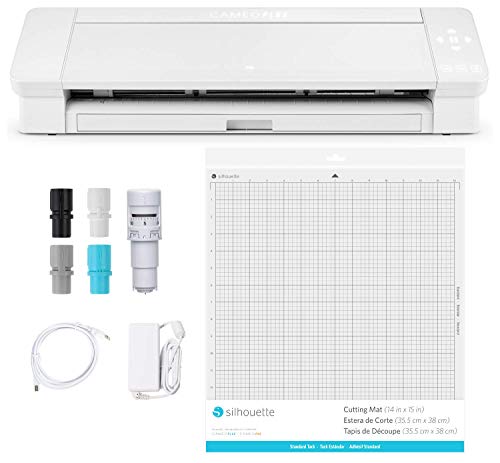
The Silhouette Cameo 4 Plus expands cutting capacity with a 15-inch width, a built-in roll feeder, and a dual-carriage system that detects tool types and adjusts settings via Silhouette Studio software. This setup is well-suited to vinyl, heat transfer, and cardstock projects, with speed and precision for intricate designs. The roll feeder simplifies long cuts, while the dual carriage accelerates multi-material workflows.
Why choose Cameo 4 Plus
- Large cutting width supports more layout options
- Integrated roll feeder for efficient vinyl production
- Smart tool detection and automatic software adjustments
For users invested in Silhouette Studio and seeking flexibility across vinyl projects, heat transfer and cardstock, the Cameo 4 Plus offers a comprehensive ecosystem with scalable options for future projects.
Buying Guide: Key Purchase Considerations
When selecting a computer-controlled cutter, consider these perspectives to align with your needs:
- Cutting width and materials: Choose a model that matches your typical project size and media range, from vinyl decals to fabric and paper.
- Scanner vs. standalone: Built-in scanners enable drawing-to-cut workflows, while non-scanner models excel in large-format signing and plotting.
- Connectivity and software: Evaluate whether Bluetooth, USB, or network options fit your workspace. Look for ecosystems you already use or plan to adopt, including design libraries and print-then-cut capabilities.
- Precision and speed: Check advertised cutting accuracy (often ±0.01 mm) and speed settings, especially for complex graphics and long runs.
- Ease of use and maintenance: A responsive touchscreen, intuitive software, and reliable blade or tool sensing minimize trial cuts and material waste.
- Space and noise: Larger formats demand room and cooling; consider the machine’s footprint and typical noise level for shared spaces.
- Cost of ownership: Include blades, mats, user licenses, and any required accessories when budgeting for a long-term setup.
Practical performance varies with material type and thickness. For best results, perform a test cut on your most-used media and maintain regular blade changes and calibration checks as recommended by the manufacturer.