Finding an affordable PVC card printer that still produces reliable, durable ID cards is essential for small offices, schools, and clubs. This guide highlights five cost-effective options that balance price with practical features like color printing, ease of use, and included supplies. Each option comes with essential extras so you can start printing right away, whether you need simple employee IDs, member cards, or event badges. Explore practical choices, then compare at-a-glance details in the summary table below.
| Product | Brand | Key Features |
|---|---|---|
| IDP SMART-21S ID Card Printer Kit | IDP | YMCKO color ribbon, 100 PVC cards, PC-only software, easy setup, high-speed color/mono printing |
| Bodno Pronto ID Card Printer Bronze Bundle | Bodno | User-friendly, MA100YMCKO ribbon, 100 PVC cards, complete starter package |
| Badgy100 Color Plastic Card Printer | Badgy | 45-second color print, near-edge printing, beginner-friendly setup |
| Bodno Seaory S25 Single Sided Printer | Bodno | All-in-one supply kit, manual feed for precision, Bronze edition with license |
| Cardholdir ID Easy Badges Solid 210 | Cardholdir ID | Single-sided, beginner software, 200 cards included, easy to use for first-time printers |
IDP SMART-21S ID Card Printer Kit

The IDP SMART-21S Starter Kit combines an affordable single-sided printer with essential supplies and a PC-based software suite. It includes the printer, IDesigner software, a driver, manuals, a power cord and USB cable, plus 100 YMCKO color ribbons and 100 PVC cards. This setup enables quick, professional color ID cards for small teams or school clubs. The device supports both color and monochrome outputs, making it versatile for various badge needs. Printing speed exceeds 150 color cards per hour or 600 monochrome cards, leveraging a straightforward LED control panel for simple operation.
Bodno Pronto ID Card Printer Bronze Bundle
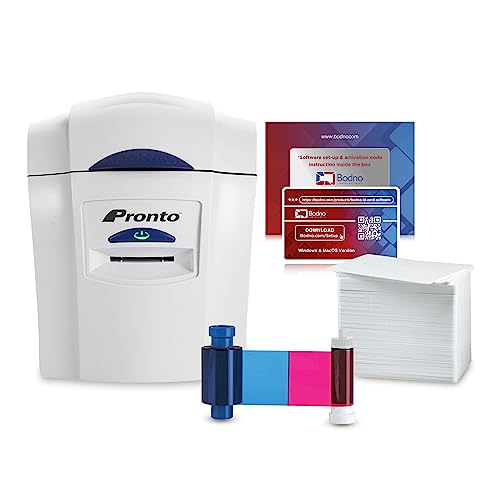
The Bodno Pronto Bronze Edition provides an all-in-one solution for creating professional-looking ID cards. The package includes the Pronto printer, the MA100YMCKO color ribbon, and 100 white PVC cards, making it a ready-to-use option for small organizations. The printer is positioned as user-friendly, designed to get you printing in minutes. Its streamlined workflow suits offices or clubs that require quick turnarounds without investing in high-end equipment. The included software and templates help users design badges easily, even without graphic design experience.
Badgy100 Color Plastic Card Printer
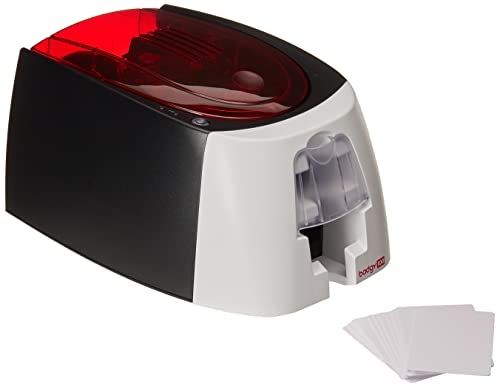
Badgy100 is a compact, beginner-friendly color plastic card printer designed for fast results. It offers near-edge printing with a 1.35 mm print margin, enabling vibrant full-color cards in about 45 seconds. The bundled design software and streamlined setup cater to schools, clubs, and small businesses needing quick badge creation. Its user-oriented approach reduces the learning curve, though the printer focuses on straightforward color cards rather than high-volume production. The result is reliable everyday ID printing with minimal overhead.
Bodno Seaory S25 Single Sided Printer Bundle

The Bodno Seaory S25 single-sided printer package is designed for low-volume, on-demand ID card printing. The all-inclusive kit includes the Seaory 11011 color ribbon, plus 100 prints, ensuring a quick start for small offices. A manual feed system allows precise control when handling each card, making it suitable for classrooms or small teams that don’t require rapid mass production. The Bronze Edition often comes with lifetime software license, providing templates and drag-and-drop design features for easy badge creation.
Cardholdir ID Easy Badges Solid 210

Cardholdir ID Easy Badges Solid 210 focuses on simplicity for first-time badge printing. This single-sided printer comes with beginner software and supplies enough to design and print around 200 badges. It’s ideal for schools or small teams introducing ID cards with minimal setup. The standard 300 full-color card batch provides a smooth work cycle, while the included software templates help users create consistent, professional-looking badges without needing an external designer. It’s a practical entry point for affordable ID card programs.
Buying Guide
- Printing needs: Consider whether you primarily need color or monochrome cards, and whether single-sided printing suffices or you require dual-sided capabilities for richer designs.
- Starter supplies: Look for bundles with ribbons, blank cards, and driver/software included. Kits with templates are especially helpful for non-designers.
- Software ease of use: Beginner-friendly drag-and-drop templates save time and reduce the learning curve for new users.
- Compatibility and support: Ensure compatibility with Windows or Mac as needed, plus available customer support and updates.
- Physical size and noise: For smaller spaces, choose a compact, quiet printer that fits your desk or office area.
- Reliability and cost per card: Evaluate printer reliability, availability of replacement ribbons and cards, and overall cost per printed badge.
- Intended volume: If your badge issuance is low to moderate, a single-sided printer with a manual feed can be cost-effective; for higher volumes, dual-sided options may be worth the extra cost.
- Future-proofing: Consider models with upgrade options or flexible software that can accommodate new badge formats or templates as your needs evolve.
Across these options, you’ll find choices that balance upfront price with practical features. If you need simple, reliable printing for small teams, the kits with complete supplies and straightforward software tend to offer the best value. For occasional badge creation, compact single-sided printers with easy-to-use software and bundled ribbons provide a straightforward path to professional results without heavy investment.