For small businesses seeking affordable, reliable digital signage, a compact media player can turn a basic TV into a dynamic information hub. The following selections emphasize ease of setup, 4K capability, and CMS integrations without high recurring costs. Each option is optimized for unattended operation, remote management, and broad compatibility with common content formats. Compare features, installations, and cloud options to choose the best value for your storefront, office lobby, or restaurant.
| Product | Brand | Key Benefit |
|---|---|---|
| Amazon Signage Stick – Professional Digital Signage 4K Media Player | Amazon | Unattended kiosk mode with CMS integration |
| OptiSigns OptiStick Digital Signage Player | OptiSigns | Android-based 4K with broad app ecosystem |
| TV Stick Digital Signage Player 4K (EZ-AD) | EZ-AD | Cloud control with PowerPoint uploads and AI image enhancer |
| EZ AD TV Digital Signage Player Kit | EZ-AD | 4K content library, free plan, mobile app |
| LIGHTNING ADS Digital Signage Player for Restaurants | LIGHTNING ADS | Plug-and-play with free upload and affordable upgrades |
Amazon Signage Stick – Professional Digital Signage 4K

The Amazon Signage Stick is designed for unattended operation by auto-launching the chosen CMS in kiosk mode. It emphasizes simple setup, enabling you to deploy one or multiple sticks via a free mobile app. The device is built for compatibility with major CMS providers, making it a straightforward choice for businesses integrating digital menus, announcements, or wayfinding content. The emphasis on CMS compatibility means you can subscribe to your preferred CMS and manage displays remotely, reducing on-site maintenance.
OptiSigns OptiStick Digital Signage Player

OptiStick is an Android-based 4K UHD HDMI stick that ships with the OptiSigns Player pre-installed. It supports remote screen management through OptiSigns portals and apps and offers extensive integrations with more than 160 apps to quickly publish content. The emphasis is on ease of management from anywhere, making it suitable for venues that require frequent updates, multiple screens, or dynamic content from a central dashboard. It’s ideal for storefronts, lobby displays, and quick-service restaurants that rely on timely promotions.
TV Stick Digital Signage Player 4K (EZ-AD)

EZ-AD’s TV Stick offers cloud-controlled digital signage with 4K playback and auto content updates. It supports PowerPoint uploads, enabling presentations to be shown directly on TVs without conversion steps. An AI image enhancer helps adapt content to non-standard image sizes, preserving a polished look on any screen layout. A premium template library complements the free plan, making it easier to create professional displays for menus, events, or promotions, while a mobile app enables on-the-go management.
EZ AD TV Digital Signage Player Kit

EZ-AD’s digital signage kit emphasizes a robust 4K experience with a large content library. The product lineup includes a free plan that supports up to 50 slides and essential content management features, along with mobile app control for convenient updates from anywhere. The combination of a rich template library and cloud-based content helps businesses quickly deploy engaging displays in retail, hospitality, or corporate environments without ongoing high costs.
LIGHTNING ADS Digital Signage Player For Restaurants
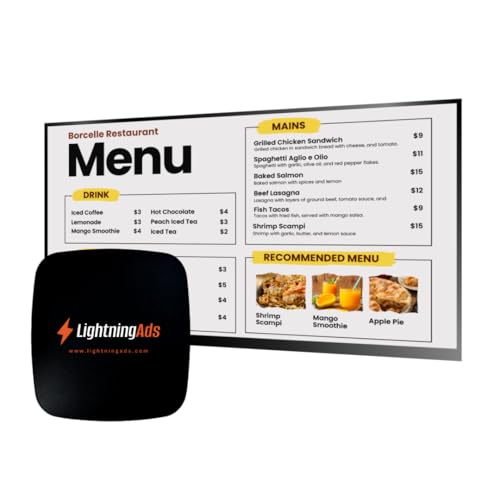
Lightning Ads provides a plug-and-play digital signage solution with no subscription needed. It comes with free upload and a menu scheduler to handle frequent changes in a restaurant setting. For operators, the allure is affordability and rapid deployment, plus premium tools like a Template Builder and AI Enhancer available through affordable upgrades. The remote management capability helps restaurant teams update menus, daily specials, and promos from anywhere, with straightforward Wi-Fi connectivity.
Micca 4K Ultra-HD Digital Media Player

Micca 4K Ultra-HD media players turn any TV into a digital signage display capable of playing videos, music, and photo slideshows from USB drives or microSD cards. They support 4K playback and offer multiple USB ports and card slots for direct content sourcing. The devices are compact, budget-friendly, and suitable for simple, localized signage needs such as event boards or small shop windows. They pair well with legacy displays or in environments where running networked CMS is unnecessary.
Buying Guide
- Content management and CMS compatibility: Some players auto-launch a CMS in kiosk mode, while others rely on cloud-based portals. Choose a model that aligns with your preferred CMS and staff capabilities.
- Video and image formats: Look for 4K support, H.265/HEVC decoding, and broad media compatibility (MP4, MKV, JPG, PNG, PowerPoint uploads). Ensure your content workflow accommodates pre-made assets and templates.
- Remote management capabilities: If you operate multiple displays, remote control and scheduling help maintain consistency across locations. Consider apps or web portals for updates on the go.
- Connectivity and placement: Verify HDMI output, USB ports for offline content, and network options (Wi-Fi or Ethernet). For restaurants or storefronts, a compact form factor and reliable power supply are essential.
- Plans and pricing: Some options include free plans with basic features and paid upgrades for templates, AI enhancers, or additional app integrations. Weigh upfront hardware costs against ongoing subscription costs.
- Content templates and libraries: A broad library of templates and design assets can speed up deployment. Check whether you gain access to premium templates or if upgrades unlock new tools.
- Security and updates: Ensure firmware updates are available and that CMS credentials can be rotated. Consider devices with stable manufacturer support for longer lifecycle.
- Use-case fit: For menus, promotions, or wayfinding, 4K clarity and reliable auto-updates are valuable. For simple notices, a plug-and-play device with remote scheduling may suffice.
In summary, the best option depends on your content needs, the number of screens, and whether you prefer a cloud-based solution or on-device CMS management. For quick deployments with minimal setup, plug-and-play kits from EZ-AD or LIGHTNING ADS offer strong value. If you need broader app ecosystems and robust remote control, OptiSigns OptiStick or Amazon Signage Stick provide scalable options. For flexibility with media from USB drives, Micca players are a practical choice when networked CMS features are less critical.