The best charging station with USB ports depends on whether you need AC outlets, laptop-level USB-C power, or a compact hub for several everyday devices. The kakyanill tower is best for combining outlets and USB ports; the MGRNPONY is better for high-output USB-C charging; and the Gitryin is designed for a desktop setup with retractable cables. Compare the listed port types, output details, and layout before choosing.
| Product | Best For | Listed Ports or Output |
|---|---|---|
| kakyanill Power Strip Tower | AC outlets plus USB charging | 9 AC, 4 USB-C, 4 USB-A |
| 10-Port USB Charging Station | Compact everyday USB charging | 10 USB ports; 50W listed in name |
| MGRNPONY 320W USB-C Charger | Higher-power USB-C charging | 5 USB-C, 5 USB-A; 320W listed |
| Gitryin Desktop Charging Station | Retractable desktop charging | 4 AC, 4 USB-C; 260W listed |
| ADRICY 6-Port USB Tower | Portable multi-device USB charging | 6 USB ports; 50W listed |
kakyanill Power Strip Tower

This tower is best for buyers who need both standard AC outlets and USB charging in one vertical unit. Its listed configuration includes nine AC outlets, four USB-C ports, and four USB-A ports, with outlets spaced 1.5 inches apart to accommodate larger adapters. The product specifies a total USB output of up to 4.8A and a 1875W/15A circuit breaker.
The retractable six-foot cord and flat, angled plug are intended to help manage space near desks, beds, and furniture. Choose this model if a combination of outlet expansion and USB ports matters more than a compact USB-only block. Its USB output is specified by total amperage, not by individual USB-C wattage, so it may not suit buyers seeking a clearly stated high-wattage laptop charging port.
10-Port USB Charging Station

This USB charging station is best for households or desks that need a simple way to charge several 5V USB devices. The listing describes a compact, lightweight design for home, office, and desktop use, plus a 50W, 10A rating in the product name. It also specifies a 100–240V input range, which may be useful for buyers considering travel, though the listing does not establish plug compatibility for every destination.
The product description lists surge, overcurrent, and overvoltage protection. Choose it if you want a multiport USB hub without a tower-style AC outlet strip. The available details do not specify USB-C port count, individual port output, or how power is distributed when all ports are occupied, so check those details if your devices need a particular charging standard or speed.
MGRNPONY 320W USB-C Charger
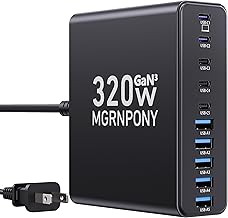
This 10-port charger is best for users who want USB-C and USB-A ports in a single charging block, including people charging a laptop alongside phones and smaller devices. It has five USB-C ports and five USB-A ports. The description identifies USB-C PD/PPS outputs of 65W, 30W, and 20W and says a dedicated USB-C port can power newer electronics. The product title lists 320W total output.
The listing also describes GaN technology and protections against overcharging, overheating, short circuits, overcurrent, and overvoltage. Choose this model if USB-C output options are more important than adding AC outlets. The available information does not map every listed wattage to a specific port or state the exact output available across all ten ports at once, so verify the port-level details for a multi-device setup.
Gitryin Retractable Desktop Charging Station

The Gitryin station is best for home offices or shared desks where retractable charging cables can reduce loose-cord clutter. Its title lists a 12-in-1 design, 260W output, four AC outlets, four USB-C ports, and 33.5-inch retractable cables. The product description says each modular 65W USB-C charger can provide up to 65W when one retractable cable or USB-C port is used alone.
Choose it if you want a desktop hub with AC outlets and built-in cable reach, especially for USB-C devices. The listed 65W figure applies to a single cable or port used alone; do not assume every port provides that output simultaneously. Confirm that the product’s port layout and cable arrangement match your device mix before buying.
ADRICY 6-Port USB Tower Charger

This compact tower is best for buyers who want to charge several USB devices without adding AC outlets. It has six USB ports and a 50W total rating in the product name. The description says it detects connected devices, supports up to 10A total, and provides up to 2.4A per port. Its non-slip design is described as suitable for a nightstand or desktop, and the listing presents its size as portable for travel or camping.
Choose this model for phones, tablets, watches, headphones, and similar USB devices when a small footprint matters. The listing explicitly says Qualcomm Quick Charge is not supported, so avoid it if that specific charging standard is required. It does not list USB-C ports, making it a less suitable choice for buyers who need USB-C-only charging.
Buying Guide: How to Choose a Charging Station With USB Ports
Do you need AC outlets as well as USB ports?
A USB charging hub powers devices through USB connections, while a power strip tower also provides standard AC outlets for items with wall adapters. Choose the kakyanill or Gitryin if you need both types of connection. A USB-only model can take up less space when your devices charge directly by USB.
How much USB-C power do your devices need?
Check for a stated USB-C wattage and charging standard if you plan to power a laptop or other higher-demand device. The MGRNPONY lists several PD/PPS output levels, while the Gitryin describes up to 65W from one USB-C port or retractable cable used alone. Do not treat total station wattage as the output available from every port.
How many devices will charge at once?
Count the USB-A and USB-C connections you actually use, then consider whether AC outlets are also necessary. A higher port count does not by itself explain how power is shared, so review individual port specifications when simultaneous charging speed is important.
Will the layout fit your space?
Vertical towers can organize plugs in a smaller footprint, while desktop stations with retractable cables can keep charging leads close at hand. For a tight spot behind furniture, check plug shape, cord length, and the station’s dimensions in the listing before choosing.
Frequently Asked Questions
What is the difference between a USB charging station and a power strip?
A USB charging station provides USB ports for compatible devices. A power strip adds AC outlets for standard plugs; some models include both AC outlets and USB ports.
Can a multiport USB station charge a laptop?
It depends on the USB-C port’s output and the laptop’s charging requirements. Check the stated port wattage and supported charging standard rather than relying only on the station’s total wattage.
Does a higher number of ports mean faster charging?
No. Port count shows how many devices can connect, not the charging speed each device will receive. Check individual port output and any stated limits when multiple ports are in use.
Should I choose USB-C, USB-A, or both?
Choose ports that match the cables and devices you use. A station with both USB-C and USB-A can support a wider mix of newer and older USB devices, while a USB-C-focused model may better fit a USB-C setup.