The best CD player for a receiver is one with an output that matches an available receiver input. The THINKYA JA-310R is best for optical or AUX connections, while the Gueray and Deluxe Products models suit receivers with a 3.5mm audio input. If you want a disc player that also plays DVDs, the ELECTCOM PRO and MEGATEK offer HDMI and RCA connections. Check your receiver’s inputs before choosing: the connector types on both devices must match.
| Product | Best For | Connection Highlight |
|---|---|---|
| THINKYA JA-310R | Optical or AUX input receivers | Optical, AUX, Bluetooth transmitter |
| Gueray Desktop CD Player | Flexible desktop listening | 3.5mm audio and Bluetooth |
| Deluxe Products Portable CD Player | Simple wired connection | Included 3.5mm AUX cable |
| ELECTCOM PRO DVD/CD Player | CDs and DVDs | HDMI and RCA |
| MEGATEK DVD/CD Player | Multi-region disc playback | HDMI and RCA |
THINKYA JA-310R Retro CD Player

Best for: A receiver with an optical digital input or AUX input. This dedicated CD player lists SPDIF optical output and AUX, giving buyers two wired connection options to compare with their receiver’s available inputs. It also includes a Bluetooth 5.3 transmitter, USB, and a remote control.
The product is described as having a high-precision laser pickup and lossless CD decoding. Choose this model if you want a CD-focused component with both digital optical and analog AUX options. The listing says it has no built-in speakers and no battery, so it needs to connect to an audio system or other playback equipment.
Gueray Bluetooth Desktop CD Player

Best for: Buyers who want a multifunction player and have a receiver with a compatible 3.5mm audio input. The listed features include a 3.5mm audio connection, built-in speakers, Bluetooth 5.0, FM radio, USB and TF-card playback. Its Bluetooth transmitter can also send audio to a Bluetooth speaker or headphones.
This is a better fit for a flexible desktop setup than for someone seeking only a conventional receiver component. Confirm whether your receiver has the appropriate wired input before buying; the product details do not specify RCA or optical output. It supports CD, CD-R, CD-RW, MP3, and WMA according to the listing.
Deluxe Products Portable CD Player
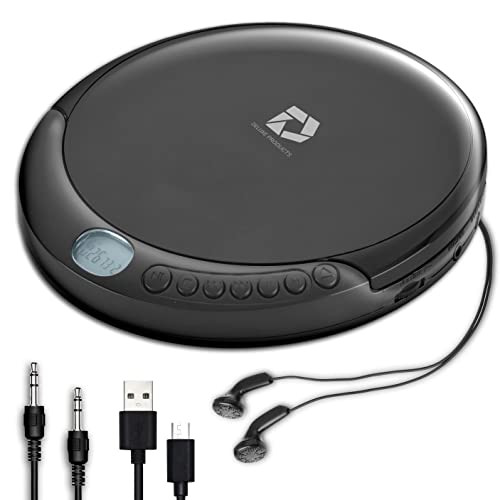
Best for: A basic wired setup when the receiver has a 3.5mm AUX or line input. The player comes with an AUX cable and an AC USB power cable, making it a straightforward option for connecting to equipment with the matching audio jack. It also has 60-second anti-skip protection.
It plays standard music CDs, CD-R, and CD-RW discs. Avoid this choice if you need MP3-CD playback: the product information specifically says MP3 CDs are not supported. It is portable, but the included wired connection means the receiver still needs a compatible 3.5mm input.
ELECTCOM PRO Region-Free DVD/CD Player

Best for: Buyers who want one device for CDs and DVDs and have a receiver or home theater setup with HDMI or RCA connectivity. The listing specifies both HDMI and RCA outputs, plus support for CD, CD-R/RW, DVD formats, VCD, SVCD, MP3, WMA, and JPEG. It also plays DVD regions 0–6 and reads PAL/NTSC formats.
Choose this model if DVD playback and international disc support matter alongside CD playback. It is not a Blu-ray player, so avoid it if you need Blu-ray disc playback. Before connecting, confirm which input type your receiver supports and select the corresponding input after setup.
MEGATEK Region-Free HDMI DVD Player

Best for: A receiver-based setup where you also want DVD playback and multi-region support. This compact player lists HDMI and RCA connections, plays CDs and several DVD formats, and supports DVD regions 1–6 plus PAL and NTSC standards. Its HDMI feature upscales standard-definition DVD content to 1080p.
This is a practical choice when a single player needs to handle music CDs and video discs. Its limitation is that it does not support Blu-ray discs. The 1080p upscaling feature applies to DVD video; it is not a reason to expect a change in the audio capabilities of your receiver.
Buying Guide: How to Connect a CD Player to a Receiver
Which receiver input should you look for?
Check the back or front panel of your receiver for an input that matches the player’s output. Common options in this selection include optical digital, AUX or 3.5mm audio, HDMI, and RCA. A matching connector is essential; do not assume that a player’s USB port is an audio output for a receiver.
Is optical, RCA, or HDMI better?
Use the connection type supported by both devices. Optical is a digital option on the THINKYA player. RCA is listed for the ELECTCOM PRO and MEGATEK, while HDMI is available on those DVD/CD players. A 3.5mm AUX connection suits compatible receivers and is listed on the THINKYA, Gueray, and Deluxe Products players. The receiver may need the correct input selected to play sound.
Should you choose a CD player or a DVD/CD player?
Choose a dedicated CD player if music playback and the specified audio outputs are your priorities. Choose a DVD/CD model if you also want to play DVDs or need HDMI or RCA options listed for that device. The DVD/CD choices in this guide do not support Blu-ray.
What should you check before buying?
- Identify the receiver’s available audio inputs and match them to the player’s listed outputs.
- Check disc support, especially if you use CD-R, CD-RW, MP3 discs, or DVDs from other regions.
- Decide whether built-in speakers, portability, a remote, or extra playback modes are useful for your setup.
- For Bluetooth, confirm the intended role: the Gueray and THINKYA listings describe Bluetooth transmission, but a wired connection may be the simpler match for a receiver input.
Frequently Asked Questions
Can I connect any CD player to a receiver?
No. The player needs an output that matches an input on the receiver, or a suitable audio adapter. Check both devices’ listed connections before purchasing.
Can I use a 3.5mm AUX cable with my receiver?
Yes, if the receiver has a matching 3.5mm AUX or line input. The Deluxe Products player includes an AUX cable, and the Gueray and THINKYA listings include 3.5mm or AUX audio connectivity.
Can a DVD player play CDs through a receiver?
The ELECTCOM PRO and MEGATEK listings both specify CD playback and HDMI/RCA connections. Confirm that the receiver has a matching input and supports the connection you plan to use.
Do these DVD/CD players play Blu-ray discs?
No. The ELECTCOM PRO and MEGATEK product details state that Blu-ray discs are not supported.
Will Bluetooth connect every CD player to a receiver?
No. Bluetooth support varies by device and receiver. The listed THINKYA and Gueray models describe Bluetooth transmission, but check whether the receiver supports Bluetooth audio reception before relying on a wireless connection.