Finding the right corner TV mount can maximize space and optimize viewing angles in living rooms, offices, or bedrooms. This guide compares top caddy corner mounts designed for a range of screen sizes, extending reach, and full motion capabilities. Read on to see how each option stacks up for corner installations and choose the best fit for your setup.
| Product | Brand | VESA Range | Weight Capacity | Arm Extension |
|---|---|---|---|---|
| MU0047-L | MOUNTUP | 150×100 to 600×400 mm | 99 lbs | 37.9″ extendable |
| Corner TV Mount | Mount-It! | Up to 800×400 mm | 132 lbs | Corner-specific, can mount on separate walls |
| USX MOUNT Corner | USX MOUNT | Up to 400×400 mm | 80 lbs | 14.04″ extension |
| Monoprice Cornerstone | Monoprice | Up to 600×400 mm | 99 lbs | Corner-friendly dual arms |
| PERLESMITH PSCLF1 | PERLESMITH | Up to 600×400 mm | 99 lbs | +5°/-10° tilt; 45° swivel |
Note: Always verify TV weight, VESA pattern, stud configuration, and input accessibility before purchasing. The right mount should align with your TV’s dimensions and room layout for optimal viewing comfort.
MOUNTUP MU0047-L Long Arm Corner Mount

Universal compatibility covers most 42-75 inch TVs with VESA patterns from 150×100 mm up to 600×400 mm, supporting screens up to 99 lbs. The 37.9″ long arm extends from the wall and retracts to about 3″, delivering space-saving flexibility. A full-motion design enables +/-90° swivel and +/-5° to -10° tilt with +/-3° leveling for precise viewing from multiple angles.
Mount-It! Corner TV Mount
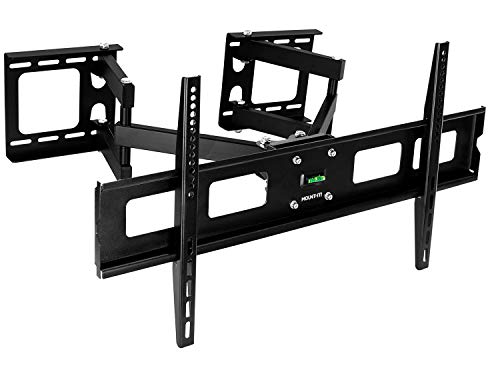
Designed specifically for corner installation, this mount can be mounted on adjacent walls or on the same wall for standard articulating use. It supports most 37-63 inch TVs with VESA up to 800×400 and weight up to 132 lbs. The arms articulate independently to optimize corner placement and viewing symmetry, accommodating both curved and flat screens.
USX MOUNT Corner TV Wall Mount

Suitable for 26-60 inch TVs up to 80 lbs, this full-motion bracket supports VESA patterns from 75×75 mm to 400×400 mm. It extends up to 14.04″ for better viewing angle and folds back to 2.38″ to save space. A steel construction and security screws enhance stability while allowing tilt, swivel, and level adjustments to reduce glare and improve viewing comfort.
Monoprice Corner Friendly Full Motion

Optimized for corner mounting, this Cornerstone Series mount supports curved or flat TVs up to 99 lbs with a range of motion that includes swivel, tilt, and pan adjustments. Its dual swing arms provide the flexibility to position the TV away from the wall and then return to the corner, saving space while maintaining easy access to inputs and cables.
PERLESMITH PSCLF1 Corner TV Mount

Universal corner mount for 37-70 inch TVs up to 99 lbs with VESA compatibility up to 600×400 mm. Full motion features include +5°/-10° tilt, 45° swivel (dependent on TV size), and +/-3° level adjustment. The design helps reduce glare and provides flexible viewing angles in tight spaces, making it a solid all-around option for corner setups.
USX STAR Corner TV Wall Mount Long Arm
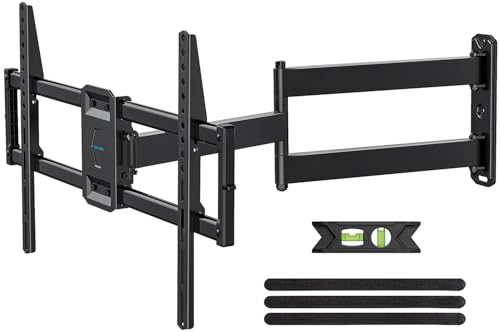
Designed for 37-84 inch TVs up to 100 lbs, this long-arm mount offers a 32″ extension with a retractable reach to 2.52″. VESA compatibility includes up to 600×400 mm. The lengthened arm is ideal for corner placement, enabling viewing from multiple room positions while maintaining a sleek profile when retracted.
Buying Guide: Corner Mount Considerations
- TV size and weight: Verify compatibility with your TV’s size, weight, and VESA pattern. Most options here support up to 99 lbs and VESA patterns up to 600×400 mm or 800×400 mm.
- Arm reach and space: Corner mounts vary from around 14″ to over 37″ of extension. Consider your room layout, furniture, and whether you need to view from multiple rooms or angles.
- Motion range: Full-motion arms with tilt, swivel, and level adjustments provide flexibility. Ensure the mount offers the tilt range you need to minimize glare from windows or lights.
- Corner installation vs. single-wall setup: Some mounts are optimized for true corner mounting on adjacent walls, while others work well when attached to a single wall with a corner-friendly design.
- Build quality and safety: Steel construction, anti-slip features, and security screws help ensure stability and reduce the risk of TV movement or detachment.
- Cable management and accessibility: Consider how cables will route behind and along the mount, especially if the TV is on a long-arm extension.
- Stud and wall type compatibility: Check whether the mount supports wood studs, brick, or concrete walls and follow installation guidance for your wall type.
- Ease of installation: Some mounts feature simpler mounting plates or clearer alignment options, which can reduce installation time and effort.
When selecting a caddy corner mount, match TV dimensions and room geometry with arm reach, motion range, and mounting surface compatibility. For corner-heavy layouts, a dedicated corner design with independent arm articulation can yield better alignment and viewing comfort across seating positions.