Finding a reliable printer that prints on both sides automatically can save time, reduce paper use, and simplify busy workflows. The following picks focus on models with automatic duplex printing and strong feature sets for homes and small offices. Each product is evaluated for ease of use, print speed, wireless connectivity, and overall value. This guide highlights five top options that balance performance and practicality.
| Product | Brand | Key Duplex Capability |
|---|---|---|
| Brother Work Smart 1360 MFC-J1360DW | Brother | Automatic Duplex Printing |
| Canon imageCLASS MF465dw II | Canon | Duplex (2-sided) Printing |
| HP Smart Tank Plus 570 | HP | Automatic Document Feeder with Two-Sided Printing |
| Epson EcoTank ET-2980 | Epson | Auto 2-Sided Printing |
| Canon Color imageCLASS MF753Cdw II | Canon | Duplex Printing |
| Xerox C235dni | Xerox | Automatic 2-Sided Printing |
Note: Each model below offers automatic duplex printing as part of its core capabilities, along with additional features tailored to different user needs—from compact home offices to busy small workgroups.
Brother Work Smart 1360: Wireless Duplex Color Inkjet

The Brother MFC-J1360DW is a compact all-in-one designed for home and home-office use. It prints, copies, and scans with automatic duplex printing to save paper, and it includes a 1.8-inch color display for straightforward navigation. Cloud app connections enable printing from and scanning to popular services such as Google Drive and OneDrive directly from the device. The 20-sheet ADF and 150-sheet paper tray support everyday document handling, while print speeds reach up to 16 ppm in black and 9 ppm in color, making it a practical option for routine tasks.
Canon imageCLASS MF465dw II: Wireless Duplex Laser

The Canon MF465dw II is a monochrome laser all-in-one with built-in wireless connectivity and duplex printing. It prints up to 42 pages per minute, offering fast performance for dense print jobs. A quick first print time of around 5 seconds reduces wait times, and easy wireless setup helps users get connected quickly. This model is well suited for offices that prioritize speed and reliability for text-heavy documents.
HP Smart Tank Plus 570: Wireless All-in-One

The HP Smart Tank Plus 570 is ideal for high-volume households and families. It combines color printing with scanning and copying, and features a 35-page ADF for multi-page workflows. The system emphasizes long-term savings with up to two years of ink included, and mobile plus wireless printing simplifies daily use. While designed for volume, it also manages duplexing tasks efficiently for everyday document tasks.
Epson EcoTank ET-2980: Refillable Supertank
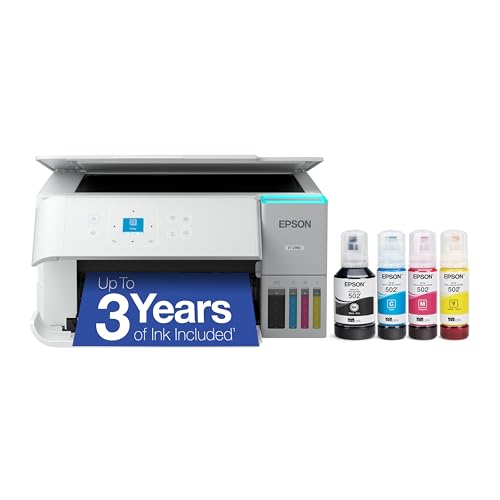
The Epson EcoTank ET-2980 is a color all-in-one with refillable ink tanks and a focus on value. It delivers reliable print quality with a compact design, and ships with enough ink for extended use. The printer targets households and small offices looking to minimize ongoing cartridge costs, offering automatic duplex printing to enhance efficiency on two-sided documents. The 1.44-inch screen provides straightforward navigation for everyday tasks.
Canon Color imageCLASS MF753Cdw II: Dual‑Tray Duplex

The Canon MF753Cdw II brings color duplex capability to a higher-performance level. It offers fast print speeds, a robust feature set, and a 3-year limited warranty, making it suitable for small offices with frequent color print tasks. Its wireless options and efficient duplex printing support help manage large workloads while maintaining print quality across both color and monochrome jobs.
Xerox C235dni: All‑In‑One with Duplex

The Xerox C235dni combines print, copy, scan, and fax with a color touch interface and built-in Wi-Fi. It supports automatic two-sided printing and offers a compact form factor suitable for home offices or small businesses. With a 22 ppm color and black-and-white capability, it balances speed with versatile color features, making it a strong option for mixed-media tasks and everyday office workflows.
Buying Guide
When choosing an automatic two-sided printer, consider the following aspects to match your needs:
- Duplex Performance: Verify the speed and reliability of automatic duplex printing. For high-volume tasks, prioritize models with fast first-page times and consistent two-sided output.
- Print Type and Color Needs: If you require color printing for marketing materials or presentations, focus on color-capable models with robust image quality. For text-heavy documents, monochrome lasers can offer speed and cost efficiency.
- Ink and Toner Economics: Supertank and inkjet models may offer lower per-page costs, particularly for high-volume printing. Assess initial ink/toner inclusions and refill costs over time.
- Connectivity: Look for wireless printing, mobile printing, and cloud integration if you work from multiple devices or locations. Cloud app compatibility enhances flexibility for remote work.
- Page Capacity and Feeds: A larger paper capacity reduces refills. An automatic document feeder (ADF) is essential if you routinely scan or fax multi-page documents.
- Warranty and Support: A longer warranty and accessible customer support can be valuable for busy offices or home offices with limited IT resources.
- Size and Footprint: Ensure the printer fits your workspace. Compact models are ideal for desks and small offices, while larger devices suit dedicated home office setups.
Across these five models, users gain automatic duplex printing, various connectivity options, and a range of document handling features to fit different budgets and workloads. Each option marries practical duplex functionality with additional capabilities, from color printing to multi-function document handling, enabling a versatile setup for households and small offices.