For those upgrading older devices or connecting legacy AV gear to modern displays, choosing the right analog-to-HDMI path matters. The products below focus on converting analog signals to HDMI or extracting HDMI audio for amplifiers and soundbars. Each option supports common setups, with emphasis on ease of use, compatibility, and reliable signal transfer. Use this guide to compare adapters, cables, and converters that bridge old and new tech without compromising quality.
| Product | Brand | Type | Key Benefit |
|---|---|---|---|
| Setuact AV to HDMI Converter | Setuact | Analog AV to HDMI Converter | One-way signal from RCA to HDMI with simple plug-and-play |
| N64 to HDMI Converter | HDSUNWSTD | All-in-One Cable Converter | Direct N64/NGC/SNES to HDMI with built-in ports |
| HDMI to RCA Cable | SNLLMZI | HDMI to RCA Cable | Simple, one-way HDMI to RCA transmission without signal conversion |
| 192KHz HDMI ARC to RCA Audio Converter | Unstincer | ARC to RCA Converter | Extracts TV audio to RCA for speakers or soundbars |
| 192KHz HDMI ARC to Optical Converter | Unstincer | ARC to Optical Converter | ARC TV audio output to optical audio for home theater |
Setuact AV to HDMI Converter With HDMI Cable

This device converts analog RCA composite input (yellow, white, red) to HDMI output at 720P/1080P (60Hz). It is designed for use with classic game consoles and media players that supply AV signals. Note that the converter is one-way, and it does not improve video quality—it requires an HDMI-capable display for proper output. USB power is needed for operation (5V 1A recommended) but is not included in the package.
N64 to HDMI Converter All-in-One Cable

This all-in-one cable converts Analog RGB signals from N64/NGC/SNES/SFC to digital HDMI, enabling modern displays to render classic graphics with improved clarity. The built-in N64 port and HDMI plug simplify setup by eliminating extra cables. It emphasizes upscaled signal processing and color accuracy to enhance the retro gaming experience on contemporary TVs and monitors.
HDMI To RCA Cable With 3-RCA Connectors
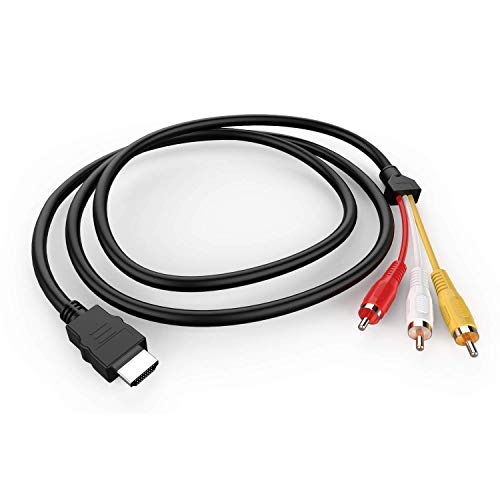
This cable provides a straightforward HDMI to RCA (one-way) transmission. It is explicitly labeled for compatibility with devices that can encode/decode signals and cautions that it may not work with all PCs, laptops, or gaming consoles. It is not a signal converter; it simply transmits HDMI’s digital signal to an RCA display where the receiving device must support the analog conversion.
Unstincer HDMI ARC to RCA Audio Converter

This ARC-to-RCA adapter enables an ARC-enabled TV to send audio through the built-in RCA output to an external sound system. It’s designed for PCM/LPCM-compatible streams and aims to simplify connecting a TV to a legacy stereo or amplifier. It’s a straightforward, plug-and-play solution that eliminates extra cables, suitable for home theaters and conference rooms where analog speakers are used.
Unstincer HDMI ARC to Coaxial/ Optical Audio Converter
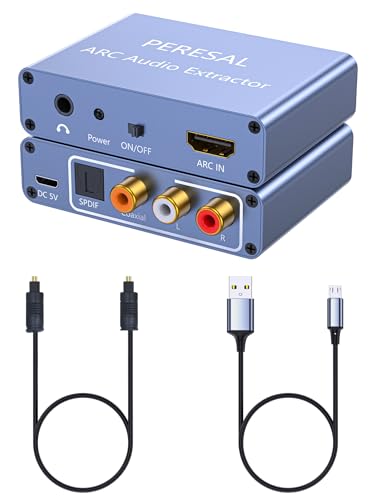
This ARC audio extractor offers simultaneous output via coaxial and optical (SPDIF) as well as RCA and 3.5mm, enabling flexible connections to multiple audio devices. It supports 24-bit/192kHz sampling and requires an ARC-enabled TV to function. It’s designed for higher fidelity audio from modern TVs to older AV receivers, amplifiers, or soundbars that accept digital inputs.
Buying Guide: Key Considerations For Analog To HDMI Upgrades
- Signal direction: Many adapters are unidirectional (HDMI to RCA or RCA to HDMI). Confirm the direction matches your setup to avoid incompatibility.
- Signal quality and resolution: Analog-to-digital conversions can affect video quality. Look for devices that preserve 720p/1080p where possible and note that some composites won’t improve image clarity on modern displays.
- Power requirements: Some converters require external power. Check whether the product includes a USB power cable and if an adapter is included or needed.
- Audio handling: If supplying audio through HDMI is essential, ensure the converter supports PCM/LPCM or ARC as needed, and verify whether simultaneous outputs (analog + digital) are available.
- One-way vs two-way: For setups with multiple devices, a one-way adapter may be sufficient; for future-proofing, consider devices labeled as bi-directional or with explicit compatibility notes.
- Compatibility: Older consoles and players have varied signaling standards (composite RCA, S-Video, RGB). Verify that the device can accept your source’s outputs and your display’s inputs.
- Cable quality and interference: Gold-plated connectors and shielded cables help maintain signal integrity. Consider braided or reinforced cables if you need durability.
- Ease of use: Plug-and-play devices are preferable for quick setups. If a unit requires software or drivers, ensure system compatibility and available support.
- Future needs: If you plan to integrate multiple legacy devices, consider a switcher or matrix that supports HDMI and analog inputs for centralized control.