The best affordable note-taking tablet depends on whether you prefer writing directly on a screen or capturing handwriting on paper. The Lenovo Idea Tab with 8GB of memory is best for digital notes and multitasking, while its 4GB version is a simpler tablet-and-pen option. The XPPen Note Plus and YUAN Smart Notebook digitize handwriting on paper, and the Jeazans bundle pairs a tablet with a keyboard and stylus for broader school or work tasks.
| Product | Best for | Writing method |
|---|---|---|
| Lenovo Idea Tab, 8GB/256GB | Digital notes and multitasking | Touchscreen and included pen |
| Lenovo Idea Tab, 4GB/128GB | Basic study and notes | Touchscreen and included pen |
| XPPen Note Plus | Handwriting on real paper | Paper and dedicated ink pen |
| YUAN Smart Digital Notebook | Paper notes with app syncing | Paper and smart pen |
| Jeazans Android 16 Tablet | Notes plus laptop-style tasks | Touchscreen and stylus |
Lenovo Idea Tab With 8GB Memory
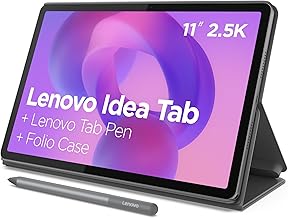
This Lenovo configuration is best for students who want a general-purpose tablet for handwritten notes, reading, and switching among study apps. It includes an 11-inch 2.5K IPS touchscreen with a 90Hz refresh rate, a Tab Pen, and a folio case. The listed MediaTek Dimensity 6300 processor and 8GB of memory make it the stronger of the two Lenovo options for multitasking.
Its 256GB of listed storage offers more room for files than the 128GB configuration. Lenovo also lists Circle to Search with Google, which can search or translate selected on-screen content. Choose this model if you want a screen-based writing experience and more memory. Its display size may be less convenient than a compact notebook for carrying in a small bag.
Lenovo Idea Tab With 4GB Memory
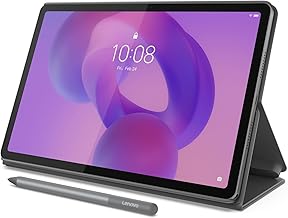
This model is best for buyers who want a tablet, pen, and case for everyday note-taking without prioritizing a larger memory configuration. It has the same listed 11-inch 2.5K IPS, 90Hz touchscreen and MediaTek Dimensity 6300 processor as the 8GB version. The included Tab Pen supports writing and interacting with the screen.
Lenovo lists 4GB of memory and 128GB of storage, so this configuration has less memory and storage than the other Idea Tab in this guide. That makes the 8GB/256GB model a better fit for users who expect to keep many apps or files available. Choose this one if its listed specifications suit your workload and you want an included folio case.
XPPen Note Plus Digital Notebook

The XPPen Note Plus is best for people who prefer writing on real paper but want digital copies on a phone. It uses A5 paper and a dedicated ink pen, with strokes syncing through Bluetooth 5.3. The listed 8192 levels of pressure sensitivity are intended to capture variations in handwriting and sketching.
Choose this notebook for lecture notes, meeting records, or sketches when a conventional tablet screen is not your preferred writing surface. A key limitation is that it has no electronic screen: you write on paper and use a phone to view synced notes. The listing specifies a matching pen, so it is not the same kind of open-ended screen tablet as the Lenovo models.
YUAN Smart Digital Notebook Set

This set is best for writers who want paper-based notes to sync to a smartphone or iPad through an app. Its smart pen uses a coded dot pattern and infrared camera to capture strokes. The listing includes one main notebook and one mini notebook, with paper sized 13 by 21 centimeters for the main notebook. App tools include fountain pen, pencil, and pastel styles.
Choose it if you want the feel of paper plus digital copies and multiple writing styles in the app. Note that the listing says handwriting cannot be erased from the physical notebook. It also states that the smart pen works only with YUAN notebooks, and the first full pen charge may take several hours.
Jeazans Android 16 Tablet Bundle

The Jeazans tablet is best for students or remote workers who want note-taking alongside keyboard-based tasks. The bundle lists a 10.1-inch tablet, stylus, Bluetooth keyboard, wireless mouse, and folding case. It also lists Android 16, 64GB of storage, and expandable storage up to 4TB. The stylus is intended for note-taking, sketching, and annotation.
Choose this option if the keyboard and mouse are useful additions to your study setup. The listing does not specify the display resolution or processor, so buyers comparing screen clarity or processing hardware have less information than they do for the Lenovo models. Confirm the storage expansion details and app requirements before relying on a particular workflow.
Buying Guide: How to Choose an Affordable Note-Taking Tablet
Do you want to write on a screen or on paper?
A screen tablet is the more versatile choice if you want to write, annotate, and use apps on one device. The Lenovo models include a Tab Pen and folio case. The paper-based XPPen and YUAN options suit buyers who prefer physical pages, with phone or tablet syncing for digital access.
How much memory and storage do you need?
Compare listed configurations rather than assuming all tablets handle the same workload. The Lenovo 8GB/256GB model provides more memory and storage than the Lenovo 4GB/128GB model. The Jeazans listing states 64GB of storage and expansion support. For paper notebooks, consider whether your synced notes will be stored on a phone or another device.
Which accessories are included?
Check the bundle contents before choosing. Both Lenovo configurations list a pen and folio case. The Jeazans bundle adds a keyboard and mouse, while the XPPen and YUAN sets use dedicated pens with paper. A keyboard can help with longer typed assignments, but it does not replace checking whether the device meets your app needs.
Frequently Asked Questions
Which option is best for digital handwriting on a screen?
Both Lenovo Idea Tab configurations include a touchscreen and Tab Pen. The 8GB/256GB version has more listed memory and storage than the 4GB/128GB version.
Which product keeps handwriting on real paper?
The XPPen Note Plus and YUAN Smart Digital Notebook capture writing made on paper and sync it digitally. The XPPen listing specifies A5 paper, while the YUAN set includes a main and mini notebook.
Does the XPPen Note Plus have a screen?
No. Its listing describes writing on real paper with an ink pen and syncing strokes to a phone over Bluetooth.
Can you erase YUAN notes from the notebook?
The listing says handwriting cannot be erased from the physical notebook. It describes an eraser tool in the app for digital notes.
Which option includes a keyboard and mouse?
The Jeazans Android tablet bundle lists a Bluetooth keyboard, wireless mouse, stylus, and folding case.