Choosing the right ADSL2+ modem router can improve stability, speed, and Wi‑Fi coverage for homes with DSL connections. This guide highlights five well‑rounded options, balancing built‑in modem capabilities with solid router performance. Each entry lists core features to help you compare setup, compatibility, and wireless reach across typical living spaces.
| Product | Brand | Top Feature |
|---|---|---|
| TP-LINK TD-W8961N 300Mbps | TP-Link | All‑in‑One with Wireless N and 4‑port switch |
| CenturyLink Technicolor C1100T | CenturyLink | VDSL2 + ADSL2+ ready with Gigabit WAN |
| Tp-Link TD-W9950 | TP-Link | 300Mbps Wireless N with DSL modem |
| NETGEAR Nighthawk CAX30 | NETGEAR | Wi‑Fi 6 with high device capacity |
| ARRIS SURFboard SB8200 | ARRIS | DOCSIS 3.1 modem for future‑proof cable speeds |
Note: While this list includes some cable modem options for broader performance context, each product section below centers on DSL/ADSL2+ relevance when applicable and overall features for stable home networks. Consider your service provider, plan speed, and whether you need built‑in routing or separate modem functionality when making a choice.
TP-LINK TD-W8961N: All‑In‑One DSL Modem Router

The TD-W8961N combines an ADSL2+ modem with a NAT router, a 4‑port switch, and Wireless N access point. It supports wireless speeds up to 300 Mbps, making it suitable for households with multiple devices streaming HD video, gaming, and video calls. The Easy Setup Assistant offers quick, multilingual installation, reducing setup friction for users who prefer a simple, plug‑and‑play experience.
Key considerations: an all‑in‑one device reduces clutter but limits upgrade paths if you later need more advanced routing features or Wi‑Fi standards. It is well suited for small to medium homes with standard DSL speeds and moderate device counts.
CenturyLink Technicolor C1100T: VDSL2 Ready Router

The Technicolor C1100T targets CenturyLink DSL networks with full VDSL2 support and ADSL2+ compatibility. It emphasizes reliable performance on DSL lines and includes 2.4 GHz Wi‑Fi (802.11n) with MIMO for improved coverage across typical homes. The router offers a straightforward wired configuration with a built‑in 4‑port switch for local devices and NAS‑like connectivity via wired LAN.
Key considerations: while ADSL2+ compatibility is solid, this model is most beneficial for CenturyLink users seeking compact hardware with stable DSL support rather than cutting‑edge Wi‑Fi. Network range should be evaluated against home layout and wall thickness.
Tp-Link TD-W9950: 300Mbps DSL Modem Router

The TD‑W9950 provides a compact, DSL modem router solution with Wireless N capability up to 300 Mbps. It is designed for basic home networks and light to moderate streaming or gaming. The integrated DSL modem reduces the need for an extra device, simplifying the setup for households with modest bandwidth needs and limited space.
Key considerations: while convenient, the device’s Wi‑Fi performance may lag behind newer standards in larger homes or device‑dense environments. If you expect heavy streaming or multiple 4K streams, a more modern router could be beneficial.
NETGEAR Nighthawk CAX30: Wi‑Fi 6 DSL/Hybrid Router

The Nighthawk CAX30 blends DSL/alternative WAN support with next‑gen Wi‑Fi 6, designed for high device counts and dense home networks. It supports multiple ports and robust wireless performance across 2.4 GHz and 5 GHz bands, suitable for households with many smart devices, gaming consoles, and 4K streaming. It emphasizes compatibility with major cable providers but retains broad functionality for DSL environments where a separate modem is used.
Key considerations: Wi‑Fi 6 helps with throughput and efficiency in crowded networks, but DSL plan speeds can bottleneck overall performance. Ensure your internet plan aligns with the router’s capabilities to maximize value.
Motorola MG8702: Cable Modem + Wi‑Fi Router
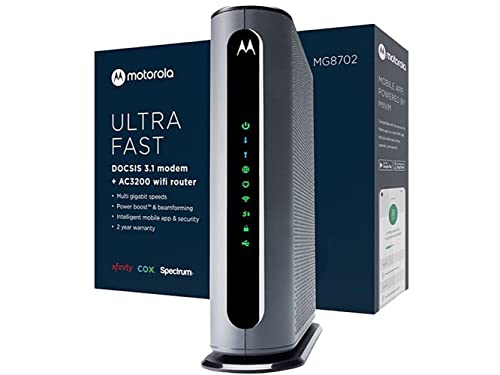
The MG8702 combines a DOCSIS 3.1 cable modem with an AC3200 Wi‑Fi router, offering strong performance for cable connections while including Power Boost and Range Boost technologies. It is a suitable option for households with cable broadband plans seeking a single device for both modem and router functions, potentially reducing equipment rental costs and simplifying management through a unified interface.
Key considerations: while excellent for cable internet, this model is not compatible with DSL services. If your service is DSL, this product should be considered only for hybrid setups or future cable upgrades. For current DSL users, pairing a DSL modem with a high‑performance router could be an alternative.
ARRIS SURFboard SB8200: High‑Speed Cable Modem

The SB8200 is a DOCSIS 3.1 modem designed for cable internet plans up to 2 Gbps. It delivers multi‑Gig Ethernet speed via two 1‑Gbps ports and requires a separate router to provide Wi‑Fi coverage. This device is ideal for users who want maximum speed and plan to upgrade to higher‑tier cable services or use a robust router in tandem with the modem.
Key considerations: as a modem, it does not include built‑in routing. If you require a combined modem/router for DSL, this product is better suited to a cable internet setup. For DSL users, a dedicated DSL modem paired with a capable router is a better fit.
Buying Guide: Key Considerations For ADSL2+ Modem Routers
- DSL compatibility: Confirm ADSL2+, VDSL2, or multi‑mode support with your service provider. Some devices are clearly labeled for CenturyLink or other DSL networks, while others target generic ADSL2+ use.
- Modem vs. router capabilities: All‑in‑one devices save space but may limit future upgrades. Separate modem and router setups often offer easier expansion and more advanced features.
- Wi‑Fi standard and coverage: Wireless N provides basic coverage, while Wi‑Fi 6 (or 802.11ax) offers higher capacity for many devices. Evaluate home size, wall construction, and device load to choose a suitable standard.
- Number of Ethernet ports: A four‑port switch suffices for small homes; more ports or gigabit WAN/LAN options help if you connect multiple wired devices or use NAS sharing.
- Ease of setup vs. advanced features: Entry devices often prioritise quick installs, while higher‑end models provide QoS, guest networks, and parental controls. Decide which features matter most.
- Future‑proofing: DSL infrastructure can be stable for years, but if you anticipate a move to fiber or cable in the near term, consider devices that support more modern WAN options or easily integrate with future routers.
- Provider compatibility: Some devices are optimized for specific providers (for example, CenturyLink or Comcast Xfinity). Verify compatibility with your current plan and required services.
Across these options, the best choice hinges on your service type, coverage needs, and whether you prefer a compact all‑in‑one unit or a modular approach with a separate modem and router. For smaller homes with modest bandwidth demands, an affordable DSL‑oriented model may suffice. For larger households or crowded networks, a Wi‑Fi 6 router with a capable DSL or hybrid modem can offer more reliable performance and future compatibility.