For converting a digital audio output into analog sound, the PROZOR 5.1-channel DAC is the best fit for buyers who need support for multichannel input, while the PROZOR volume-control model suits listeners who want an onboard adjustment knob. The other picks cover straightforward PCM stereo conversion, a long optical-to-RCA cable, and a compact converter with both RCA and headphone outputs. Check your source’s audio format and the converter’s direction before choosing: most products below convert digital audio to analog, not the other way around.
| Product | Best For | Key Difference |
|---|---|---|
| PROZOR 5.1-Channel DAC | Multichannel-format input | Supports listed DTS and Dolby formats |
| PROZOR PCM DAC | Two-channel PCM audio | Optical and coaxial inputs |
| AUTOUTLET Optical-to-RCA Cable | Direct RCA connection | Built-in 7-foot cable |
| EASYCEL DAC | RCA and 3.5mm output | Optical and coaxial inputs |
| PROZOR DAC With Volume Knob | Manual output adjustment | Built-in volume control |
PROZOR 5.1-Channel Optical DAC
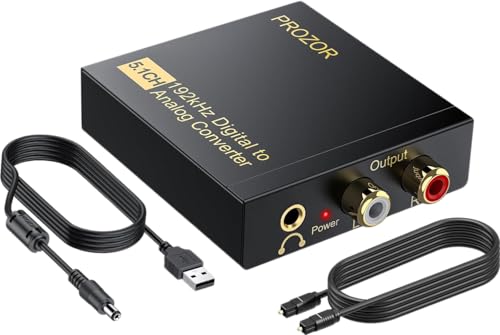
This PROZOR converter is best for buyers whose source provides a supported DTS or Dolby AC-3 5.1-channel signal and who need analog stereo output. It accepts optical or coaxial digital input and provides left/right RCA and 3.5mm analog outputs. The listed feature set says it converts supported 5.1-channel input to 2.0-channel analog output, making it a fit for connecting a digital source to stereo equipment.
It supports PCM and listed DTS and Dolby AC-3 formats, with a stated sampling rate up to 192 kHz and 24-bit SPDIF input. Choose this model if those format options matter. Its limitation is that the output is two-channel analog, not 5.1-channel analog; verify the source format and setup before buying.
PROZOR Two-Channel PCM DAC

This model is best for buyers who need a simple digital-to-stereo-analog connection from an optical or coaxial source. It sends analog audio through RCA and 3.5mm outputs simultaneously. The product supports uncompressed two-channel LPCM or PCM, with listed sampling rates of 32, 44.1, 48, 96, and 192 kHz and 24-bit SPDIF input.
Choose this converter for a PCM stereo setup rather than a surround-sound decoding requirement. The source must be set to PCM or LPCM to avoid potential distortion, and the product information says it does not support optical output. It is not the right choice if you need the converter to decode 5.1 audio.
AUTOUTLET Optical-to-RCA Cable DAC

The AUTOUTLET is best for a buyer who wants an optical-to-RCA connection with a 7-foot, or 2.1-meter, cable built into the product. It converts optical Toslink digital audio to analog RCA and is described as suitable for connecting to a stereo amplifier. Listed features include a professional audio amplifier chip and a dual-channel operational amplifier.
This is a focused option for RCA equipment, not a flexible choice for every listening setup. The product information says it does not support headphones, and volume must be adjusted on the output device rather than with the TV remote. Set the TV’s digital output to PCM and use a 5V, 1A power supply, as specified.
EASYCEL Optical and Coaxial DAC

This EASYCEL converter is best for buyers who want both RCA and 3.5mm analog outputs and a choice of Toslink optical or coaxial input. It converts PCM or LPCM digital signals to analog stereo, with both output types available simultaneously. Its listed sample-rate support runs from 32 to 96 kHz, and the product includes an optical cable and power adapter.
Choose it if your digital source uses a supported PCM format and you do not need 192 kHz support. The stated upper limit is 96 kHz. If both optical and coaxial cables are connected, the converter gives priority to the optical input. The product specifies use with a 5V, 1A power adapter.
PROZOR DAC With Volume Knob
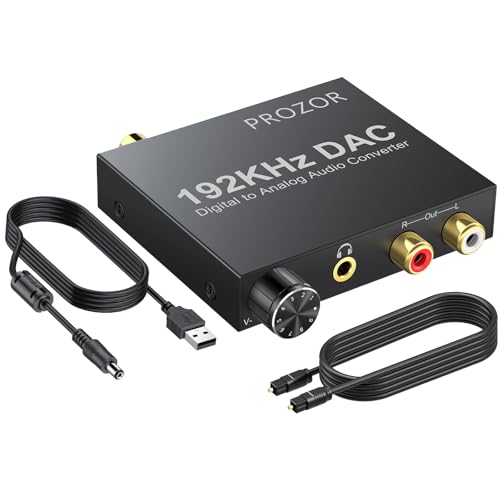
This PROZOR model is best for buyers who want to adjust analog output volume directly on the converter. It accepts coaxial or Toslink digital PCM audio and outputs stereo RCA and 3.5mm audio simultaneously. Its listed support includes sampling rates up to 192 kHz and 24-bit SPDIF input. The product also describes automatic muting when the input is a non-audio signal.
Choose this model when a physical volume knob is useful for your setup. Its input and output direction cannot be reversed: it converts digital audio to analog only. The product describes PCM input, so buyers using other digital audio formats should confirm their source can output PCM.
Buying Guide: How to Choose an Audio DAC
Does the converter match your signal direction?
Digital-to-analog converters take a digital signal—typically optical Toslink or coaxial SPDIF—and provide analog output such as RCA or 3.5mm. They do not automatically work in reverse. For analog RCA input to digital optical output, select a product specifically labeled analog-to-digital. That is a different device category.
Which audio format does your source output?
Check the TV, game console, disc player, or other source’s audio settings. Several products here require PCM or LPCM stereo input. A model that lists support for certain Dolby or DTS formats may suit a different setup, but confirm the precise format requirements. If the source offers a PCM setting, select it when the converter’s instructions call for PCM.
Which output and input connections do you need?
Choose RCA for a stereo receiver or amplifier with left/right analog inputs. Choose 3.5mm when the destination accepts that connection. For digital input, check whether you need optical, coaxial, or both. Also consider cable layout: the AUTOUTLET option has a built-in 7-foot cable, while other listed models provide converter-style connections.
Does the sampling-rate limit matter?
Compare the source’s digital output setting with the converter’s stated range. The EASYCEL model lists support up to 96 kHz; several other options list support up to 192 kHz. A higher listed maximum does not remove the need to match the supported audio format and connection type.
Frequently Asked Questions
What does an audio DAC converter do?
A digital-to-analog converter changes a supported digital audio signal into analog audio, commonly for RCA or 3.5mm equipment.
Will a digital-to-analog converter work in reverse?
No. A DAC converts digital input to analog output. Reverse conversion requires a device specifically designed for analog-to-digital conversion.
Why should I set my TV audio output to PCM?
Some converters in this list specify PCM or LPCM input. Setting the TV to PCM can help provide a signal format the converter supports; follow the instructions for the model you choose.
Can I connect headphones to every converter here?
No. Output connections vary by model, and the AUTOUTLET product specifically says it does not support headphones. Check the listed outputs before choosing a converter for headphone use.
Do all these converters support 192 kHz audio?
No. The EASYCEL model lists support up to 96 kHz. Other selected models list support up to 192 kHz, but source format and connection requirements still apply.