Discover top 65-inch smart boards designed to boost collaboration, teaching, and meetings. The following picks emphasize 4K clarity, robust processing, multi-user touch, and open app ecosystems suitable for classrooms, training rooms, and hybrid work environments. Compare features, connectivity, and built-in tools to find the best fit for your space.
| Product | Brand | Key Strength | Storage / RAM | Camera / Mic |
|---|---|---|---|---|
| COOLHOOD 65″ Smart Board | COOLHOOD | Wireless collaboration & Android 13 | 128GB | – |
| BIG VUE 65″ Interactive Smart Board | BIG VUE | Excellent video conferencing tools | 8GB / 256GB | 48MP Cam / 8-Array Mic |
| JAV 65″ Smart Board Pro | JAV | Google EDLA Certified with Android 14 | 8GB / 128GB | 48MP Camera / AI features |
| Dornium 65″ Smart Board | Dornium | EDLA-Certified with OTA updates | 8GB / 128GB | – |
| HORION 65 Inch 4K Smart Board | HORION | All-in-one productivity suite | 8GB / 128GB | AI camera features |
COOLHOOD 65″ Smart Board

The COOLHOOD 65-inch 4K interactive whiteboard runs on Android 13 with 128GB of storage and a capable octa-core processor. It supports 20-point multi-touch for simultaneous writing, making it suitable for classrooms and collaborative office spaces. Wireless screen sharing across devices and cross-platform compatibility (Mac, Windows, iOS, Android) enable flexible presentations. Useful tools include smart voting, screenshot capture, and a timer to streamline decision-making. A QR code file-sharing feature reduces steps when distributing notes. The unit ships with a wall mount; a separate stand is available for different room setups.
BIG VUE 65″ Interactive Smart Board

This 65-inch 4K UHD touch display from BIG VUE emphasizes classroom and meeting-room versatility. It combines an 8GB RAM / 256GB storage configuration with a high-resolution panel, ideal for teaching apps, screen sharing, and multimedia content. Built-in 48MP camera and an 8-array microphone system support high-quality video conferencing, making it well-suited for hybrid classrooms and remote meetings. The device targets educators and business users needing reliable performance for interactive lessons, collaborative projects, and virtual sessions.
JAV 65″ Smart Board Pro
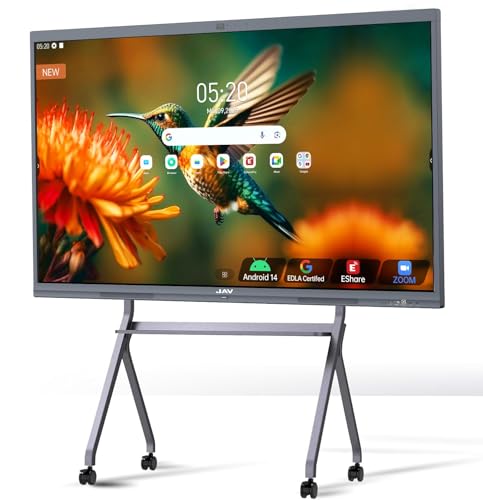
JAV’s 65-inch Smart Board Pro is Google EDLA-certified and runs Android 14 with OTA updates. It offers 8GB RAM and 128GB storage, delivering smooth performance for writing and drawing. The board supports 20-point touch, palm erase, and multi-finger zoom, with features to import and annotate PDFs. It includes wireless mirroring and screen sharing, split-screen display, built-in smart voting, screenshots, and a timer to boost engagement. An eight-microphone array and AI camera support clear collaboration for hybrid classrooms and remote meetings.
Dornium 65″ Smart Board

Dornium delivers an EDLA-Certified 65-inch 4K smart whiteboard with Android 14, OTA updates, and 8GB RAM, 128GB ROM. It emphasizes secure access to Google Play and Drive with enterprise-grade privacy features, including NFC-based multi-user management. Cross-device sharing is straightforward via wireless screen sharing and HDMI with Mac, Windows, iOS, and Android. QR code notes sharing supports quick distribution of session materials for classroom or meeting contexts.
HORION 65 Inch Smart Board

HORION’s 65-inch 4K smart board focuses on an all-in-one productivity ecosystem with 8GB RAM and 128GB storage. It supports 50-point touch and wireless casting, delivering a broad collaborative surface for classrooms and offices. The device promises an integrated experience—combining whiteboard functionality, digital signage, a projector-like interface, and a built-in computer and sound system. The open app ecosystem enables flexible app selection to match various teaching and meeting needs, while wireless screen sharing keeps sessions fluid.
Buying Guide: Key Purchase Considerations And Comparisons
- Operating system and app ecosystem: Consider whether Android, Google-certified environments, or open app ecosystems best fit your software needs and school or corporate IT policies.
- Display quality and touch capabilities: Look for 4K resolution, 20-point or higher touch, palm erase, and anti-glare coatings to support multiple users and long sessions.
- Camera and audio tools: A high-resolution camera and multi-microphone arrays improve remote collaboration, while built-in speakers or soundbars affect room acoustics.
- Storage and RAM: More RAM (8GB+) and larger internal storage (128GB+) support multitasking, file handling, and multimedia content without slowdowns.
- Connectivity and sharing: Wireless screen sharing, cross-platform compatibility, QR sharing, and HDMI options influence ease of collaboration across devices.
- Mounting and room setup: Wall-mount kits are common, but some users may prefer stands or modular mounting options for flexible spaces.
- Security and updates: EDLA certification and OTA updates provide ongoing security and software improvements, important for schools and offices with IT governance.
- Future-proofing: Consider expansion potential (additional cameras, microphones, or OPS/PC options) to match evolving meeting formats and hybrid learning needs.