For a compact keyboard with clicky blue switches, the strongest matches here are the CACKBIRD 61-key model, Snpurdiri’s wired 60% keyboard, DIERYA’s 68-key option, and MageGee’s 68-key MK-Box. They suit buyers who want to save desk space while keeping tactile, audible key feedback. The Womier DK75 is included as a quieter, larger-layout alternative, but it uses silent membrane switches rather than blue mechanical switches.
| Keyboard | Best for | Layout and connection |
|---|---|---|
| CACKBIRD 60% | Backlighting and travel | 61 keys, wired USB-C |
| DIERYA T68SE | Wireless flexibility | 68 keys, tri-mode |
| Snpurdiri 60% | Simple lighting and compact setup | 60%, wired USB-C |
| MageGee MK-Box | Arrow keys in a small layout | 68 keys, wired |
| Womier DK75 | Quieter typing and more keys | 75%, tri-mode |
CACKBIRD 61-Key Blue-Switch Keyboard

This is a strong match for buyers seeking a traditional 60% footprint and audible mechanical feedback. Its 61-key layout is designed to leave more desk room for mouse movement, and the blue switches provide a tactile bump and click. A detachable Type-C cable supports easier packing, while the keyboard uses Fn+Space to access direction keys.
Its rainbow backlighting offers 18 effects, five brightness levels, five speeds, and one customization mode. Double-injection ABS keycaps are described as providing clear, uniform lighting. The included keycap puller can help with cleaning.
- Best for: Gamers or typists who prioritize a compact wired board and customizable rainbow lighting.
- Limitation: The 61-key layout relies on a function shortcut for direction keys, and clicky switches may be too loud for shared spaces.
DIERYA T68SE 68-Key Keyboard

Choose the DIERYA T68SE if wireless connection options matter as much as a compact layout. It supports Bluetooth 5.0, 2.4GHz wireless, and USB-C wired use, and its listed features include connections for up to three Bluetooth devices. The 68-key layout adds keys compared with a 61-key design, while full anti-ghosting is intended to register simultaneous key presses.
Its blue switches have a distinct tactile bump and crisp, loud click. That makes this model better for users who want clear audible feedback than for people who need quiet typing.
- Best for: Buyers who want a compact blue-switch keyboard with multiple connection modes and anti-ghosting.
- Limitation: The clicky switches are louder than quieter switch types, and the 68-key layout is not a strict 61-key 60% arrangement.
Snpurdiri 60% Wired Blue-Switch Keyboard

This Snpurdiri keyboard is a straightforward choice for shoppers who want a small wired board without elaborate lighting options. It has a detachable USB-C cable and blue switches described as delivering a crisp click, tactile bump, and responsive commands for typing and gaming. Its black-and-white design is paired with ice-blue LED backlighting and clear character legends.
- Best for: Users who prefer a compact wired keyboard with a simple, single-color lighting style.
- Limitation: The listed features do not describe wireless connectivity or multiple backlight colors, and blue switches produce audible clicks.
MageGee MK-Box 68-Key Keyboard
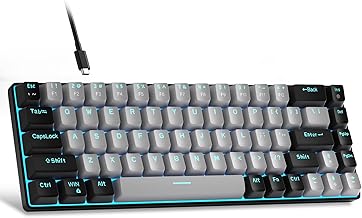
The MageGee MK-Box is a better fit than a standard 61-key board for buyers who want a compact size but value dedicated arrow keys. Its 68-key arrangement also includes F1–F12 keys and Fn functions, according to the product details. Blue switches provide audible clicks and tactile feedback for gaming or typing.
Blue LED lighting has about 15 modes. The listed controls use Fn+Ins to change lighting effects, Fn plus the arrow keys to adjust speed, and Fn with the up or down arrow to change brightness.
- Best for: Buyers seeking a space-saving wired keyboard with arrow keys and function-row access.
- Limitation: This is a 68-key compact layout, not a strict 61-key 60% board, and its blue switches are loud.
Womier DK75 Quieter Compact Alternative

The Womier DK75 is not a blue-switch mechanical keyboard, so it is not a direct match for this search. It is included as an alternative for buyers who want a larger compact layout and quieter typing. Its 75% arrangement uses silent membrane switches with a mechanical-inspired design, and it offers Bluetooth 5.0, 2.4GHz wireless, and wired USB connectivity.
The listed features include RGB lighting with 15 effects, seven colors, and adjustable brightness and speed, plus an OLED screen and media knob.
- Best for: People who prioritize quiet membrane typing, multiple connection modes, and a 75% layout.
- Limitation: Avoid this model if blue mechanical switches or a 60% footprint are essential.
Buying Guide: How To Choose A 60% Blue-Switch Keyboard
Do you need exactly 61 keys?
A 61-key layout saves desk space, but often places navigation functions behind an Fn shortcut. The CACKBIRD and Snpurdiri are the closest listed matches to a strict 60% design. A 68-key option such as the DIERYA or MageGee takes slightly different layout priorities: the MageGee specifically lists separate arrow keys and F1–F12 access.
Are blue switches right for your room?
Blue switches are designed to provide tactile feedback and an audible click. That can suit users who like sound and a clear keystroke response. It can be distracting in shared offices or quiet rooms. For a quieter typing experience, the Womier uses silent membrane switches, but it does not meet the blue mechanical-switch requirement.
Should you choose wired or wireless?
Wired models use a direct cable connection; the CACKBIRD and Snpurdiri list detachable USB-C cables. The DIERYA and Womier offer Bluetooth, 2.4GHz wireless, and wired modes. Choose based on whether desk simplicity, portability, or switching between devices matters most.
What lighting and key access matter?
Compare lighting type as well as layout. CACKBIRD lists rainbow effects and customization, Snpurdiri lists ice-blue lighting, and MageGee lists blue LED modes. If you frequently use arrow or function keys, check how a compact model accesses them before choosing.
Frequently Asked Questions
What does a blue switch feel and sound like?
Blue switches are described as tactile and clicky, with a noticeable bump and audible sound during key presses.
Is a 68-key keyboard the same as a 61-key 60% keyboard?
No. Both are compact, but their key counts and arrangements differ. The MageGee lists separate arrow keys and F1–F12 access in its 68-key layout.
Which listed keyboard supports wireless use?
The DIERYA T68SE and Womier DK75 list Bluetooth, 2.4GHz wireless, and USB wired modes. The Womier is a membrane keyboard, not a blue-switch mechanical model.
Which model has a detachable cable?
The CACKBIRD and Snpurdiri product details list detachable USB-C cables.
Are blue-switch keyboards suitable for quiet offices?
They may not be ideal because the listed blue switches produce audible clicks. Consider a quieter switch or membrane model if reducing typing noise is important.