The best 5.1 computer speaker system depends on whether you prioritize verified surround formats, flexible connections, or a compact setup. The Logitech Z906 is best for buyers seeking Dolby Digital and DTS playback, while the Acoustic Audio AA5170 offers multiple input options and wired satellites. Bobtot’s systems provide 5.1 speaker layouts, including a compact option for small rooms. The OHAYO is a stereo alternative for desktop buyers who do not need discrete surround sound.
| System | Best for | Key distinction |
|---|---|---|
| Logitech Z906 | Format-focused surround | Dolby Digital and DTS |
| Acoustic Audio AA5170 | Flexible home setups | Optical, RCA, Bluetooth, USB, and SD |
| Bobtot Surround Sound System | Room-filling wired surround | Five speakers and a 5.25-inch subwoofer |
| Bobtot Small Subwoofer Home Theater | Compact rooms | Space-saving 5.1 layout |
| OHAYO 60W Speakers | Simple desktop stereo | Compact 2.0 design |
Logitech Z906 5.1 Surround Sound
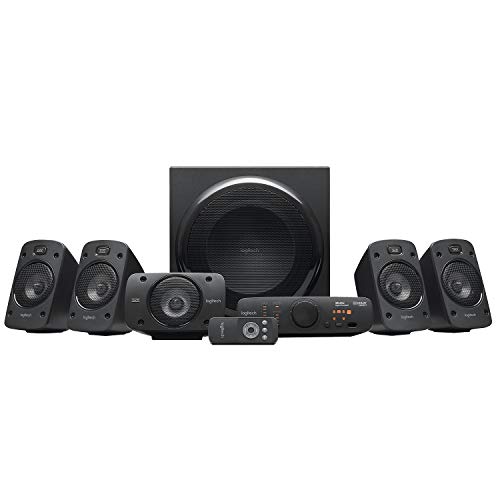
The Logitech Z906 is best for computer users who want a dedicated 5.1 system with named surround-sound format support. Its listed features include Dolby Digital and DTS playback, THX certification, a subwoofer, and four wall-mountable satellite speakers. The system is rated for 500 watts continuous power, with peak output listed at up to 1,000 watts under certain circumstances.
Choose this model if support for Dolby Digital and DTS is a priority and you want satellite speakers that can be wall-mounted. The stated format support makes it a strong fit for compatible movie and game audio sources. A caution: the product details do not specify every computer connection or the cables included, so check your source’s outputs and the system’s connection requirements before buying.
Acoustic Audio AA5170 5.1 System

The Acoustic Audio AA5170 is best for buyers who want several ways to connect entertainment devices. Listed inputs include RCA, digital optical, AUX, six independent RCA inputs, Bluetooth, USB, and SD card. It also includes an FM tuner, remote, and front-panel controls. The package has a powered subwoofer and five wired satellite speakers, with longer cables specified for the rear speakers.
Its Pro Surround function converts stereo to 5.1 sound, which may suit sources that do not provide discrete surround audio. Choose this system if input variety and flexible speaker placement matter. The five satellites are wired, so plan for cable routing; rear speakers have 25-foot cables, while front and center speakers have 15-foot cables.
Bobtot 5.1 Surround Sound System

This Bobtot system is best for buyers seeking a complete wired 5.1 speaker arrangement for films, games, television, and music. Its listed layout has three front speakers and two rear speakers connected through the subwoofer. The product details specify a 5.25-inch subwoofer, 3-inch surround speakers, and 700 watts peak power.
Choose it if you want five satellite speakers and a dedicated subwoofer rather than a two-speaker desktop setup. The stated speaker layout is useful for spreading audio around a listening area, but placement and wiring require more room than a compact stereo pair. The feature information does not list connection types, so verify that your computer or audio source can connect before choosing it.
Bobtot Compact 5.1 Home Theater

The Bobtot compact system is best for a small room or apartment where a full-size surround layout would be difficult to fit. Its listed configuration includes a center speaker, two front speakers, two rear speakers, and a main speaker with a 4-inch subwoofer. Bluetooth connectivity is also listed.
Choose this model if you want a multi-speaker arrangement in limited space and value a built-in receiver. The product description presents it as suitable for computers, TVs, and projectors, but it does not detail all wired input options. Check connection needs and the available room for positioning five speakers before buying.
OHAYO 60W Desktop Stereo Speakers

The OHAYO is a stereo alternative, not a 5.1 system. It is best for desktop buyers who prefer a simpler two-speaker setup with Bluetooth 5.3 and 3.5mm AUX, RCA, and USB inputs. The listed design includes two 30-watt speakers, front volume control, MDF enclosures, and a rear bass port.
Choose it if saving desk space and keeping setup straightforward matter more than surround placement. It offers a different kind of desktop listening setup from the four 5.1 options above. Avoid it if you specifically need five satellite channels and a subwoofer as part of a 5.1 configuration; the supplied details describe it as 2.0 stereo.
Buying Guide: How To Choose A 5.1 Computer Speaker System
Do you need true 5.1 surround sound?
A 5.1 system uses five speaker channels and a subwoofer channel. For the intended surround effect, both the speaker system and the audio source must support an appropriate multichannel signal. Stereo-to-surround processing, such as the Acoustic Audio system’s Pro Surround feature, is different from receiving discrete 5.1 audio from a source.
Which connections should you check?
Match the system’s inputs to your computer, monitor, console, or other source before purchasing. Optical and RCA inputs are listed for the Acoustic Audio AA5170, while the Bobtot compact model lists Bluetooth. The supplied details for some systems do not name all connection types. Confirm the exact connection path rather than assuming a computer can connect directly.
How much space and wiring can you manage?
Five satellite speakers need careful placement around the listening area, and wired models require routes for rear-speaker cables. The Acoustic Audio AA5170 specifies 25-foot rear cables and 15-foot front and center cables. A compact system may better suit a small room, but it still needs space for its speakers and subwoofer.
Should you choose a 5.1 or stereo system?
Choose 5.1 if you want sound distributed among front, center, and rear speakers and have compatible sources. Choose stereo if your priority is a simpler desktop footprint, fewer speakers, or basic computer audio. A stereo system such as the OHAYO is not a replacement for discrete 5.1 surround.
Frequently Asked Questions
Can I use a 5.1 speaker system with a computer?
Yes, if the computer’s audio output and the speaker system’s inputs are compatible. Check whether your computer provides the necessary multichannel output or whether an appropriate audio interface is needed.
Does Bluetooth provide 5.1 surround sound?
Bluetooth support alone does not confirm discrete 5.1 playback. Check the system’s listed surround inputs and the source’s audio capabilities.
What is the difference between 5.1 and 2.1 speakers?
A 5.1 setup has five speaker channels plus a subwoofer channel. A 2.1 setup has two main speakers and a subwoofer, so it does not provide the same five-channel surround layout.
Is the OHAYO speaker system a 5.1 system?
No. The OHAYO product is described as a 2.0 stereo pair. It is an alternative for desktop listening, not a 5.1 surround system.
Do wired rear speakers need extra setup?
Wired rear speakers need cable routing from the system to their positions. Measure the room and check the listed cable lengths before deciding where to place the speakers.