The latest 4K smart laser projectors blend bright imaging, smart streaming, and flexible setups to rival traditional TVs. This guide highlights five top options, covering built-in Google TV, HDR support, and powerful audio for immersive viewing across living rooms, backyards, and outdoor spaces. Each model represents a different balance of brightness, color accuracy, and smart features to help you pick the right laser projector for your needs.
Summary of chosen products:
| Product | Brand | Key Feature | Brightness | Screen Range |
|---|---|---|---|---|
| [Official Google TV] Smart Projector G1 | WiMiUS | Google TV Built-In, voice control, WiFi 6 | Not stated (projector brightness typical for living rooms) | Outdoor-friendly, auto focus |
| JMGO N1S 4K Smart Portable Projector | JmGO | Triple laser, 1100 ISO, gimbal auto focus, Google TV | High brightness (1100 ISO lumens) | Up to 200″ |
| NEBULA Cosmos 4K SE | NEBULA | Dolby Vision, HybridBeam, 200″ screen | 1800 ANSI Lumens | Up to 200″ |
| Hisense M2 Pro | Hisense | Triple laser, Vidaa OS, 4K, Netflix included | 1300 ANSI lumens | 65″–200″ |
| AWOL VISION LTV-2500 | AWOL VISION | UST with center channel, Dolby Vision & Atmos | Bright laser with 150″ scope | Up to 150″ |
[Official Google TV] Smart Projector G1
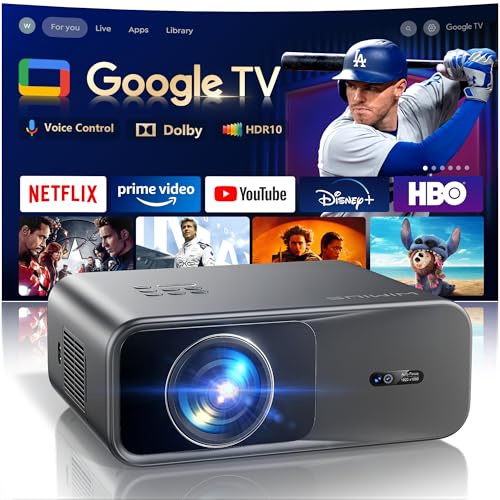
The G1 model from WiMiUS offers a fully integrated Google TV experience, so streaming partners like YouTube, Disney+, Prime Video, and more are accessible directly on a single screen—no external devices required. It supports voice search and remote casting from a phone, making navigation straightforward. Its AI-driven recommendations help you discover new content across subscriptions, while the For You sports tab helps surface live games. This device is designed for both indoor living rooms and outdoor setups thanks to stable connectivity and a broad app ecosystem.
Features in brief include hands-free voice control, the ability to cast from a phone or tablet, and Google Photos integration for on-screen memories. With built-in WiFi 6, it promises faster streaming and smoother app switching. The G1 focuses on convenience and a seamless smart TV experience within a projector form factor, which can be especially appealing for homes seeking a large, flexible display without multiple streaming devices.
JMGO N1S 4K Smart Portable Projector

JMGO N1S brings 4K visuals with a triple-laser system and a gimbal-based instant auto focus. The 1100 ISO lumens deliver brightness suitable for various environments, and the projector supports HDR10 with 200″ image potential for a true theater-like experience at home or outdoors. Dolby Audio speakers provide immersive sound, and Blu-ray 3D support adds another layer of realism for compatible content. Its integrated gimbal offers flexible placement angles, while FlexiSmart 2.0 smart eye protection adds safety for homes with pets or kids during operation.
Key strengths include vivid color reproduction from MALC 2.0 RGB triple lasers, no rainbow effect, and high color coverage (110% BT.2020, 151% DCI-P3). The N1S’s portable design makes it a versatile option for living rooms, bedrooms, or outdoor movie nights, especially when you want a large screen without fixed installation. The combination of auto focus, wide throw flexibility, and robust smart features places it among top 4K laser projectors for large-format viewing.
NEBULA Cosmos 4K SE

NEBULA Cosmos 4K SE emphasizes high-brightness imaging with 1,800 ANSI lumens and Dolby Vision, delivering vibrant visuals on large screens up to 200 inches. The HybridBeam technology blends LED and laser sources, producing rich colors and improved brightness with a broad color gamut. NebulaMaster image engine focuses on color accuracy, contrast, and grayscale to enhance overall image quality, making it a strong pick for home theaters and office presentations where true-to-life visuals matter.
Beyond brightness, the Cosmos 4K SE integrates Google TV-powered smart features for streaming and app access. The projector aims to balance portability with a cinema-grade viewing experience, supporting Dolby Vision and immersive sound options for a more complete home entertainment system. If you value HDR performance, large-screen versatility, and a robust software ecosystem, Cosmos 4K SE is a compelling option.
Hisense M2 Pro
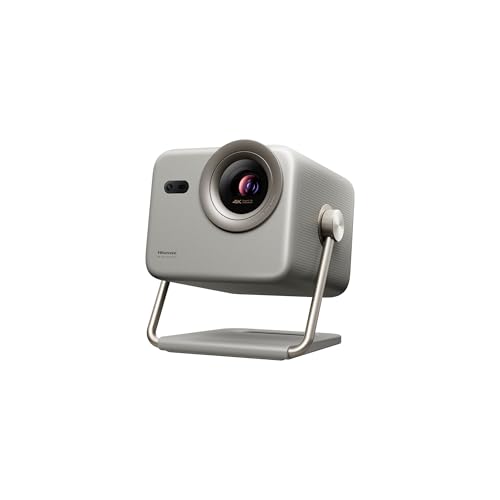
Hisense M2 Pro brings triple-laser technology to a versatile range from 65″ to 200″, supporting 4K UHD with Dolby Vision for a cinema-like image. The device includes Vidaa OS and Netflix licensing, ensuring straightforward streaming access. A 1,300 ANSI lumens brightness level helps deliver vivid content in moderately lit rooms, while an optical zoom feature aids in achieving precise image framing at various distances. This model emphasizes a balance of brightness, screen size flexibility, and app availability within a dedicated ecosystem.
The M2 Pro is designed to be family-friendly with smart features, a wide projection range, and a robust color profile thanks to triple lasers. For users who want a large-screen experience without sacrificing smart TV features or streaming access, the M2 Pro provides a strong combination of performance and convenience in a 4K laser package.
AWOL VISION LTV-2500

The AWOL VISION LTV-2500 combines ultra-short-throw laser projection with a built-in center channel speaker system, creating a cohesive screen-and-sound experience. Dolby Vision and Atmos support enhance picture and audio depth, while HDR10+ enhances dynamic range. The inclusion of a Fire TV Stick 4K Max expands streaming options, making it easy to access apps and content without external devices. The kit is designed for compact spaces where distance to the screen is minimal, yet a sizable display is desired.
As a complete home theater solution, the LTV-2500 seeks to simplify setup with its integrated audio approach and advanced laser projection. It’s particularly attractive for users prioritizing an all-in-one solution with strong color performance, immersive sound, and a substantial image size, all in a smaller footprint compared with traditional, larger projection setups.
Buying Guide: Key Considerations When Choosing a 4K Smart Laser Projector
- Brightness and ambient conditions: Look for ANSI or ISO lumen ratings and consider where you’ll place the projector (living room, yard, or daytime spaces). Higher brightness helps in daylight or well-lit rooms.
- Screen size and throw ratio: If you have a small room, an ultra-short throw can project large images from near the wall. For larger rooms, check throw distance and zoom capabilities to fit your space.
- Color accuracy and laser technology: Triple laser systems generally offer wider color gamuts (BT.2020, DCI-P3) and better color fidelity. HDR support (Dolby Vision, HDR10+) enhances contrast and brightness.
- Smart features and ecosystem: Built-in Google TV or other smart OS can simplify access to Netflix, YouTube, Prime Video, and more. Check voice control, casting, and app availability for your preferences.
- Audiovisual integration: Some models pair with built-in speakers or center-channel systems; others may require external speakers. Consider Dolby Atmos or Dolby Vision support for a more immersive experience.
- Portability vs. installation: Portable, gimbaled, or UST designs suit flexible setups, including outdoor viewing. Decide if you need auto focus, keystone correction, and easy alignment features.
- Longevity and maintenance: Laser light sources typically offer longer life and lower maintenance compared to lamp-based projectors. Check warranty terms and service options.
When comparing models, consider how you plan to use the projector most: casual streaming in a living room, outdoor movie nights, or a dedicated home theater. Each option balances brightness, color accuracy, built-in apps, and form factor differently, so prioritize the features that align with your space and viewing habits.