Finding the right 4 GB server memory can help extend the life of aging servers, improve stability, and support lightweight workloads. This guide highlights five 4 GB memory modules and kits from reputable brands, covering DDR3 and DDR4 types, ECC support, and server-grade reliability. Each entry includes key specs, compatibility notes, and where to buy. Use the buying guide below to compare form factors, voltages, and performance profiles before purchasing.
| Product | Memory Type | Speed | Form Factor | ECC |
|---|---|---|---|---|
| A-Tech 8GB Kit (2x4GB) DDR4 2400MHz | DDR4 | 2400MHz | 288-Pin RDIMM | ECC |
| A-Tech 4GB DDR4 2400MHz | DDR4 | 2400MHz | 288-Pin RDIMM | ECC |
| A-Tech 4GB RAM Replacement for Synology D4NESO-2666-4G | DDR4 | 2666MHz | SO-DIMM | Non-Registered (Non-ECC) |
| Timetec 8GB Kit (2x4GB) DDR3L 1600MHz | DDR3L / DDR3 | 1600MHz | UDIMM | Non-ECC |
| Samsung 4GB 240-Pin DDR3 ECC Registered | DDR3 | 1333MHz | DIMM | ECC Registered |
Note: Compatibility varies by server model, motherboard, and BIOS version. Always verify support for ECC, voltage (1.2V or 1.35V/1.5V for DDR3L), and rank configuration before purchasing. The entries below follow the order of relevance to a 4 GB memory focus while representing both DDR3 and DDR4 options.
A-Tech 8GB DDR4 Memory Kit For Servers

A-Tech’s 8GB kit (2x4GB) delivers DDR4 memory with 2400MHz speed in an ECC Registered RDIMM format. Although the kit totals 8GB, each module contributes 4GB to memory pools in supported servers. It is compatible with select DDR4 server and workstation systems that require ECC RDIMM memory and 288-pin DIMMs. The modules use JEDEC DDR4-2133/2400 standards and operate at 1.2V, providing a reliable upgrade path for compatible enterprise hardware. This option is ideal when a system needs modest capacity increases while maintaining server-grade reliability.
A-Tech 4GB DDR4 2400 ECC RDIMM
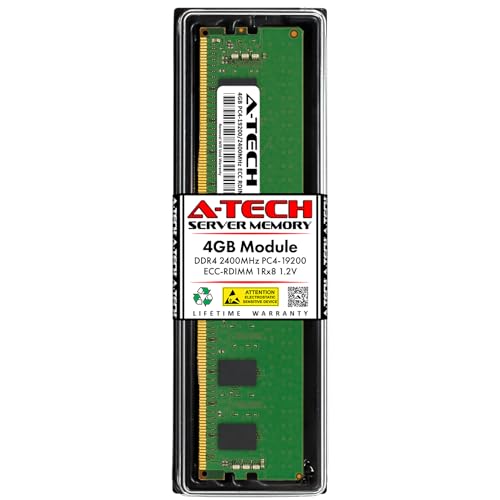
This 4GB DDR4 RDIMM module supports ECC and is designed for servers and workstations. It is a single 4GB 288-pin module operating up to 2400MHz with 1Rx8 organization. It adheres to the JEDEC DDR4 standard and uses 1.2V. Intended for server-grade memory pools, this module is a straightforward upgrade for compatible systems seeking reliable, ECC-protected memory. Desktop systems and laptops are not supported by this module.
A-Tech 4GB DDR4 RAM Replacement For Synology

This 4GB RAM replacement is specifically listed for Synology NAS and NVR systems, offering DDR4 2666MHz compatibility in a 288-pin profile, typically used in SODIMM form factors. While it targets NAS and network storage appliances, it provides a reliable memory option for compact server-like setups that require a modest upgrade. Note that NAS-specific memory compatibility should be verified against the exact Synology model and BIOS/firmware support.
Timetec 8GB Kit (2x4GB) DDR3L 1600MHz
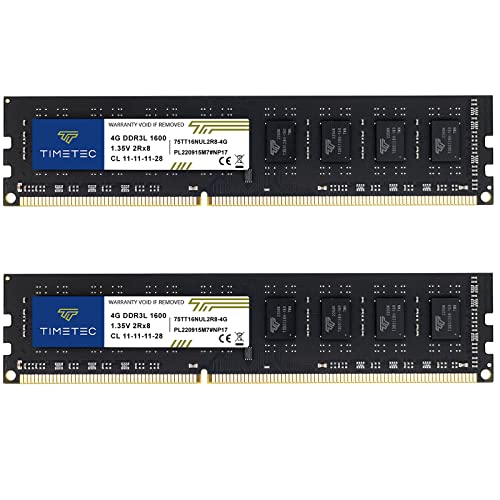
The Timetec kit provides 8GB total capacity in a 2x4GB configuration for DDR3L/DDR3 1600MHz PCs. It supports non-ECC unbuffered memory with dual-rank 2Rx8 organization and dual voltage compatibility (1.35V or 1.5V). Although marketed for desktop and some workstation contexts, this kit can be used in certain server or NAS environments that permit non-ECC memory and DDR3L voltages. It is compatible with systems that support DDR3L timing profiles and can offer a cost-effective upgrade path where server-grade ECC is not mandatory.
Samsung 4GB DDR3 ECC Registered Server Memory

This Samsung 4GB DDR3 ECC registered server memory (Model M393B5170FH0-CH9) is a 4GB, 240-pin DIMM designed for server use. It is a 1333MHz module with ECC Registered features suitable for reliability-focused server environments. It is explicitly intended for server deployments and is not suitable for standard desktop systems. The Samsung part number indicates compatibility with a range of server platforms that require ECC memory for data integrity and error correction.
Buying Guide
Key purchase considerations
- Server compatibility: Verify ECC support, rank configuration (1Rx8 vs 2Rx8), and DIMM type (RDIMM vs UDIMM vs SO-DIMM) for your specific server model.
- DDR generation and voltage: DDR3 memory typically runs at 1.5V (or 1.35V for DDR3L), while DDR4 uses 1.2V. Mixing generations or voltages can cause instability or boot failures.
- ECC vs non-ECC: ECC memory provides error correction beneficial for servers and NAS devices. Non-ECC modules are generally not recommended for critical server workloads.
- Module size and density: 4GB per module is common for upgrades in older servers; verify maximum per-slot capacity and whether your server supports dual-rank (2Rx8) or single-rank (1Rx8) DIMMs.
- Form factor and fit: Desktop DIMMs (UDIMM) and notebook SO-DIMMs differ from server RDIMMs and may not be interchangeable. Check the motherboard or server’s memory socket requirements.
Performance and reliability perspectives
- ECC RDIMM (DDR4) offers robust error correction and is ideal for reliability-critical workloads, but may require BIOS/firmware support and compatible server hardware.
- DDR3/DDR3L memory tends to be cheaper and accessible for legacy servers; however, performance and energy efficiency are lower compared to DDR4, and compatibility with newer systems is limited.
- For NAS and NVR systems, membrane-specific RAM (like Synology replacements) can provide a straightforward compatibility pathway, but always confirm model compatibility and firmware support.
- Mixing memory types (DDR3 with DDR4, ECC with non-ECC) is generally not recommended and can lead to instability or hardware faults. If upgrading, replace with a uniform memory type compatible with the server.
Price and warranty considerations
- Look for modules with a lifetime or long-term warranty to mitigate the risk of early failure in server environments.
- Vendor support and clear documentation about compatibility can help avoid returns and compatibility issues.
- Consider the total system memory needs and future upgrade plans to maximize cost efficiency and minimize fragmentation in memory pools.