The best 3D printer with a camera depends on whether you prioritize remote viewing, failure alerts, multicolor printing, or a straightforward setup. The Creality SPARKX i7 is best for everyday remote monitoring, while the Creality K2 Combo listings emphasize AI camera detection and multicolor capability. The FLASHFORGE AD5M Pro with built-in camera is a high-speed option with a 220 mm build volume. One listed printer does not specify a camera, so check its listing carefully if camera monitoring is essential.
| Product | Best For | Camera Details Listed |
|---|---|---|
| Creality SPARKX i7 | Wi-Fi monitoring and beginner-friendly setup | Remote viewing, time-lapse, status detection |
| Creality K2 Combo | AI alerts and multicolor printing | AI monitoring and failure notifications |
| FLASHFORGE AD5M Pro | Fast printing with a built-in camera | Built-in camera |
| Creality K2 Combo Official | Camera-assisted multicolor workflow | AI cameras and remote monitoring |
| FLASHFORGE Adventurer 5M | Fast printing on a budget-conscious feature set | Camera not specified in supplied features |
Creality SPARKX i7

Best for: Home users who want camera access through a phone or computer. The listed smart camera supports remote viewing, time-lapse recording, and print-status detection. Wi-Fi connectivity and automatic bed leveling also suit buyers who want to monitor jobs without standing beside the printer.
The printer has a 260 × 260 × 255 mm build volume, direct-drive extruder, and features described as quiet, high-speed desktop printing. It is selected for its clearly stated camera functions and beginner-oriented setup.
Limitation: The supplied details do not state specific camera resolution or the exact detection events supported.
Creality K2 Combo With CFS

Best for: Buyers seeking multicolor printing alongside camera-based oversight. The K2 Combo includes one CFS unit, and the product description says up to four CFS units can enable printing with as many as 16 colors. Its smart AI camera is listed alongside a 260 × 260 × 260 mm build volume and automatic leveling.
This option is a strong fit when color changes and monitoring matter more than a compact footprint. The listing also describes the printer as 95% pre-assembled and includes a silent mode.
Limitation: The advertised 16-color capability requires connecting up to four CFS units; the supplied combo includes one.
FLASHFORGE AD5M Pro With Camera

Best for: Buyers who want a built-in camera in a fast CoreXY printer. The listed features include a built-in camera, 600 mm/s speed, 280°C quick-swap hotend, and 220 × 220 × 220 mm build volume. The description also lists 0.4 mm and 0.6 mm hotends and a 250 g PLA inclusion.
This model is selected because camera inclusion is explicit rather than inferred. Its stated 50 dB noise level may also be useful to buyers comparing operating-noise information.
Limitation: The supplied product details do not explain whether the camera supports remote viewing, alerts, or time-lapse recording.
Creality K2 Combo Official
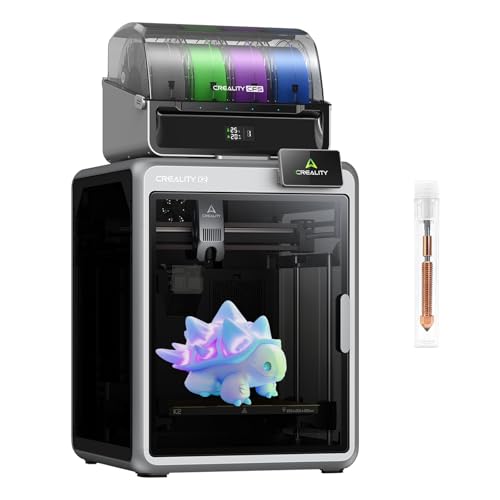
Best for: Users who want AI-assisted monitoring and multicolor material options. The listing describes AI cameras that detect filament errors, foreign objects, or idle alerts, with time-lapse capture and automatic failure notifications. It also lists a 260 × 260 × 260 mm build volume and a 300°C nozzle.
The K2 Combo listing describes up to 16-color, multi-material printing when as many as four CFS-enabled modules are connected. Its 600 mm/s speed and automatic leveling make it suitable for buyers balancing workflow features with throughput.
Limitation: The full 16-color setup depends on additional CFS modules; confirm what is included in the selected package.
FLASHFORGE Adventurer 5M

Best for: Buyers comparing fast, automatically leveled printers who may not require a confirmed camera. Its listed features include a CoreXY frame, up to 600 mm/s travel speed, automatic bed leveling, a 280°C direct extruder, and a 220 × 220 × 220 mm build volume.
It is included as a feature-focused alternative for buyers prioritizing speed, quick nozzle changes, and a dual-sided PEI platform. Those features support a streamlined printing workflow, but the supplied product information does not mention a camera.
Limitation: Do not choose this model specifically for camera monitoring without confirming camera availability in the product listing.
Buying Guide: How to Choose a 3D Printer With a Camera
What camera features should you look for?
Check whether the camera supports live remote viewing, time-lapse capture, print-status detection, or specific failure alerts. These functions are not interchangeable. The SPARKX i7 listing names remote viewing and time-lapse, while the K2 listings describe AI error detection and notifications. The AD5M Pro listing confirms a built-in camera but does not specify its software functions.
Do you need multicolor printing?
If multicolor output is important, compare the K2 Combo listings. Their descriptions say up to 16 colors are possible with as many as four CFS units, while one combo listing includes one CFS unit. Consider the system components included with the package rather than relying only on the maximum advertised color count.
How much build volume and speed do you need?
Compare the dimensions with the objects you plan to print. The K2 and SPARKX i7 list larger build volumes than the 220 × 220 × 220 mm FLASHFORGE models. Speed claims can also differ from practical results based on the model, material, and print settings, so treat maximum speed as a listed capability rather than a guarantee for every job.
Is automatic leveling important?
Automatic bed leveling can reduce manual setup and help with first-layer preparation. All five selections list automatic leveling or a similar automatic calibration feature, but camera monitoring and leveling solve different problems: leveling prepares the print surface, while a camera helps observe an ongoing job.
Frequently Asked Questions
Which listed printer has remote viewing?
The Creality SPARKX i7 listing explicitly describes remote viewing through a smartphone or PC over Wi-Fi.
Which models list AI camera alerts?
Both Creality K2 Combo listings describe AI camera monitoring. One specifically names filament errors, foreign objects, idle alerts, and failure notifications.
Does the FLASHFORGE AD5M Pro include a camera?
Yes. The supplied AD5M Pro product details specify a built-in camera, but they do not describe its remote-monitoring functions.
Can every printer in this guide monitor prints by camera?
No. The Adventurer 5M features provided here do not mention a camera. Confirm camera availability before buying if monitoring is essential.
Which printer is best for multicolor printing?
The Creality K2 Combo listings are the multicolor options in this selection. Their descriptions state that up to 16 colors require connecting as many as four CFS units.