Finding a capable graphics card with about 3 GB of memory can balance cost and performance for casual gamers, college setups, or media PCs. This guide highlights five options that either offer 3 GB memory or sit close to that capacity, detailing core specs, key strengths, and what to expect in real-world use. Whether you’re upgrading an older system or building a compact PC, these cards provide a solid starting point for entry-level gaming, video playback, and multi-display setups.
| Product | Brand | Memory | Key Benefit |
|---|---|---|---|
| PNY NVIDIA Quadro K4000 3GB | PNY | 3GB GDDR5 | Professional-grade drivers and robust memory bandwidth |
| EVGA Ge Force GTX 1060 3GB GAMING | EVGA | 3GB GDDR5 | Reliable mid-range gaming performance |
| SRhonyra GTX 1060 3GB Low Profile | SRhonyra | 3GB GDDR5 | Compact form factor for small builds |
| GIGABYTE GV-N710D3-2GL | GIGABYTE | 2GB DDR3 | Low-profile option for basic displays |
| MSI GT 1030 4GB | MSI | 4GB DDR4 | Low-power, modern 2D/3D acceleration |
PNY Quadro K4000 3GB GPU Memory Card
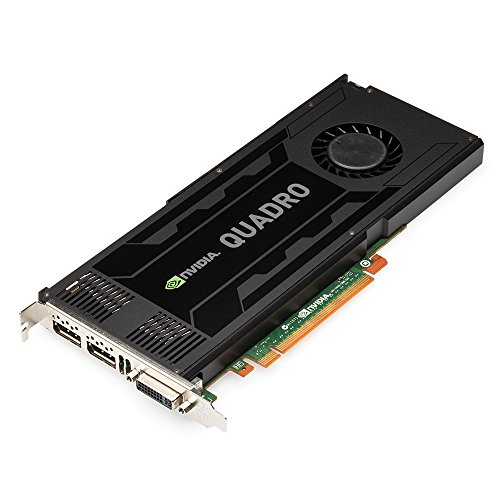
The PNY Quadro K4000 is a professional-class graphics card with 3GB of GDDR5 memory and a broad memory interface. It features 768 CUDA cores and a 192-bit memory interface delivering up to 134GB/s of bandwidth. While primarily aimed at CAD, design, and professional workloads, it provides a stable, reliable option for legacy game titles or design software that benefits from professional drivers and certified performance. This card is bulkier and power-hungry relative to consumer GPUs, so ensure your PSU and case airflow support it. It’s a solid choice for users prioritizing memory bandwidth and compatibility over raw gaming FPS in a budget segment.
EVGA GeForce GTX 1060 3GB GAMING

The EVGA GTX 1060 3GB GAMING offers a compact option within the 1060 family, featuring 3GB of GDDR5 memory and a robust thermal design suitable for a single-fan setup. This card benefits from DX12 support and solid 1080p performance across many titles, when settings are tuned. It’s a practical selection for budget-conscious gamers who want stable frame rates at 1080p with medium to high settings in less demanding titles. Power efficiency and driver support from EVGA make it a dependable daily driver for classic titles and esports titles that are not shader-intensive.
SRhonyra GTX 1060 3GB Low Profile

The SRhonyra GTX 1060 3GB Low Profile card is designed for compact builds, delivering 3GB of GDDR5 memory within a small form factor. Built on the GP106 GPU, it offers 1280 shading units, 80 TMUs, and 40 ROPs. This makes it capable of handling basic to moderate gaming at 1080p with lowered settings, as well as 3D modeling and video editing tasks that don’t demand the most memory-heavy textures. The low-profile design helps fit in SFF cases or systems with limited clearance, though you’ll trade higher-end cooling and potential overclocking headroom for size.
GIGABYTE GV-N710D3-2GL 2GB
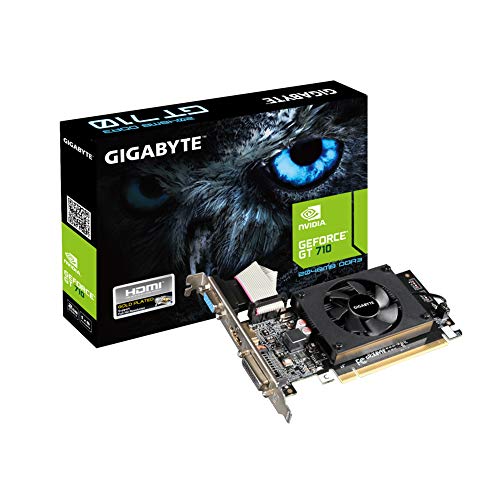
The GIGABYTE GV-N710D3-2GL is a low-profile graphics card featuring 2GB of memory. While it sits below the 3GB target, it remains relevant for basic display tasks, video playback, and light gaming on older titles. It’s an energy-efficient option that fits small form-factor builds and HTPC setups. For gamers seeking a 3GB target, this card may serve as a transitional upgrade in very budgeting-focused scenarios, but performance will be notably limited in modern titles.
MSI GT 1030 4GB

The MSI GT 1030 4GB is a low-power option with 4GB of memory and modern display capabilities, including support for DirectX 12. While it has more memory than the target 3GB, it remains a common upgrade path for lightweight gaming, 2D/HD video tasks, and multimedia PCs. It typically consumes less power and generates less heat, making it suitable for small builds or refurbished systems where energy efficiency is important. For strictly 3GB configurations, this card falls outside the core criterion, but it belongs to the broader class of budget-friendly, modern GPUs that improve day-to-day performance.
Buying Guide: Choosing The Right 3 GB Or Near-3 GB Card
- Performance target: Decide what games at what resolutions you intend to play. 3GB cards generally target 1080p at medium settings in many titles. If you want higher frame rates in newer games, you’ll benefit from more memory, faster cores, and a wider memory interface.
- Memory bandwidth and architecture: GDDR5 memory with a wide bus (128-bit or wider) improves texture loading and shader throughput. Check core clock, memory speed, and overall bandwidth to estimate real-world performance.
- Form factor and power: Low-profile designs fit small cases but may limit cooling. Ensure your power supply and case airflow match the card’s requirements, especially for 3GB-class GPUs that can run warmer under load.
- Usage mix: For CAD, video editing, or software that benefits from CUDA or OpenGL acceleration, a professional-grade card (like the K4000) might offer stability and certified drivers. For gaming, consumer GPUs (GTX/RTX family) commonly provide better gaming performance per dollar.
- Future-proofing: If you anticipate upgrading other components soon, a slightly higher memory and core count (e.g., 4GB or more) may extend the usable life of the system, especially for titles released in the last few years.
- Driver and software support: Consider vendors with strong driver updates and reliable warranty support. EVGA, MSI, ASUS, and SRhonyra are known for accessible driver ecosystems and replacement policies in many markets.
When evaluating options, align the card’s memory size with your gaming goals, the rest of your system’s capabilities, and your budget. For older titles and general computing, a 3GB card can be a cost-effective solution. For newer titles at higher settings, plan for more memory and modern architecture.